

Sp1ke Image Translator
1 rating
)
Overview
Translate text inside images and comics on any website. Private on-device reading, 22 languages.
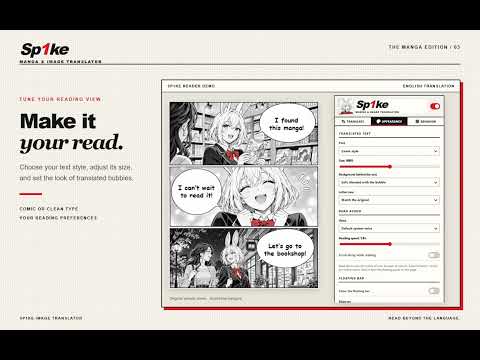
NEW in version 1.4.5: the extension has a brand-new theme! The settings window and the floating button now have a black-and-white manga style. This update also adds a learning mode that shows the original text under each translation, sound effects shown as small labels, and a names glossary for each series that you can export and share. Sp1ke Image Translator reads the text inside pictures on a web page and shows the translation right on top of the image, in a matching style, so you can keep reading naturally. Features - Translates the text inside images on any website, drawn over the original speech bubbles. - Finds the language of the pictures by itself, even when the page is in another language. - Click a translated bubble to see the original text, copy it, or correct the translation by hand. - Names glossary: write how a name should look once, and it is used on every page – for all websites or just the series you are reading. Export and import lists to share them with friends. - Learning mode: see the original text in small letters under each translation. - Translate an area: drag over any part of the screen to translate it (Alt+Shift+S). Alt+Shift+Y translates the picture under the mouse. - Next chapter in advance: once a chapter is done, the next one is prepared in the background. - Read aloud: the translated bubbles can be read out loud, in order, with your browser's voices. - Reads horizontal and vertical text, including Japanese and Chinese columns. - Sound effects drawn on the artwork can be translated, shown as a small label so the art stays visible, or left as they are. - Optional: add your own DeepL API key for higher-quality translations. - The extension's own menus follow your browser language. Private by design - Images are read on your own computer and are never uploaded. - Translation uses Chrome's built-in on-device translator whenever it can. Only if that isn't possible, the extracted text (never the image) can be sent to an online translator – you can switch this off. - Your glossary and DeepL key stay in your browser. - No accounts, no ads, no tracking. You stay in control - Press "Translate the images on this page", or right-click an image and choose "Translate this image". - Turn on "Always translate on this site" for the sites you read often, or keep everything manual. - "Don't show on this website" hides the floating button on sites where you don't need it. - Or choose "Show only on" and list the websites where the floating button may appear; it stays away from every other site. - Hold Shift to peek at the original, or press Alt+Shift+T to switch back and forth. - Choose the font, text size, background style and letter case. Tip for faster translation Download Chrome's offline language pack once: open the extension, go to "Translation settings" and press "Download language pack". After that, translation happens directly on your computer – faster, private and with no daily limit. Chrome 138 or newer is needed for the built-in translator; older versions use the online option.
4 out of 51 rating
Details
- Version1.4.5
- UpdatedNovember 6, 2026
- Offered bySp1ke
- Size54.18MiB
- Languages23 languages
- Developer
Email
slowzwd@gmail.com - Non-traderThis developer has not identified itself as a trader. For consumers in the European Union, please note that consumer rights do not apply to contracts between you and this developer.
Privacy

Sp1ke Image Translator has disclosed the following information regarding the collection and usage of your data. More detailed information can be found in the developer's privacy policy.
Sp1ke Image Translator handles the following:
This developer declares that your data is
- Not being sold to third parties, outside of the approved use cases
- Not being used or transferred for purposes that are unrelated to the item's core functionality
- Not being used or transferred to determine creditworthiness or for lending purposes