


Overview
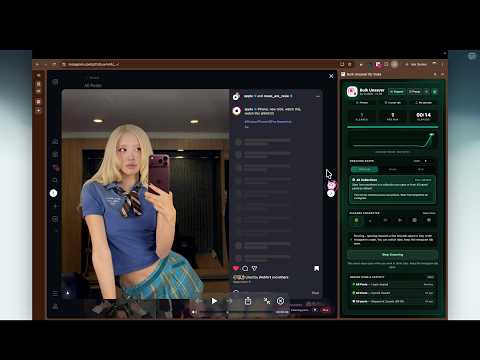
The fastest Instagram post unsaver out there! Watch an animated cleaner character sweep your saved posts.
Watch your animated character hop across Instagram, jump onto Save buttons, sweep away saved posts with sparkles, and move to the next post! Choose your favorite in the Popup or Side Panel. Your selection stays synchronized across both. Now with 6 animated cleaning buddies that make clearing your Saved posts fun! ✨ FEATURES: 🤖 6 Animated Cleaner Characters — NEW! Pick your cleaning buddy! Choose from 6 adorable animated characters: • 🐱 Neko Paws — Bouncing Cat • 🧹 Broomie — Magic Broom • 👾 Chomper — Neon Jelly Slime • 🐤 Bonk Duck — Mallet Chick • 👻 Boo-Duster — Floating Ghost • 🤖 Vac-Bot — Cyber Sweeper ✨ Animated Cleaning on Instagram — NEW! Your cleaning buddy works directly on Instagram while unsaving! A compact floating pill in the bottom-right corner displays your live cleared count and a Stop button. Monitor progress or stop instantly without opening the extension. Animations automatically pause when Instagram is in a background tab, so your cleaner doesn't get in the way. ⚡ Automatic Unsaving — Unsaves saved posts sequentially without repetitive manual clicking. 🌙 Background Processing — Keep unsaving while working in other tabs! The Side Panel stays open so you can monitor progress without keeping the Popup open. This is one of Bulk Unsaver's biggest advantages. 🎯 Choose What/Where to Unsave: — NEW! • All Collections — Fully unsave posts from all collections. Start from a particular post if you want to preserve earlier posts. • Single Collection — Choose one specific collection. • Multiple Collections — Select exactly which collections to process. View your Instagram collection names directly inside the extension. 🚀 Start Anywhere on Instagram — No need to manually navigate to Saved posts! Whether you're watching Reels, messaging friends, browsing Instagram, or uploading photos, press Start and let the extension guide you through the process. 🔢 Custom Batch Limits — NEW! Unsaving thousands of posts? Choose a limit like 50 or 100, enter any number, or select All for unlimited processing. The extension automatically stops after reaching your selected limit. Perfect for clearing your Saved posts in manageable batches. Resume with another batch whenever you want! 🔔 Live Toolbar Badge + Completion Sound — NEW! See your live cleared count directly on the Chrome extension icon, even when the Popup or Side Panel is closed. A ✓ appears when your run finishes, accompanied by a gentle completion chime. Prefer silence? Toggle the sound using the 🔊 button. 🏎️ Optimized Processing — Uses randomized pauses and waits for Instagram to respond between actions. For the best speed, keep Instagram in its own browser window while working in another window. 🎨 6 Custom Themes — Personalize both Popup and Side Panel: • 🌅 Warm Sunset (Default) • 💜 Electric Violet • 🌊 Ocean Azure • 🌿 Emerald Mint • 🌹 Rose Velvet • ⚪ Titanium Mono 📊 Live Progress & Activity — Track posts cleared, speed, elapsed time, and status in real time. Popup and Side Panel remain synchronized, even when you close and reopen the Popup. 🎛️ Popup & Side Panel — Start, stop, and monitor runs from either interface. Choose whichever works best for your workflow. 📌 Start from Any Saved Post — Begin from a specific saved post rather than the first one. Supports posts saved in multiple collections. ⏹️ Stop Anytime — Stop directly from the Popup, Side Panel, or Instagram's floating progress pill. Already processed posts remain unsaved. 🌍 Any Instagram Language — Designed to work regardless of your Instagram interface language. 🔒 No Instagram Password Required — Uses your existing signed-in Instagram session. Never asks you to enter your Instagram password. 🚀 HOW IT WORKS Install Bulk Unsaver and enter your license. Open Instagram in Chrome. Choose All, Single, or Multiple Collections. Set your batch limit or select All. Pick your favorite animated cleaning buddy! Press Start from the Popup or Side Panel. Watch your character clean your saved posts, or continue working while Bulk Unsaver runs automatically! 💳 PRICING • $2 ONE-TIME PAYMENT • No subscriptions. No recurring payments. Lifetime access. 💻 COMPATIBILITY & NOTES • Works on instagram.com in Google Chrome desktop. • Keep Instagram open in a visible browser window while a run is active. Chrome background-tab throttling and Instagram's rate limits may affect processing speed. ⚖️ DISCLAIMER Bulk Unsaver for Instagram is an independent third-party extension. It is not affiliated with, endorsed by, or sponsored by Instagram or Meta Platforms, Inc.
4.3 out of 514 ratings
Details
- Version1.26
- UpdatedOctober 19, 2026
- FeaturesOffers in-app purchases
- Size108KiB
- LanguagesEnglish
- DeveloperVrajesh TrivediWebsite
15, Parag, Government Co.Ho. society, Opposite Municipal Market, Navrangpura Ahmedabad, Gujarat 380009 INEmail
Trivedi.vrajesh2597@gmail.comPhone
+91 99981 12597 - TraderThis developer has identified itself as a trader per the definition from the European Union and committed to only offer products or services that comply with EU laws.
Privacy

Bulk Unsaver for Insta has disclosed the following information regarding the collection and usage of your data. More detailed information can be found in the developer's privacy policy.
Bulk Unsaver for Insta handles the following:
This developer declares that your data is
- Not being sold to third parties, outside of the approved use cases
- Not being used or transferred for purposes that are unrelated to the item's core functionality
- Not being used or transferred to determine creditworthiness or for lending purposes
Support
For help with questions, suggestions, or problems, please open this page on your desktop browser