

LumaTune
1 rating
)
Overview
Tune video appearance, speed, and Theater Mode from the popup or on-video controls.
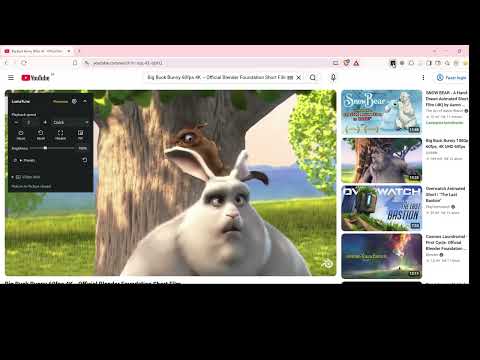
LumaTune lets you adjust how videos look and play in your browser. Open the Adjust tab to change brightness, contrast, saturation, and playback speed from 0.25x to 8x. Use sliders or numeric inputs, reset controls individually, or temporarily pause adjustments while keeping your saved values. The compact on-video controls follow the selected player and give you quick access to speed and viewing actions. Theater Mode fits the player inside the browser window while keeping the browser controls visible. Press Esc to exit Theater Mode. Native Picture-in-Picture opens one video in a floating window when the browser and player support it. Visual filters may be unavailable in that window. Open Video info to see the video's resolution and playback status. Enable it per site to view optional details such as buffering and lost frames. Video info shows observations from your browser and leaves the player in control of playback. Preview built-in presets by hovering over them or focusing them with the keyboard. Apply a preset for the current site or use Undo to restore the previous settings. Use the Site profiles page to search, edit, disable or delete your saved site preferences. Configure shortcuts for speed, pausing adjustments, Theater Mode and temporary on-video control visibility in Chrome. Free features - Brightness, contrast, saturation, grayscale and playback speed. - Cinema, Vivid, Lecture and Black & White presets with preview and Undo. - On-video speed controls and basic site profile management. - Theater Mode with Contain, native Picture-in-Picture and Video info. - Configurable shortcuts and temporary pause of adjustments. Pro features - Gamma, sharpness, RGB balance, temperature, hue, sepia, invert and vignette. - Quarter-turn rotation and horizontal mirror for compatible media. - Visual adjustments for videos, images or the whole page. - Dark Scene, Night, Warm and Cool presets, custom presets and two favorite-preset shortcuts. - Brightness and custom presets in the on-video controls, plus customization of position, size, opacity, visible controls and auto-hide. - Theater Cover, zoom, position, background color and optional per-site settings. - Global adjustment defaults, preset values saved to a site, profile copy and move, per-site on-video control overrides and local JSON export. Try Pro free for 7 days. Paid plans and checkout are provided by ExtensionPay. Website access and privacy LumaTune uses temporary access when you invoke it on the active tab. You can grant optional website access once to restore saved settings automatically and use controls with compatible embedded players across sites. You can revoke that access in Chrome's extension settings. Adjustments and presets stay in Chrome extension storage. LumaTune saves site origins for your adjustments and explicit preferences. Video info samples stay in browser memory. ExtensionPay handles the trial and checkout, and its bundled client can use Chrome Sync for licensing records.
5 out of 51 rating
Details
- Version0.12.1
- UpdatedNovember 9, 2026
- FeaturesOffers in-app purchases
- Offered bypauloint88
- Size111KiB
- LanguagesEnglish (United States)
- Developer
Email
pauloint88@gmail.com - Non-traderThis developer has not identified itself as a trader. For consumers in the European Union, please note that consumer rights do not apply to contracts between you and this developer.
Privacy

This developer declares that your data is
- Not being sold to third parties, outside of the approved use cases
- Not being used or transferred for purposes that are unrelated to the item's core functionality
- Not being used or transferred to determine creditworthiness or for lending purposes