

Custom New Tab Mangement v2

Overview
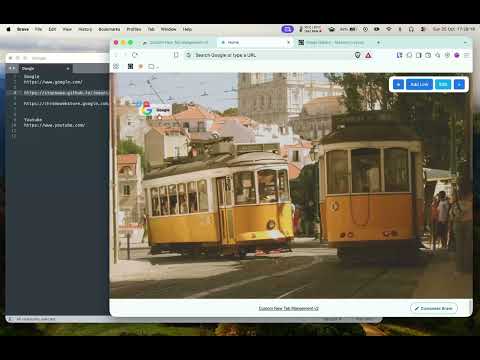
Renders a custom local new tab page.
Custom New Tab Management replaces your default new tab with a fast, clean, and private dashboard tailored to your workflow. See how to use: https://youtu.be/1M98DR0YXp8 Old version 1 can be found here: https://chromewebstore.google.com/detail/custom-new-tab-redirect/phenpbfhfgcghknjgmdlkekpigfaaobe ## Key Features 🔗 **Custom Visual Bookmarks** - Add and arrange your favorite websites on an open visual grid. - Set custom icons using any direct image link (http:// or https://), base64 data:image/... URIs, or a built-in default icon. - Built-in helper directory for quick icon discovery across popular repositories. - Drag-and-drop reordering with a snap-to-grid system for a neat layout. 🖼️ **Daily Rotating Wallpapers** - Enjoy a fresh, high-resolution background every calendar day. - On-demand reload button to fetch and rotate a new background anytime. - Built-in controls to adjust brightness, saturation, and contrast. - Optional subtle ambient wallpaper zoom animation with adjustable speed. - Smart offline caching using IndexedDB to keep page loads instant. 🔒 **Powered 100% by Chrome Bookmarks** - All bookmark links, icons, and layout coordinates are stored directly inside your browser's native bookmarks bar. - Synced automatically across your devices via your Google Chrome profile with zero proprietary lock-in. - Wallpaper preferences and visual filter settings stay strictly on your local machine. 🛡️ **Absolute Privacy — Zero Telemetry** - No analytics, no telemetry, no third-party tracking, and no external databases. - No account or login required — everything runs strictly on your device. ## How It Works 1. **New Tab Experience**: Every new tab opens your custom dashboard. 2. **Organize**: Enter "Edit Mode" to drag bookmarks, adjust positions, edit details, or add new links. 3. **Customize Wallpaper**: Open the settings panel to tune visual filters and animation settings to your liking. ## Perfect For - Power users who want a clean, aesthetic, and functional start page. - Anyone valuing privacy and local data ownership over cloud-synced extensions.
0 out of 5No ratings
Details
- Version1.3
- UpdatedOctober 26, 2026
- Size138KiB
- LanguagesEnglish (United Kingdom)
- Developer
Email
szymondzialowski@gmail.com - Non-traderThis developer has not identified itself as a trader. For consumers in the European Union, please note that consumer rights do not apply to contracts between you and this developer.
Privacy

This developer declares that your data is
- Not being sold to third parties, outside of the approved use cases
- Not being used or transferred for purposes that are unrelated to the item's core functionality
- Not being used or transferred to determine creditworthiness or for lending purposes