

Deckhand: Quick Search

Overview
The plain-language parser for Magic: The Gathering card searches, usable on Scryfall, Commander Spellbook and Cube Cobra.
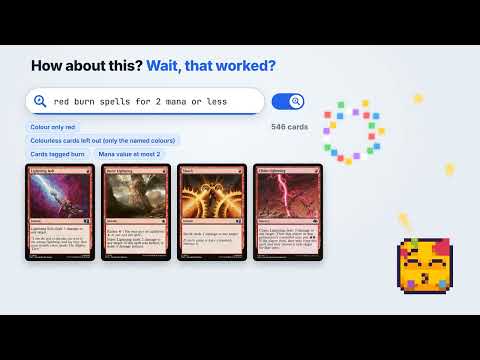
Type a sentence in the search box of a site you already use, for example "green creature that makes tokens for 3 mana or less", and press Enter. No account and nothing to learn first. The extension writes the real search in that site's syntax, leaves it in the box where you can edit it like any search you typed yourself, and shows how it read each part of your sentence. Press Escape or Undo and your own words come back. No AI-powered Search. A fixed list of written rules and word lists reads your sentence on your own computer. It never makes up a card or a term, and the same sentence always gives the same search. What you get - Works on scryfall.com, cubecobra.com and commanderspellbook.com, each in that site's own spelling of the terms - Shows its work: which words it understood, which it did not, and anything the site has no term for. It names what it left out instead of guessing - Reads how players talk: colours and guild names, mana value and "drops", price words such as cheap, budget and expensive, release years, rarity, roles like removal or ramp, and counting things on a card on Scryfall ("more than 3 creature types", "4 or more printings") - It does not suggest or rank cards. It is for when you know roughly what you want and would rather say it than spell it - Conversation mode (Auto Continue): after a search, say "make it gruul instead", "also under 3 mana" or "drop the token part" and the search changes to match - "Did you mean" for words it could not read, and "Search without them" when a search finds nothing - Your sentence shown as chips under the results bar: drop a part with one click, or swap it for another reading - Copy the search, or a link to the results, with one click - Paste a deck list into the box (one card name per line) and it becomes a search for those cards - Optional, off until you turn them on: Remember my searches, Dictionary (your own words and what they mean), Show an example in the empty box, and Read back for a search you typed in the site's syntax - Announces what each part was read as to a screen reader - Light and dark: it follows each site's own style - Switches you can turn off at any time: Auto Enter, Auto Continue, the parts chips, bigger text and screen reader announcements Privacy Deckhand: Quick Search reads only the search box, the search in the page address and the result totals on those three sites, plus a deck list when you paste one into that box. Your choices, and the recent searches and dictionary words if you turn those on, stay in the extension's own storage on your computer and are never sent. It sends nothing anywhere unless you press Report on a sentence it got wrong and then press Send. A report holds the sentence, what it was read as, what you expected, the sentence before it when you were in a conversation, the extension version and which site you were on, and goes to the developer's server with no account. No tracking, no ads, no remote code. This is an unofficial tool. It is not affiliated with or endorsed by Scryfall, Cube Cobra, Commander Spellbook or Wizards of the Coast. Magic: The Gathering is a trademark of Wizards of the Coast. Deckhand: Quick Search is unofficial Fan Content permitted under the Fan Content Policy. Not approved/endorsed by Wizards. Portions of the materials used are property of Wizards of the Coast. ©Wizards of the Coast LLC. Free, and it stays free. Made by Deckhand.
0 out of 5No ratings
Details
- Version0.0.237
- UpdatedNovember 9, 2026
- Offered byDeckhand
- Size226KiB
- LanguagesEnglish
- Developer
Email
info@tuxedoapps.ca - Non-traderThis developer has not identified itself as a trader. For consumers in the European Union, please note that consumer rights do not apply to contracts between you and this developer.
Privacy

Deckhand: Quick Search has disclosed the following information regarding the collection and usage of your data. More detailed information can be found in the developer's privacy policy.
Deckhand: Quick Search handles the following:
This developer declares that your data is
- Not being sold to third parties, outside of the approved use cases
- Not being used or transferred for purposes that are unrelated to the item's core functionality
- Not being used or transferred to determine creditworthiness or for lending purposes
Support
For help with questions, suggestions, or problems, please open this page on your desktop browser