

Add More Colors to Calendar

Overview
Enhance your Google Calendar with a Chrome extension that adds custom colors to each event for a personalized, organized schedule.
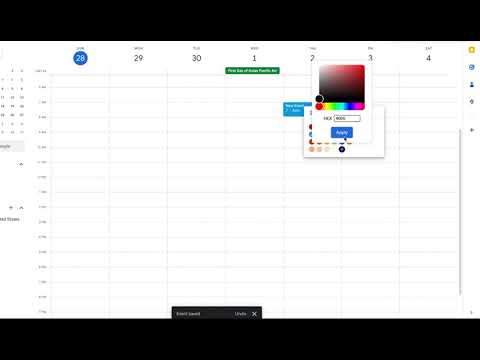
Add More Colors to Calendar turns Google Calendar into a color-coded system that works for you automatically. Google now lets you pick custom colors — but only one event at a time, shown as tiny dots on timed events. Our extension goes further: set color RULES once and every matching event is colored automatically, as a full, easy-to-scan color bar in every view. Plus manual overrides whenever you want. NEW — Your Google Tasks get colors too Tasks used to be stuck in a single default color, impossible to tell apart at a glance. Now they follow your rules like everything else: color all your tasks at once, or only the ones matching a keyword. Works in Month, Week and Day view, and keeps the task's shape and checkbox intact. WHAT YOU CAN DO • Automatic coloring rules — "Title contains Meeting" → orange. Set it once, it applies to every matching event, forever. • Events and Tasks kept separate — two tabs, two independent rule lists. An event rule never touches your tasks, and vice versa. • Full color bars, every view — timed events get a full colored bar instead of a tiny dot, so you can scan a whole week at a glance. • Your own palette — save the colors you actually use and reuse them in one click. No duplicates. • Color a single item by hand — recolor one event or task on the fly whenever you need an exception. • Edit a color anytime — change a saved color and every event using it updates instantly. No recoloring one by one. • Always readable — black or white text is picked automatically for contrast, or you choose it yourself. • Smart conditions — match by keyword, regular expression, all-day, recurring, or "all tasks". HOW IT WORKS Click the extension icon Pick the Events or Tasks tab Choose a condition, pick a color, click Add That's it. Your calendar recolors instantly, and stays that way. FREE AND PRO Free: up to 3 rules with keyword matching, your color palette, manual coloring, and full color bars. Pro ($8/month or $40/year): unlimited rules and smart conditions (regular expressions, all-day, recurring, all tasks), plus every future feature. PRIVACY Your colors and rules are stored in your account so they follow you across devices. The extension does not read your event contents beyond the title shown on screen, and never shares your calendar with anyone. Questions or ideas? Use the "Suggest a feature" box in the extension, or write to morecolorsforcalendar@gmail.com — we read everything. Color a single event manually: 1. Open or create an event, then click "🎨 More colors" next to Google's color option and pick any color. 2. Or, on the calendar grid, hover an event and click the color button that appears. 3. A manual color always overrides any rule for that event. Tip: text color (black/white) is set automatically for legibility — or choose it yourself per rule. WHY COLOR-CODE YOUR CALENDAR? • Enhanced organization: categorize meetings, focus time, personal events and deadlines by color — automatically. • Scan at a glance: full color bars (not dots) let you read a busy week in seconds. • Set it and forget it: rules do the work; you stop recoloring events by hand. • Aesthetic & branding: match your calendar to your style, or your company's colors. KEY FEATURES • Automatic, rule-based coloring (by keyword in the title, and more). • Manual per-event override that beats the rules. • Full-height color bars on timed events, in day, week and month views. • Unlimited colors and exact custom shades. • Automatic, legible text contrast. • Cross-device sync tied to your account. HOW TO CANCEL YOUR PRO SUBSCRIPTION 1. Click the Add More Colors to Calendar icon in your browser bar. 2. Click the "Manage Subscription" link. 3. Log in to your account in Stripe. 4. Click "Cancel Subscription". HOW TO DELETE A SAVED COLOR 1. Click the extension icon and log in if needed. 2. Click the "✕" beside a saved color. 3. It is removed; you can then add a new one in its place. SUPPORT & SUGGESTIONS Love the extension? A one-time $5 keeps it alive and improving. Have an idea? Use the built-in "Suggest a feature" form in the popup — we read every message. Ready to make your Google Calendar effortless to read? Install Add More Colors to Calendar and let your schedule color itself. Work also on Firefox
3.4 out of 542 ratings
Details
- Version1.0.1
- UpdatedSeptember 11, 2026
- FeaturesOffers in-app purchases
- Size347KiB
- LanguagesEnglish
- DeveloperWebsite
Email
morecolorsforcalendar@gmail.com - Non-traderThis developer has not identified itself as a trader. For consumers in the European Union, please note that consumer rights do not apply to contracts between you and this developer.
Privacy

Add More Colors to Calendar has disclosed the following information regarding the collection and usage of your data. More detailed information can be found in the developer's privacy policy.
Add More Colors to Calendar handles the following:
This developer declares that your data is
- Not being sold to third parties, outside of the approved use cases
- Not being used or transferred for purposes that are unrelated to the item's core functionality
- Not being used or transferred to determine creditworthiness or for lending purposes
Support
For help with questions, suggestions, or problems, please open this page on your desktop browser