


Overview
Manual test execution and evidence capture
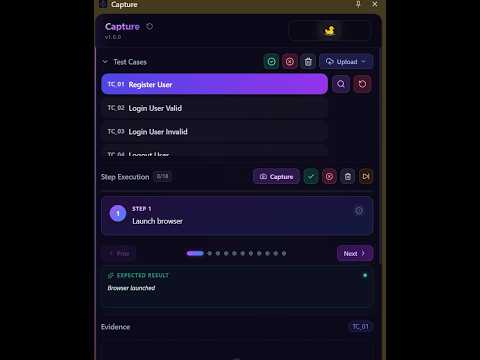
Capture – Manual Test Execution & Evidence Documentation Capture turns manual testing into a structured, documented process. Load your test cases, work through them step by step in Chrome's side panel, capture screenshot evidence as you go, and export a professional report for every test case, all without leaving the page you are testing. Capture has no backend. It runs entirely on your own computer, and your testing data never leaves it. Built by TestAstra for QA engineers, manual testers, developers, business analysts and product teams. WHAT YOU CAN DO • Import test cases from a CSV file or directly from Jira • Run tests step by step: mark each step passed, failed or discarded, or skip ahead, with the expected result always in view • Capture screenshot evidence in one click, filed under the right test case and step • Follow a live timeline of your actions on the page: clicks, typing, navigation and page changes • Export a Word (.docx) evidence report for each executed test case, or for a selection of test cases • Publish results to Jira: Capture posts the outcome as a comment and attaches the evidence report to the issue • See your progress at a glance: the side panel header tracks every step you mark and stamps each finished test case PASSED, FAILED or DISCARDED PREPARING YOUR TEST CASES Upload a CSV file with these columns, in any order: TestCaseID, TestCaseName, Priority, Module, Preconditions, StepNumber, StepDescription, TestData, ExpectedResult Use one row per step. TestCaseID, TestCaseName, StepNumber, StepDescription and ExpectedResult must be filled in; the other columns can be left blank. Full guide: https://testastra.in/pages/Capture PRIVACY: EVERYTHING STAYS ON YOUR COMPUTER • No backend: Capture has no servers and no account to create • No data processing in the cloud: test cases, screenshots, recordings and reports are handled entirely within your browser • Your data is stored locally in your browser on your computer, and reports are saved straight to your computer • No analytics or tracking: nothing is sent to TestAstra or anyone else • Text typed into password fields is never recorded • Jira is optional: if you connect your own Jira site, Capture sends results and reports only to that site, and only when you import or publish WHY CAPTURE NEEDS ACCESS TO WEBSITES Capture records your actions and takes screenshots on whichever site you are testing, so it needs access to the pages you open. Everything it records stays on your computer. WHAT'S NEW IN 1.0 • Capture is out of beta: this is our first full release • A redesigned side panel in the TestAstra visual style • A new progress banner: every step you mark is pinned up as a photo, and each finished test case gets a clear result stamp • Bug fixes, including correct version information in exported session data ABOUT TESTASTRA Capture is the first product from TestAstra. It brings order to manual testing today and lays the groundwork for the automation workflows to come.
0 out of 5No ratings
Details
- Version1.0
- UpdatedNovember 3, 2026
- FeaturesOffers in-app purchases
- Size480KiB
- LanguagesEnglish
- DeveloperSanjeet ChowdhuryWebsite
Baburchipara, colonelgola Medinipur, West Bengal 721101 INEmail
sanjeetchowdhury1996@gmail.comPhone
+91 70018 53665 - TraderThis developer has identified itself as a trader per the definition from the European Union and committed to only offer products or services that comply with EU laws.
Privacy

Capture has disclosed the following information regarding the collection and usage of your data. More detailed information can be found in the developer's privacy policy.
Capture handles the following:
This developer declares that your data is
- Not being sold to third parties, outside of the approved use cases
- Not being used or transferred for purposes that are unrelated to the item's core functionality
- Not being used or transferred to determine creditworthiness or for lending purposes
Support
For help with questions, suggestions, or problems, please open this page on your desktop browser