

Clatasha Studio

Overview
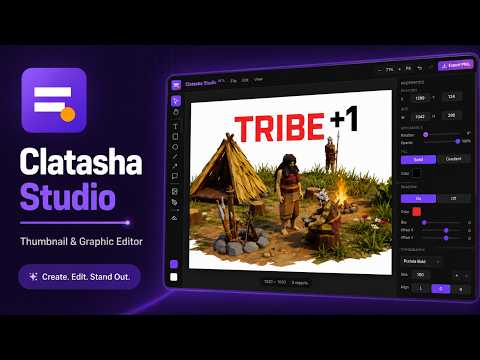
Clatasha Studio is a Simple Thumbnail Maker For YouTube — fully offline, no APIs needed.
Clatasha Studio is a browser based design and thumbnail editor built directly into Chrome. It gives creators a simple way to create YouTube thumbnails, Shorts graphics, social media images, channel graphics, and other visual content without relying on a separate desktop program or online design service. Clatasha Studio works offline, does not require an account, and keeps your projects stored locally on your device. ⭐ Feature Summary ⭐ 🎨 DESIGN AND CANVAS TOOLS • Create horizontal thumbnails and vertical graphics • Add images, editable SVG graphics, text, shapes, arrows, speech bubbles, stickers, and drawings • Use rectangles, circles, lines, arrows, and speech bubbles • Start faster with built in templates and background graphics • Navigate your canvas with zoom, pan, rulers, guides, and snapping • Use tool specific mouse cursors for clearer editing feedback ✍️ TEXT TOOLS • Add editable text layers • Customize fonts, sizing, alignment, spacing, opacity, and text wrapping • Import your own fonts • Apply built in text styles with gradients, outlines, shadows, and curved text • Save and reuse custom text presets • Keep Text Styles available while working in other editor panels 🖌️ BRUSH AND DRAWING TOOLS • Paint on editable Paint Layers with Brush Studio • Use Hard Round, Soft Round, Airbrush, Marker, Highlighter, Glow Brush, Spray Paint, and Texture Brush presets • Adjust brush size, hardness, opacity, flow, spacing, smoothing, and color • Use drawing tablet pressure support • Erase painted content without affecting other layers • Create, clear, edit, save, and reopen Paint Layers 🖼️ IMAGE EDITING • Import images and editable SVG graphics from your device • Capture still frames from local video files • Crop images or apply circle and rounded masks • Correct image perspective using four movable corner points • Adjust brightness, contrast, saturation, hue, blur, noise, and pixelation • Use color based background removal with tolerance controls • Use the Cutout Brush to erase or restore image areas • Use Spot Healing to blend away unwanted marks • Use the Paint Bucket to fill connected image areas • Use the Eyedropper to sample canvas colors for fills, strokes, and outlines • Replace an existing image without rebuilding your layout • Apply blend modes and image outlines 📚 LAYERS AND WORKSPACE PANELS • Organize, rename, lock, hide, duplicate, delete, and reorder layers • Group and ungroup layers • Align and distribute objects • Use clipping masks to confine one layer to another • Manage your project through separate Layers, Properties, and Adjustments tabs • Edit object position, size, rotation, typography, fills, outlines, shadows, and other properties • Keep Templates visible at the bottom of the workspace 🎯 PRECISION AND EDITING CONTROL • Use rulers, movable guides, snapping, and keyboard movement • Move selected objects with arrow keys • Use undo and redo while editing • Keep separate scroll positions for Layers, Properties, and Adjustments • Switch between Default and Bowetech workspace themes • Use full color themed toolbar icons and a premium technology inspired interface 🔍 CLATASHA CLICK CHECK • Review thumbnails at smaller viewing sizes • Check editable text for word count, size, contrast, edge placement, and readability • Detect images enlarged beyond their original resolution • Detect uneven image stretching • Find image layers that are outside or barely visible on the canvas • Detect nearly empty transparent images • Check for extremely dark, bright, blank, or low separation designs • Warn about excessive layers and possible YouTube duration badge collisions • Review image and text scan results with labeled warnings • Capture and compare multiple thumbnail variations 📖 HELP AND UPDATES • Open the Clatasha Guide from the Help menu • View toolbar explanations, feature information, and keyboard shortcuts • Read version updates and release notes • Open About Clatasha to view company information, copyright details, and the current version 💾 PROJECTS AND EXPORTING • Save and reopen projects locally • Import and export editable .clatasha project files • Export finished artwork in various Image formats • Adjust export quality • Export transparent artwork when supported • Export captured Click Check variations • Work without an account, cloud storage, analytics, or required online services
0 out of 5No ratings
Details
- Version1.0.63
- UpdatedSeptember 22, 2026
- Offered byClatasha
- Size1.59MiB
- LanguagesEnglish
- Developer
Email
caribbeanwebservices@gmail.com - Non-traderThis developer has not identified itself as a trader. For consumers in the European Union, please note that consumer rights do not apply to contracts between you and this developer.
Privacy

This developer declares that your data is
- Not being sold to third parties, outside of the approved use cases
- Not being used or transferred for purposes that are unrelated to the item's core functionality
- Not being used or transferred to determine creditworthiness or for lending purposes
Support
For help with questions, suggestions, or problems, visit the developer's support site