

Tab Screensaver

Overview
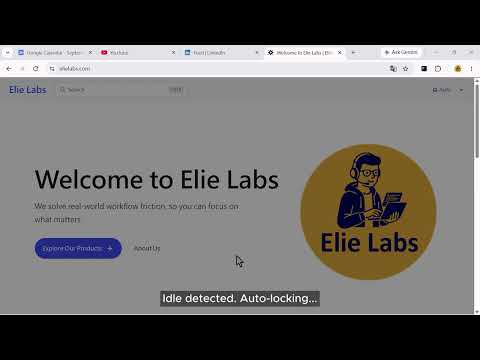
Automatically switches to the 1st tab and masks tab titles when the browser is idle.
Protect your workspace privacy and boost your focus effortlessly. Tab Screensaver automatically secures your screen by switching to the 1st tab when you step away, ensuring your sensitive work remains hidden from shoulder-surfing. Whether you are working in a busy office, a coffee shop, or just want to cultivate deep work focus, Tab Screensaver offers a seamless, frictionless experience. ✨ WHAT'S NEW IN v1.4.0 ○ Multi-Language Support: Now fully available in English, Traditional Chinese, Japanese, Korean, German, and Spanish. ○ Custom First Tab Background: Personalize your privacy by uploading custom high-res images to serve as the background screensaver for your 1st tab. ○ Custom Tab Icon & Title: Take full control of your background tabs by replacing their titles and favicons with your own custom privacy mask. ○ Split-View Canvas Protection: Perfectly handles split-screen setups. When your 1st tab is split into two views, the privacy canvas intelligently obscures the secondary sub-tab during a lock, keeping only your primary 1st sub-tab visible. 🛡️ CORE FEATURES (100% FREE) ○ Idle Auto-Lock: Automatically switches to your 1st tab after a period of inactivity (customizable timeout). ○ Split-View Canvas Protection: Multi-tasking with split screens? When your 1st tab is split into multiple views, the privacy canvas intelligently acts as a partial shield, obscuring the secondary sub-tab containing sensitive content while keeping only your primary 1st sub-tab visible during a lock. ○ Website Exclusion: Easily whitelist specific domains where the idle lock should be temporarily disabled. ○ Local Dashboard: Track your daily auto-locks and privacy shortcuts right from the popup window. 🚀 PRO FEATURES (7-Day Free Trial Available) ○ Custom Screensaver Background: Upload your own high-resolution image to act as a personalized screensaver on the 1st tab. ○ Custom Tab Masking (Icon & Title): Dynamic or Always-On masking that obfuscates all background tab titles and favicons with your uploaded icon and label. ○ Deep Work Focus Timer: Rewards uninterrupted focus. Maintain a steady workflow for a custom duration without triggering any locks to earn an automatic screen break and log a successful session. ○ Soft Transition: Gradually dims the screen for 3 seconds before switching tabs, giving you a smooth visual buffer. ○ Instant Privacy Shortcut: Instantly conceal your active workspace by switching to the 1st tab with a single keystroke. ○ Strict Unlock Behavior: Keep your screen locked on the 1st tab until a specific tab selection or shortcut is pressed, preventing accidental wakes via mouse movement. ○ Seamless Cloud Sync: Your tier status and license key sync automatically across all devices logged into your Chrome profile. 🔒 PRIVACY FIRST Tab Screensaver runs entirely locally in your browser. We do not track your browsing history, and your custom images remain safely stored on your device.
0 out of 5No ratings
Details
- Version1.4.0
- UpdatedOctober 15, 2026
- Offered byelielabs
- Size406KiB
- Languages6 languages
- Developer
Email
elielabs.service@gmail.com - Non-traderThis developer has not identified itself as a trader. For consumers in the European Union, please note that consumer rights do not apply to contracts between you and this developer.
Privacy

Tab Screensaver has disclosed the following information regarding the collection and usage of your data. More detailed information can be found in the developer's privacy policy.
Tab Screensaver handles the following:
This developer declares that your data is
- Not being sold to third parties, outside of the approved use cases
- Not being used or transferred for purposes that are unrelated to the item's core functionality
- Not being used or transferred to determine creditworthiness or for lending purposes
Support
For help with questions, suggestions, or problems, visit the developer's support site