

Commento: Website Feedback & Visual Review Solution

Overview
Pin comments on any live website, share with your team and clients, and track feedback to done.
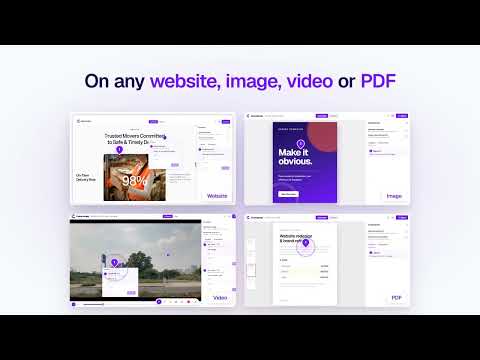
Commento is a visual feedback tool that lets you comment directly on top of any live website. Instead of describing a problem in a long email or a chat message, click the exact spot on the page, pin a comment there, and draw an arrow or a box to show what you mean. Your team sees the feedback right where it belongs and knows exactly what to change, without a single follow-up message. The extension brings Commento to the real website in your own browser: no proxy, no copy of the page, no screenshots to annotate. Every site you allow becomes a project in your Commento dashboard, where your team and your clients can review, reply and track every comment until it is done. ━━━━━━━━━━━━━━━━━━━━━━━━━━━━━━ WHO IT'S FOR • Web agencies and freelancers collecting client feedback on new websites • Designers checking that a build matches the design, pixel by pixel • Developers who need bug reports with context they can act on • QA teams reviewing staging and production sites • Product and marketing teams approving landing pages and copy changes • Clients who want to point at things instead of explaining them ━━━━━━━━━━━━━━━━━━━━━━━━━━━━━━ HOW TO USE IT 1. Add Commento to Chrome and pin it Click "Add to Chrome", then open the puzzle-piece menu next to the address bar and click the pin beside Commento. Pinning keeps Commento one click away, and the on-page widget only shows while the extension is pinned. 2. Sign in Click the Commento icon and continue with Google or your email address. New accounts start a free trial straight away, with no credit card required. 3. Allow the website you want to review Open the site, click the Commento icon and choose "Allow access to this site". Chrome asks for your permission once for that site. Commento never runs on sites you haven't allowed, and the site becomes a project in your dashboard as soon as you allow it. 4. Click anywhere to comment Turn on comment mode from the Commento toolbar in the bottom corner of the page, click the element you want to talk about and type your comment. Draw an arrow, a rectangle or a freehand mark first to point at the problem, attach files, @mention a teammate, and send. 5. Review, reply and resolve Everyone on the project sees new comments live. Reply in threads, react with an emoji, and tick a comment as resolved once the fix ships. Resolved comments stay as a record of what changed. ━━━━━━━━━━━━━━━━━━━━━━━━━━━━━━ FEATURES Pinned comments on the live page • Click any element to pin a comment to that exact spot • Pins stay attached to the element they were left on, so they follow your layout • Comments remember the page they were left on, across every page of the site • Each comment notes the screen it was left on (desktop, tablet or mobile) Draw what you mean • Arrow, rectangle, freehand paint and eraser tools • Eight colours, plus undo and redo • Draw first, then place your comment: the drawing is saved with it • Drawings appear when a comment is opened and disappear once it's resolved Rich comments and threads • Attach images, videos, PDFs or any file (up to 25 MB each) • @mention teammates to pull them into a conversation • Emoji reactions, editing and threaded replies • Team-only comments that clients and guests never see Three modes in one toolbar • Comment mode: click anywhere to pin a comment; links and buttons won't fire while you comment • Browse mode: use the site normally, with everyone's comments visible on the page • Hide mode: hide every comment when you just want to look at the site Every comment in one list • Open the comments list to see feedback from every page of the site • Filter by open, resolved, all, this page only, or team-only comments • Click a comment to jump straight to its pin, even if it's on another page Projects, teams and clients • Every allowed site becomes a project in your Commento dashboard • Copy a guest link from the toolbar popup: clients can read and reply in their browser with no account and no extension • Invite teammates to work on the same projects • Live updates: new comments and replies appear instantly for everyone Keyboard shortcuts • C: comment mode (and back from any drawing tool) • B: browse with comments visible • H: hide all comments • R: rectangle • A: arrow • P: paint (freehand) • E: eraser • L: open or close the comments list • Ctrl/⌘ + Z and Ctrl/⌘ + Shift + Z: undo and redo a drawing • ?: show every shortcut • Esc: close a comment, cancel a draft or stop commenting Shortcuts pause automatically while you type, so they never get in the way of the website you're reviewing. Built to stay out of the way • The widget sits in its own isolated layer, so it never changes the website's layout or styles • Collapse it to a single button, or keep the toolbar open on sites you review often • Moved to a different domain (for example from example.com to support.example.com)? The Commento icon shows a badge to remind you that the new domain needs access too • Turn Commento off for one site, or everywhere, from the popup or by right-clicking the toolbar icon ━━━━━━━━━━━━━━━━━━━━━━━━━━━━━━ THE TOOLBAR POPUP Click the Commento icon at any time to: • See your account and plan • Turn Commento on or off for the site you're on • Copy the guest link for this site's project • Open the project in your dashboard • Browse all your projects and open any of their sites • Show or hide Commento on all allowed sites • Log out ━━━━━━━━━━━━━━━━━━━━━━━━━━━━━━ MORE THAN WEBSITES The extension is for live websites. In your Commento dashboard you can also review images, videos and PDFs with the same pinned comments, drawings and threads, and collect feedback on any website through a review link that needs no installation at all. ━━━━━━━━━━━━━━━━━━━━━━━━━━━━━━ PRIVACY AND PERMISSIONS Commento only works on the websites you allow, one at a time. It does not read or change pages you haven't allowed, and you can remove access for any site with one click. • Site access: asked for each website separately, only when you choose "Allow access to this site" • Storage: keeps you signed in and remembers your preferences on your device • Identity: used only for "Continue with Google" • Scripting and tabs: show the comment widget on the sites you allowed, and open your dashboard and projects • Context menus: the "Allow / remove Commento on this site" and "Turn Commento off/on everywhere" options on the toolbar icon Your comments, drawings and attachments are saved to your Commento account so your team can see them. We don't sell your data or use it for anything other than running Commento. Read the full privacy policy at https://commento.net/privacy ━━━━━━━━━━━━━━━━━━━━━━━━━━━━━━ PLANS Installing the extension is free. It works with a Commento account: every new account starts with a free trial with every feature unlocked and no credit card required. After the trial, choose a plan that fits your team at https://commento.net/pricing ━━━━━━━━━━━━━━━━━━━━━━━━━━━━━━ FREQUENTLY ASKED QUESTIONS Do my clients need to install the extension? No. Share the project's guest link and clients can read and reply to comments in their browser, without an account or an extension. Does it work on pages behind a login or on staging sites? Yes. The extension runs on the page in your own browser, so it works anywhere you can open the site yourself, including logged-in areas and staging environments. Which browsers are supported? Google Chrome, and Chromium browsers such as Microsoft Edge and Brave that can install extensions from the Chrome Web Store. What happens to my comments if I remove the extension? Nothing. Your projects, comments and guest links stay in your Commento dashboard, ready for when you install it again. Why don't I see the Commento button on a page? Make sure Commento is pinned to your toolbar and that you've allowed access to that site from the Commento icon. If you just moved to a different domain or subdomain, it needs to be allowed too. ━━━━━━━━━━━━━━━━━━━━━━━━━━━━━━ SUPPORT Questions, ideas or something not working? Email us at comentoofficial@gmail.com or visit https://commento.net/support. We read every message. Learn more at https://commento.net/extension
5 out of 51 rating
Details
- Version1.0.2
- UpdatedNovember 3, 2026
- FeaturesOffers in-app purchases
- Size221KiB
- LanguagesEnglish
- DeveloperHussain AbdullahWebsite
17-E habib homes, Ali park street Near Rohi nalla Kot Lakhpat Lahore 54760 PKEmail
hussainabdullah3372@gmail.comPhone
+92 314 3176224 - TraderThis developer has identified itself as a trader per the definition from the European Union and committed to only offer products or services that comply with EU laws.
Privacy

Commento: Website Feedback & Visual Review Solution has disclosed the following information regarding the collection and usage of your data. More detailed information can be found in the developer's privacy policy.
Commento: Website Feedback & Visual Review Solution handles the following:
This developer declares that your data is
- Not being sold to third parties, outside of the approved use cases
- Not being used or transferred for purposes that are unrelated to the item's core functionality
- Not being used or transferred to determine creditworthiness or for lending purposes
Support
For help with questions, suggestions, or problems, visit the developer's support site