


Overview
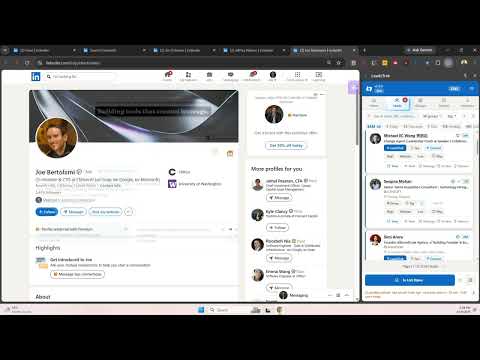
LinkedIn lead capture in a side panel: save a profile, write the message, set the follow-up date, export to CSV.
LeadzTrak is a LinkedIn lead capture tool that keeps your leads in a side panel instead of a spreadsheet. Save a profile with one click, write the message while the profile is still open, and set the follow-up date so the lead comes back to you. It is a small LinkedIn CRM for people who prospect on their own. If you save LinkedIn profiles by hand, you know the loop: copy the name, paste it somewhere, lose the thread, forget to follow up. LeadzTrak removes the copy and paste, and keeps the follow-up date attached to the person. WHAT YOU CAN DO - Save a profile with one click: name, title, company, location, connection degree. - Capture a whole search results page in one go, so a page of people becomes a list of leads. - Read the contact details LinkedIn already shows you (email, phone, website) into the lead, from the profile's own Contact info. - Keep notes and a message draft on the lead. The draft can become your connection request note. - Set a follow-up date. The panel opens with who is due today and who is overdue. - Organize with groups and sub-groups, tags and ratings. Search, filter, and save a filter you use every week. - Add leads to the Outreach queue: a focus list of the people you decided to work on, each with the message you prepared. - Export to CSV and JSON. Import CSV on paid plans. - See your own numbers: what you captured, who you contacted, what is overdue. WHAT IT WILL NOT DO LeadzTrak never sends anything for you. No auto pilot, no scheduled sending, no background bot. Every invitation and every message is sent by you, in LinkedIn, on your own click. That is deliberate: your account stays yours. HOW IT WORKS, IN ABOUT A MINUTE 1. Install LeadzTrak and open LinkedIn. The panel sits beside the page. 2. Open a profile and press Extract, or run Extract on a search results page. 3. Write the message, set the follow-up date, and close the tab. 4. Each morning, open the due list. FREE PLAN 100 leads, 3 groups, notes, drafts, follow-up dates, tags, search, filters, analytics, the Outreach queue, and CSV export. No credit card, no trial timer. PAID PLANS Starter adds capacity (3,000 leads, 120 groups), cloud sync across your devices, CSV import, and AI with your own API key. Pro adds unlimited leads, batch AI, and priority support. Prices are on leadztrak.com/pricing. AI, HONESTLY AI is optional and paid, from Starter up. You paste your own key from OpenAI, Anthropic, Google, DeepSeek, or another compatible provider, and it cleans up extracted data or drafts a first message. Every other feature works without it. The key stays on your device. YOUR DATA Leads are stored in your browser. Nothing is uploaded unless you turn on Cloud Sync yourself, and Cloud Sync is off until you enable it. No third party scraper, no data resale, no analytics SDK in the extension. WHO IT IS FOR Founders and consultants working their own network. Recruiters who source on LinkedIn. Agencies running outreach for a handful of clients. Small sales teams whose pipeline currently lives in a spreadsheet. SUPPORT Questions: leadztrak.com/contact Privacy: leadztrak.com/privacy
0 out of 5No ratings
Details
- Version2.7.4
- UpdatedOctober 27, 2026
- FeaturesOffers in-app purchases
- Size711KiB
- LanguagesEnglish
- DeveloperKAMRAN UL HAQWebsite
12A, JLN MUTIARA INDAH 1/12 PUCHONG, Selangor 47100 MYEmail
kamran@threadtrak.com - Non-traderThis developer has not identified itself as a trader. For consumers in the European Union, please note that consumer rights do not apply to contracts between you and this developer.
Privacy

LeadzTrak: Lead Capture & CRM has disclosed the following information regarding the collection and usage of your data. More detailed information can be found in the developer's privacy policy.
LeadzTrak: Lead Capture & CRM handles the following:
This developer declares that your data is
- Not being sold to third parties, outside of the approved use cases
- Not being used or transferred for purposes that are unrelated to the item's core functionality
- Not being used or transferred to determine creditworthiness or for lending purposes
Support
For help with questions, suggestions, or problems, please open this page on your desktop browser