

ChatGPT Table of Contents - LunaTOC
12 ratings
)
Overview
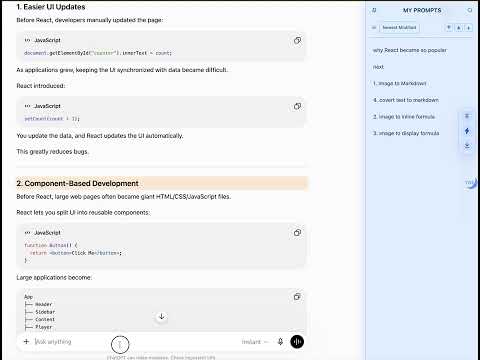
Add a table of contents, prompt navigator, and MyPrompts sidebar to long ChatGPT conversations.
ChatGPT Table of Contents - LunaTOC adds a complete, clickable table of contents to ChatGPT, making long conversations easy to navigate. Stop endless scrolling. LunaTOC automatically detects and captures every user prompt to build a complete conversation outline, so you can instantly jump to any question, section, or important part of your chat—even in very long conversations with ChatGPT's virtualized message list. What's New Version 1.13.0 - Added custom TOC titles, allowing you to rename TOC items without changing the original prompt. Features - Complete table of contents, even for very long conversations - Automatically detects and captures every user prompt - Instantly jump to any part of the conversation - Built for ChatGPT's long conversation experience - Search the conversation outline instantly - Sub-navigation for faster browsing - MyPrompts for saving, managing, and reusing prompts - Right-click any prompt to save it to MyPrompts - Type # or // to quickly insert saved prompts - Toggle the sidebar on or off at any time - Toolbar popup with quick usage tips - Works on both chatgpt.com and chat.openai.com Privacy - No login required - No tracking - No data collection - Everything stays in your browser.
4.9 out of 512 ratings
Details
- Version1.13.6
- UpdatedOctober 22, 2026
- Offered byLeo
- Size230KiB
- LanguagesEnglish
- Developer
Email
geneleoc@gmail.com - Non-traderThis developer has not identified itself as a trader. For consumers in the European Union, please note that consumer rights do not apply to contracts between you and this developer.
Privacy

This developer declares that your data is
- Not being sold to third parties, outside of the approved use cases
- Not being used or transferred for purposes that are unrelated to the item's core functionality
- Not being used or transferred to determine creditworthiness or for lending purposes
Support
For help with questions, suggestions, or problems, visit the developer's support site