


Overview
Otomatisasi Coretax All-in-One: Faktur Masukan, Bukti Potong (BPPU/NR/21/Prepaid), Import Excel & Tools
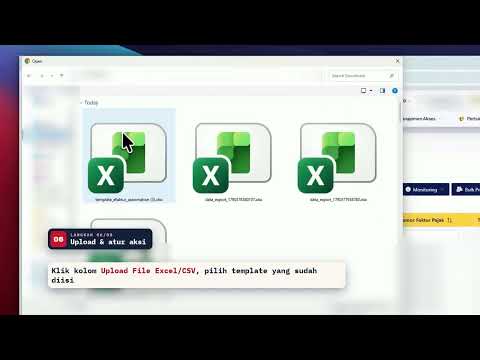
E-Faktur Automation mengkreditkan ratusan Faktur Pajak Masukan di Coretax DJP secara otomatis dari satu file Excel. Siapkan daftar nomor faktur, pilih masa kredit, klik Jalankan — ekstensi membuka faktur satu per satu, mengubah masa pajak, lalu menyimpannya untuk Anda. Tidak perlu lagi klik "Ubah" dan memilih dropdown yang sama ratusan kali setiap masa pajak. 🎬 Tonton demo lengkapnya (±3 menit) di video pada halaman ini. ━━━━━━━━━━━━━━━━━━━━ ✅ YANG BISA DIKERJAKAN ━━━━━━━━━━━━━━━━━━━━ 1) Kreditkan Faktur Pajak Masukan secara massal • Import template Excel (.xlsx) atau CSV berisi nomor faktur dan masa pajak. Template + petunjuk bisa diunduh langsung dari panel. • Atur Bulan Kredit dan Tahun Kredit sekali untuk semua faktur. • Pilih aksi akhir: Kreditkan, Tidak Dikreditkan, Tandai Tidak Valid, atau Kembali ke Status Approved. • Mode Turbo: menunggu elemen halaman secara cerdas (bukan jeda tetap) sehingga proses lebih cepat dan tetap stabil. • Filter Lintas Tahun (opsional): ikut mencari faktur di tahun sebelumnya. 2) Pantau hasil dengan jelas • Progres dan status tiap faktur tampil real-time (berhasil/gagal beserta alasannya). • Ekspor laporan Excel 2 sheet: ringkasan proses dan detail per faktur. • Proses berhenti otomatis saat kuota habis; faktur yang belum diproses ditandai jelas. 3) Download Bukti Potong — GRATIS, tidak memotong kuota • BPPU (PPh Unifikasi), BP Non-Residen, BP 21/26, dan Prepaid Bukpot. • Filter masa pajak otomatis, lanjut otomatis ke semua halaman, tombol Stop/Paksa Stop, dan log CSV per dokumen. 4) Tools tambahan • Download massal PDF Faktur Pajak Masukan dan Keluaran dari halaman Coretax. • Download Excel data Faktur Pajak Masukan per masa pajak. • Gabung banyak file Excel menjadi satu sheet — diproses di browser. ━━━━━━━━━━━━━━━━━━━━ 📌 CARA PAKAI ━━━━━━━━━━━━━━━━━━━━ 1. Pasang ekstensi, buka panelnya, lalu login dengan akun Google. 2. Buka Coretax DJP → e-Faktur → Pajak Masukan. 3. Unduh template dari panel, isi nomor faktur dan masa pajak. 4. Upload template, pilih Bulan & Tahun Kredit serta aksi akhir, lalu klik Jalankan Otomatisasi. 5. Pantau progres; setelah selesai, cek status di Coretax dan unduh laporan Excel. ━━━━━━━━━━━━━━━━━━━━ 💳 KUOTA & PAKET ━━━━━━━━━━━━━━━━━━━━ • Gratis selamanya: 30 faktur per bulan (reset tiap tanggal 1), semua fitur otomatisasi, tanpa kartu kredit. • Paket berlangganan untuk kebutuhan lebih besar mulai Rp24.900/bulan — bayar via QRIS, Virtual Account, atau e-wallet, tanpa kontrak. Detail: https://alatpajak.id/pricing • Fitur Bukti Potong gratis dan tidak mengurangi kuota. ━━━━━━━━━━━━━━━━━━━━ 🔒 KEAMANAN & PRIVASI ━━━━━━━━━━━━━━━━━━━━ • Otomatisasi berjalan di browser Anda, pada sesi Coretax yang Anda buka sendiri. Ekstensi tidak meminta dan tidak menyimpan password Coretax. • Data faktur diproses lokal di browser. Server alatpajak.id hanya dipakai untuk login Google dan pencatatan kuota. • Ada jeda aman antar faktur agar tidak membebani server Coretax. • Kebijakan privasi: https://alatpajak.id/privacy ━━━━━━━━━━━━━━━━━━━━ 💡 BANTUAN & EKOSISTEM ━━━━━━━━━━━━━━━━━━━━ • Panduan lengkap: https://doc.alatpajak.id • Website: https://alatpajak.id • Perlu rekap PDF bukti potong atau faktur pajak ke Excel? Coba BukpotRekap: https://bukpotrekap.id • Dukungan: support@alatpajak.id ℹ️ E-Faktur Automation adalah alat bantu independen dan bukan aplikasi resmi Direktorat Jenderal Pajak. Tetap periksa hasil di Coretax sebelum melaporkan SPT.
4.7 out of 53 ratings
Details
- Version3.2.0
- UpdatedOctober 22, 2026
- Size927KiB
- LanguagesIndonesia
- DeveloperWebsite
Email
support@alatpajak.my.id - Non-traderThis developer has not identified itself as a trader. For consumers in the European Union, please note that consumer rights do not apply to contracts between you and this developer.
Privacy

E-Faktur Automation has disclosed the following information regarding the collection and usage of your data. More detailed information can be found in the developer's privacy policy.
E-Faktur Automation handles the following:
This developer declares that your data is
- Not being sold to third parties, outside of the approved use cases
- Not being used or transferred for purposes that are unrelated to the item's core functionality
- Not being used or transferred to determine creditworthiness or for lending purposes