


Overview
Capture, copy, and export page screenshots.
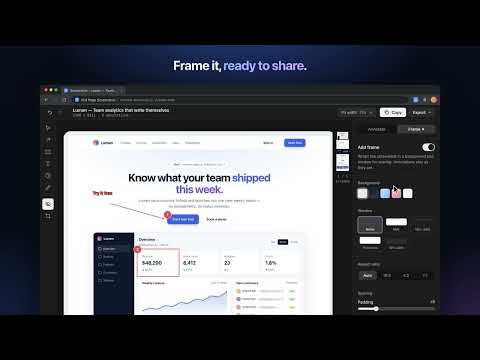
Capture an entire web page in one click: no manual scrolling, no stitching screenshots together. Full Page Screenshot scrolls the page for you and joins every section into a single, full-resolution image. Then mark it up, hide anything private, and copy or export it in seconds. CAPTURE • Full page, visible area, or just the area you select • Sticky headers and pinned bars appear once, not on every screen • Waits for lazy-loaded images and content as it scrolls • Works on web apps that scroll inside a panel, like chat, docs and dashboards • Very long pages are kept at full resolution • Keyboard shortcut: Alt+Shift+P captures the full page ANNOTATE • Arrows, boxes, freehand pen and text • Numbered steps for walkthroughs and bug reports • Move, resize, undo and redo any annotation • Crop to the part that matters HIDE PRIVATE DETAILS • Blur, pixelate or black out names, emails and numbers before you share MAKE IT READY TO SHARE • Add a background, padding, rounded corners and shadow • Wrap it in a macOS or Windows browser frame, light or dark, with the page address • Add a date stamp • Save your look as the default for next time COPY AND EXPORT • Copy to the clipboard in one click • Download as PNG, JPEG or PDF • Optionally upload and copy a share link HISTORY • Every capture is saved to a local history on your computer • Reopen any capture with its annotations still editable PRIVATE BY DESIGN Your screenshots stay on your computer. Nothing is uploaded unless you choose "Upload and copy link". No account, no sign-up.
5 out of 51 rating
Details
- Version1.5.0
- UpdatedOctober 20, 2026
- Size120KiB
- LanguagesEnglish
- DeveloperWebsite
Email
sandip@pixeldust.in - Non-traderThis developer has not identified itself as a trader. For consumers in the European Union, please note that consumer rights do not apply to contracts between you and this developer.
Privacy

Full Page Screenshot has disclosed the following information regarding the collection and usage of your data. More detailed information can be found in the developer's privacy policy.
Full Page Screenshot handles the following:
This developer declares that your data is
- Not being sold to third parties, outside of the approved use cases
- Not being used or transferred for purposes that are unrelated to the item's core functionality
- Not being used or transferred to determine creditworthiness or for lending purposes