


Overview
Autofills IRCTC booking forms instantly — passengers, stations, dates. No CAPTCHA bypass. 100% local.
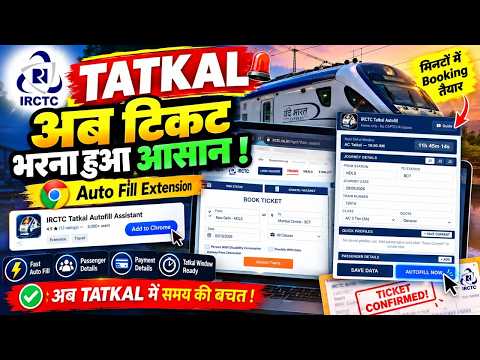
IRCTC Tatkal Autofill Assistant — the tatkal autofill extension on Chrome Web Store. Auto-fills passenger details, payment preference, IRCTC login, insurance choice, boarding station and more in under 5 seconds. Used by 4,600+ travelers. Rated 4.6 out of 5 from 28 reviews. Get a confirmed tatkal ticket before the rush catches up. Tatkal booking is a race. The window opens at 10:00 AM for AC classes and 11:00 AM for Sleeper, and hundreds of travelers compete for the same seats. Filling passenger names, ages, gender, berth preferences, mobile number and payment details manually takes 60 to 90 seconds. That delay is the difference between a confirmed tatkal ticket and a waitlisted one. IRCTC Tatkal Autofill Assistant removes that bottleneck — save your details once, autofill the form in one click, and reach the CAPTCHA in under 5 seconds. This is not a bot. It does not bypass CAPTCHAs or jump queues. It fills form fields — the same thing your browser's built-in autofill does — but built specifically for the IRCTC Next Generation website. You solve the CAPTCHA yourself, and you stay in control of every booking. ━━━━━━━━━━━━━━━━━━━━━━ PLANS AND PRICING ━━━━━━━━━━━━━━━━━━━━━━ Autofill unlocks with any plan. Try it with Basic for ₹9 (1 day), or go Pro for group bookings and speed extras. Basic — ₹9 for 1 day One passenger, one journey, one-click autofill, UPI or card payment preference, IRCTC login autofill, travel insurance preference, preferred coach, GST details, review-page continue, and Tatkal countdown timer. Pro Monthly — ₹149 per month Everything in Basic, plus multiple passengers, quick passenger profiles, multiple journeys (J1–J3), autofill on page load, IRCTC E-Wallet payment, boarding station selection, and food preference. Pro Yearly — ₹999 per year (just ₹83/month, save 44%) Full Pro access for 365 days. All payments via Razorpay (UPI, cards, net banking). Plans do not auto-renew. Buying again adds time to your current plan. To get started: create a free account on tatkalautofill.in, pick a plan, and your plan activates in the extension automatically after payment. ━━━━━━━━━━━━━━━━━━━━━━ ALL FEATURES ━━━━━━━━━━━━━━━━━━━━━━ One-Click Form Autofill Fill the entire IRCTC passenger form with a single click. Passenger names, ages, gender, berth preference, mobile number — all completed in under 5 seconds. Stop typing details manually and get to the CAPTCHA faster for a confirmed tatkal ticket. Multiple Passenger Profiles (Pro) Save separate groups for family, friends and work trips. Select the right profile before booking and all passenger details load instantly. Pro supports multiple passengers — IRCTC allows up to 4 on one tatkal ticket. Smart Payment Preference Choose your preferred payment method in advance: BHIM/UPI, cards and net banking, or IRCTC E-Wallet (Pro). The extension selects your saved choice on the passenger page and on the payment gateway page. IRCTC E-Wallet is the fastest option for tatkal — no bank redirect, no OTP delay. IRCTC Login Autofill Save your IRCTC username and password locally. The extension fills the login page automatically so you are logged in and ready before the tatkal window opens. You solve the CAPTCHA yourself. Credentials never leave your device. Travel Insurance Preference Set your travel insurance choice ahead of time. The extension selects your saved preference on the passenger page automatically — no more accidentally selecting insurance during a fast tatkal booking. Boarding Station Selection (Pro) If your boarding point is different from the origin station, the extension picks it from the IRCTC dropdown for you. No scrolling through long station lists while seconds tick away. Preferred Coach Save a coach preference such as D1, S5 or B3. The extension fills it when available on every booking. GST Details for Business Travel Save your GST number, company name and company address. The extension checks the GST box and fills all three fields automatically. Perfect for corporate travel bookings that need GST invoices on every confirmed tatkal ticket. Autofill on Page Load (Pro) Enable this and the extension fills IRCTC forms the moment pages load — login page, search page, passenger page. No button click needed. Completely hands-free until the CAPTCHA appears. The fastest way to book tatkal tickets on IRCTC. Multiple Journeys (Pro) Save up to three journey configurations (J1, J2, J3) with different station codes, dates, classes and quotas. Switch between them instantly when booking tatkal tickets on different routes. Review Page Auto-Continue After the passenger form, IRCTC shows a review page. When no CAPTCHA is present, the extension clicks Continue for you — saving more seconds in the tatkal rush. Tatkal Countdown Timer A built-in countdown timer shows exactly how long until the tatkal booking window opens. Be ready at 10:00 AM (AC) or 11:00 AM (Sleeper) with your form pre-loaded. Food Preference (Pro) Save your food preference for journeys where IRCTC offers meal options. Berth and Quota Preferences Set your preferred berth — Lower, Upper, Middle, Side Lower, Side Upper, or No Preference. Set your quota — Tatkal, General, Ladies Quota, or Premium Tatkal. 100% Local and Private All your data stays in Chrome's local storage on your device. There is no backend server collecting your information. No analytics, no tracking, no third-party services. Optional AES encryption is available in settings for extra security. Your passenger details, IRCTC login and payment preferences never leave your computer. ━━━━━━━━━━━━━━━━━━━━━━ HOW TO USE ━━━━━━━━━━━━━━━━━━━━━━ Step 1: Install the extension from Chrome Web Store and create a free account on tatkalautofill.in. Step 2: Pick a plan — Basic (₹9 for 1 day) or Pro (₹149/month or ₹999/year). Your plan activates in the extension after payment. Step 3: Open the extension popup. Save your passenger details, journey information, payment preference and other settings. Step 4: Before tatkal time, open IRCTC and log in. The extension fills your login — you solve the CAPTCHA. Step 5: When the tatkal window opens, search your train and click Book Now. On the passenger page, click Autofill Now — or let it fill on page load (Pro). Step 6: The form fills in under 5 seconds. Solve the CAPTCHA, complete payment, and your confirmed tatkal ticket is booked. Setup takes about 10 minutes and you only do it once. A full video tutorial is available on our YouTube channel and on the website. ━━━━━━━━━━━━━━━━━━━━━━ WHO IS THIS FOR ━━━━━━━━━━━━━━━━━━━━━━ Tatkal ticket bookers who want a confirmed ticket at 10 AM and 11 AM instead of a waitlisted one. Festival travelers booking train tickets for Diwali, Holi, Chhath Puja, Dussehra, Navratri and summer holidays when demand peaks. Frequent travelers who book every week or month and are tired of retyping the same passenger details. Families booking tatkal tickets for 2 to 4 members — filling multiple passenger forms manually is slow and error-prone. People booking for elderly parents or relatives who cannot book tatkal tickets online themselves. Business travelers who need GST invoices and consistent booking details on every trip. Anyone who has ever lost a confirmed tatkal ticket because the IRCTC form took too long to fill. ━━━━━━━━━━━━━━━━━━━━━━ FREQUENTLY ASKED QUESTIONS ━━━━━━━━━━━━━━━━━━━━━━ Q: What is the best IRCTC tatkal autofill extension? A: IRCTC Tatkal Autofill Assistant is ranked #1 on the Chrome Web Store for "irctc tatkal autofill", ahead of extensions with more than twice as many users. It is rated 4.4 out of 5 from 26 reviews and used by 4,000+ travelers. Q: How can I book tatkal tickets faster on IRCTC? A: Install IRCTC Tatkal Autofill Assistant, save your passenger details and payment preference once, and autofill the IRCTC form in one click when the tatkal window opens. The form fills in under 5 seconds, giving you a head start toward a confirmed tatkal ticket. Q: Does the extension solve CAPTCHA automatically? A: No. CAPTCHA solving is intentionally left manual. The extension fills all supported form fields but you solve every CAPTCHA yourself. No CAPTCHA bypass, no queue tricks. Q: Will this get my IRCTC account banned? A: No. The extension fills form fields using standard browser methods — the same as Chrome's built-in autofill. It does not bypass CAPTCHAs, manipulate queues, or use bots. IRCTC cannot distinguish it from manual typing. Q: Is the extension safe? Where is my data stored? A: All data is stored locally on your device in Chrome's local storage. Nothing is sent to any external server. There is no backend server, no analytics, and no tracking. Optional encryption is available in settings. Q: Does it work on the latest IRCTC website? A: Yes. The extension is built for the IRCTC Next Generation (nget) website and handles its Angular framework and PrimeNG components. It is updated regularly when IRCTC makes changes. Q: How many passengers can I save? A: Basic plan supports 1 passenger per booking. Pro plan supports multiple passengers — IRCTC allows up to 4 on one tatkal ticket. On Pro, you can create named profiles for different travel groups and switch between them instantly. Q: Which payment modes are supported? A: BHIM/UPI and cards/net banking on all plans. IRCTC E-Wallet on Pro. E-Wallet is the fastest option for tatkal booking — zero redirect, zero OTP wait. Q: Does it work on mobile? A: This is a Chrome desktop extension for Windows, macOS and Linux. It also works on Chromium-based browsers like Microsoft Edge and Brave. Chrome on Android and iOS does not support extensions. Q: Will it guarantee a confirmed tatkal ticket? A: The extension saves time on form filling. Seat availability and confirmation depend on IRCTC. Faster form submission improves your chances of getting a confirmed tatkal ticket, but no tool can guarantee availability. Q: Do I need to create an account? A: Yes. Create a free account on tatkalautofill.in and pick a plan. Your plan activates in the extension automatically after payment. Q: Is this an official IRCTC extension? A: No. IRCTC Tatkal Autofill Assistant is an independent tool by Neohives. It is not affiliated with, endorsed by, or operated by IRCTC or Indian Railways. ━━━━━━━━━━━━━━━━━━━━━━ Website: https://www.tatkalautofill.in Support: WhatsApp support available on the website A product of Neohives
4.4 out of 527 ratings
Details
- Version1.3.3
- UpdatedOctober 27, 2026
- Size149KiB
- LanguagesEnglish
- DeveloperWebsite
Email
ashishtiwari1332@gmail.com - Non-traderThis developer has not identified itself as a trader. For consumers in the European Union, please note that consumer rights do not apply to contracts between you and this developer.
Privacy

This developer declares that your data is
- Not being sold to third parties, outside of the approved use cases
- Not being used or transferred for purposes that are unrelated to the item's core functionality
- Not being used or transferred to determine creditworthiness or for lending purposes