

Onemark – Bookmark & Tab Manager Sidebar
1 rating
)
Overview
Bookmark manager and Arc-style side panel: pinned sites, tabs, bookmarks, downloads in one place, plus optional cross-profile sync.
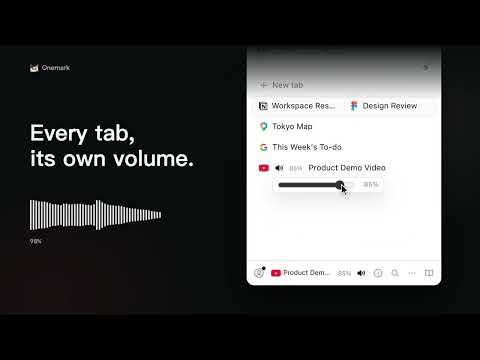
Onemark puts your Chrome bookmarks and tabs in one Arc-style sidebar, and saves the Facebook, Instagram or Threads video you are watching with a right-click. Dozens of tabs, titles squeezed to nothing. Bookmarks live in the bookmarks bar, tabs live up top, downloads live on another page, so finding one page means checking three places. Onemark keeps them in one sidebar: what is open, what you saved and what you downloaded, all found from here. ✨ What Onemark does 📌 Bookmarks are tabs: pinned sites on top, your bookmark tree in the middle, and below it only the tabs you have not saved yet. A bookmark that is already open is marked as open; click it and Onemark switches to that tab instead of opening a second copy. Drag a bookmark or tab to the top to pin it. 🎬 Save this video: when a video on Facebook, Instagram or Threads is worth keeping, right-click its tab in the sidebar and choose Save this video. Picture and sound land in one MP4, named after the post title. A notice appears when it is saved; click Open downloads to find it, or filter the manager's downloads by Media later. 🔍 Find it from one box: press Cmd+Shift+K (Ctrl+Shift+K on Windows) to open the sidebar with search ready. It looks through open tabs, bookmarks and history together and lists each kind in its own group. 🧹 Put research away in one click: Sweep into Archive saves unsaved tabs into a dated Archive folder, then closes them; tabs that are already bookmarks just close. Turn on auto-archive to tidy up after 12 hours idle (or 24 hours, 7 days, 30 days). Pinned, active and audible tabs are left alone. 🔊 Volume, tab by tab: Facebook videos too loud on autoplay? Hover the tab's speaker and set that tab from 0 to 100%. Onemark remembers the level per site and other tabs on that site follow it. Tabs playing sound show up in the now-playing bar, where you can jump to one or mute them all. ➕ Also included • Chrome tab groups drawn the way Chrome draws them, with drag in and out, rename and recolor. Right-click two tabs and choose Split tabs for Chrome's split view (Chrome 155 or later), shown as one group. • Undo a closed, moved or deleted tab: Cmd/Ctrl+Z in the sidebar, Alt+Shift+Z on any page. • A new tab page with shortcuts, frequently visited sites, recent pages and the bookmarks bar, no feed and no ads, and a small cat whose eyes follow your cursor. • A manager page to work through folders, or switch among All bookmarks, Recently added, Unfiled, Downloads, History and Archive, with a Cmd/Ctrl+K command palette. 🔒 Privacy and sync • Saved videos download straight from the original site to your computer, never through Onemark's servers. Onemark reads that page only when you choose Save this video, and what it reads is neither kept nor sent. • Volume control works only on sites you allow, one site at a time, and never reads page content. Remembered levels stay on this computer. • Optional bookmark sync across Chrome profiles with a Jetto account: 2 profiles free, unlimited with Onemark Pro (US$1.99/month or US$12/year). Bookmarks are encrypted in transit over HTTPS and encrypted at rest by Cloudflare. The sync service can read them, so the developer technically could; we do not look at, analyze or sell them. Your tabs, downloads and history never leave your device, and you can delete synced data any time in settings. • Error reports are off by default; when on, errors go to the developer through Sentry with URLs masked. About once a day Onemark sends an anonymous usage ping (a random install ID and the version) to count installs; it is on by default and can be turned off in settings. Light, dark or system theme. Available in English, Japanese and Traditional Chinese.
5 out of 51 rating
Details
- Version0.2.23
- UpdatedNovember 8, 2026
- Offered byJetto AI
- Size428KiB
- Languages3 languages
- Developer
Email
hello@jetto.ai - Non-traderThis developer has not identified itself as a trader. For consumers in the European Union, please note that consumer rights do not apply to contracts between you and this developer.
Privacy

Onemark – Bookmark & Tab Manager Sidebar has disclosed the following information regarding the collection and usage of your data. More detailed information can be found in the developer's privacy policy.
Onemark – Bookmark & Tab Manager Sidebar handles the following:
This developer declares that your data is
- Not being sold to third parties, outside of the approved use cases
- Not being used or transferred for purposes that are unrelated to the item's core functionality
- Not being used or transferred to determine creditworthiness or for lending purposes