


Overview
Draw and annotate YouTube videos instantly — no account needed. Also works on Vimeo and Wistia-hosted pages.
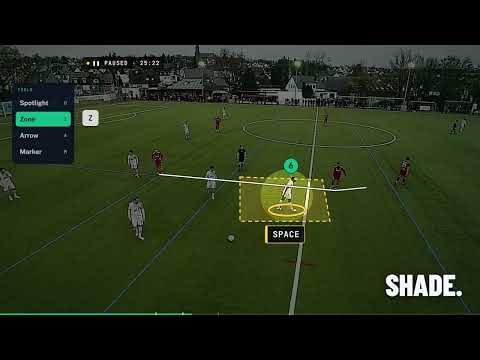
Pause the match, draw the coaching point, send it to your players. My Annotator turns any YouTube, Vimeo or Wistia video into a telestrator. One click opens the clip in the My Annotator workspace at my-annotator.com, where you can freeze the moment and draw straight over the frame: the run, the gap, the player who should have moved. No account needed to start. Nothing to install beyond this extension. WHAT THE EXTENSION DOES • Adds an "Annotate" button on YouTube, Vimeo and Wistia video pages • Opens the current video in the annotation workspace in one click • Lets you paste any video link from the popup IN THE WORKSPACE • Arrows, lines, circles, rectangles, highlights and freehand • Colours and line thickness for each mark • Eraser, undo and redo • Notes pinned to the exact second of the video • Free work is saved in your own browser, no account required WITH A PAID PLAN (my-annotator.com/pricing) • Cloud sync and a saved video library • Upload your own match footage • Shareable replay links for players and staff • Team plan: invite your coaching staff, exports and a presentation board HOW IT WORKS 1. Open a match video on YouTube, Vimeo or Wistia 2. Click "Annotate" on the page, or open the extension popup 3. Pause on the moment and draw the coaching point 4. Save it, or share a replay link PRIVACY AND PERMISSIONS • storage: remembers your preferences in Chrome. • activeTab: reads the address of the current tab, only when you click the extension, so it can open that video in the workspace. • The extension adds its launch button on youtube.com, vimeo.com and wistia.com pages. It doesn't read your browsing history, and it doesn't collect or sell personal data. Website: https://my-annotator.com Support: support@my-annotator.com
5 out of 51 rating
Details
- Version2.3.0
- UpdatedSeptember 24, 2026
- Size48.0KiB
- LanguagesEnglish
- DeveloperWebsite
Email
teambbocho@gmail.com - Non-traderThis developer has not identified itself as a trader. For consumers in the European Union, please note that consumer rights do not apply to contracts between you and this developer.
Privacy

This developer declares that your data is
- Not being sold to third parties, outside of the approved use cases
- Not being used or transferred for purposes that are unrelated to the item's core functionality
- Not being used or transferred to determine creditworthiness or for lending purposes