

Trimosa|Shorter links. Easier sharing.

Overview
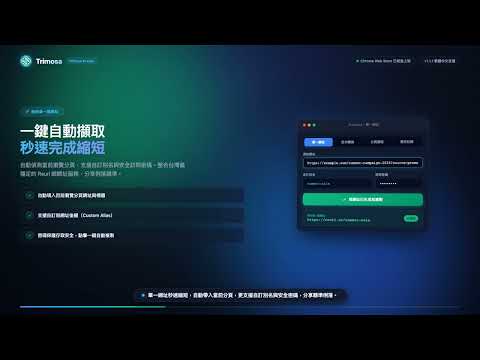
Trimosa: Shorter links. Easier sharing. Supports 7 languages. 來自台灣的高效縮網址與分頁擷取工具,支援批次轉換、QR Code 與多格式匯出。
Trimosa 是一款專注於網址處理與資訊分享的 Chrome 瀏覽器擴充套件。 秉持「Shorter links. Easier sharing.」的核心理念,整合台灣在地穩定的 Reurl 縮網址服務,提供單一與批次縮網址、全能分頁擷取、UTM 行銷標籤追蹤與向量風格 QR Code 產出,讓連結整理與分享流程更為俐落順暢。 無廣告干擾、個人 API Key 隔離儲存於本機端,提供流暢且注重隱私的使用體驗。 【主要核心功能】 一、單一縮網址與 QR Code ・一鍵填入:自動讀取目前瀏覽分頁的網址與標題,快速產出短網址。 ・UTM 追蹤產生器:內建 UTM 參數設定(Source、Medium、Campaign、Term、Content),協助標記行銷追蹤資訊。 ・自訂別名與密碼:支援自訂短網址後綴與設定訪問保護密碼。 ・高解析 QR Code:自動生成清晰向量風格 QR Code,支援一鍵下載 PNG 圖檔。 ・自動複製:產出短網址後自動複製至剪貼簿。 二、高效批次縮網址 ・多筆轉換:支援一次貼上多行網址連續縮短。 ・即時進度反饋:提供清晰的處理進度條與狀態指示。 ・資料一鍵匯出:支援將轉換成果匯出為標準 CSV 試算表。 ・QR Code 批次打包:一鍵打包所有短網址的 QR Code 為 ZIP 壓縮檔下載。 三、全能分頁擷取(Tab Grabber) ・彈性擷取範圍:支援擷取當前分頁、所在視窗的所有分頁,或跨視窗統整所有分頁。 ・預設格式與記憶:預設採用「Title & URL」格式,並自動記憶您偏好的匯出格式與範圍設定。 ・多格式便利匯出:可將分頁資訊轉換為標題與網址、Markdown 格式、試算表格式或結構化純文字清單。 ・傳送至批次縮短:支援一鍵將擷取到的分頁清單傳送至批次縮網址流程。 四、歷史紀錄管理 ・完整歷程保存:自動記錄每一次縮短的短網址、原始連結與建立時間。 ・關鍵字即時搜尋:輸入關鍵字即可快速篩選歷史紀錄。 ・快捷操作:隨時再次複製短網址、重新下載專屬 QR Code 或個別刪除紀錄。 五、安全防護與多國語系 ・隱私優先:使用者填寫的 Reurl API Key 僅儲存於瀏覽器本機端(chrome.storage.local),不傳送至任何第三方伺服器。 ・7 國語言支援:完整支援繁體中文、英文、日文、韓文、西班牙文、法文、德文,切換語言立即生效。 【30 秒免費取得專屬 API Key】 前往 Reurl 官方網站(https://reurl.cc)並登入帳號。 在首頁中段找到「開發者 API」專區,點擊「查看 API 文件」。 點擊「取得 API Key」,於確認後重新整理網頁,即會顯示您的 API Key。 複製金鑰並貼入 Trimosa 設定中的 API Key 欄位點擊儲存,即可開始使用。 ----- Trimosa is a Chrome browser extension designed for efficient link management and sharing. Guided by the mission of "Shorter links. Easier sharing.", Trimosa integrates the reliable Reurl URL shortening service to provide single and batch link shortening, tab capturing, UTM campaign tracking, and instant QR code generation in a streamlined workflow. Enjoy an ad-free experience with isolated local storage for your personal API key, ensuring complete privacy and speed. [CORE FEATURES] 1. Single URL Shortener & QR Code - Auto-fill Current Tab: Automatically detects the active tab URL and title. - UTM Campaign Builder: Built-in fields for Source, Medium, Campaign, Term, and Content to track campaigns accurately. - Custom Slugs & Passwords: Supports custom short link aliases and password protection. - High-Resolution QR Code: Generates clean QR codes with one-click PNG download. - Instant Clipboard Copy: Automatically copies shortened links to your clipboard. 2. Batch URL Shortener & Export - Multi-line Batch Processing: Shorten multiple URLs simultaneously. - Real-time Progress: Visual progress indicators for processing status. - CSV Export: Export your shortened link list into standard CSV format. - Batch QR Code ZIP Download: Package and download all generated QR codes into a single ZIP archive. 3. Tab Grabber - Flexible Capture Scopes: Easily grab the active tab, all open tabs in your current window, or all tabs across every window. - Smart Defaults & Memory: Defaults to the popular "Title & URL" format and automatically remembers your preferred export format and scope. - Versatile Export Options: Export captured tabs as Title & URL, Markdown hyperlinks, spreadsheet tables, or clean text lists. - Hand-off to Batch: Transfer captured tabs directly into the batch shortening workflow with one click. 4. History Management - Comprehensive Logs: Automatically saves original URLs, shortened links, and timestamps. - Instant Search: Filter past links by keyword. - Quick Actions: Re-copy links, re-download QR codes, or delete records individually. 5. Security, Privacy & 7 Languages - Privacy First: Your Reurl API key is stored exclusively on your local machine using chrome.storage.local and is never sent to external servers. - Multilingual Interface: Fully localized in 7 languages: Traditional Chinese, English, Japanese, Korean, Spanish, French, and German. [HOW TO GET YOUR REURL API KEY IN 30 SECONDS] 1. Visit the Reurl official website (https://reurl.cc) and log in. 2. Navigate to the "Developer API" section on the homepage and click "View API Documentation". 3. Click "Get API Key", confirm, and refresh the page to view your API Key. 4. Copy the key, paste it into Trimosa's Settings, and save to start using the extension. — ad. TJ·TH —
0 out of 5No ratings
Details
- Version1.1.3
- UpdatedSeptember 21, 2026
- Offered byHuanHsu_TW
- Size109KiB
- Languages中文(台灣)
- Developer
Email
todashinchi@gmail.com - Non-traderThis developer has not identified itself as a trader. For consumers in the European Union, please note that consumer rights do not apply to contracts between you and this developer.
Privacy

This developer declares that your data is
- Not being sold to third parties, outside of the approved use cases
- Not being used or transferred for purposes that are unrelated to the item's core functionality
- Not being used or transferred to determine creditworthiness or for lending purposes