

DBuddy – Themes, Duel Tools & Foil Rarities for DuelingBook
3 ratings
)
Overview
83 animated themes with attack effects, duel hotkeys, a middle-click wheel, turn alerts, replays and foil rarities for DuelingBook.
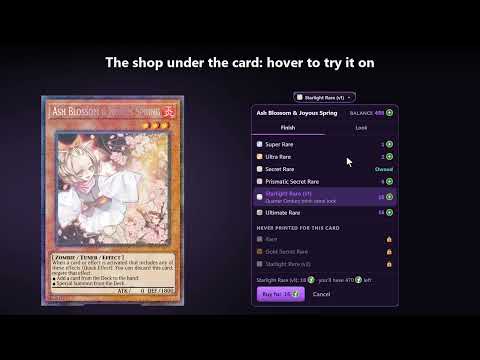
Make DuelingBook look and play the way you want. DBuddy restyles every screen of duelingbook.com, gives every theme its own attack effect, and adds duel hotkeys, a middle-click wheel, turn alerts, replay, deck and chat tools, and optional foil finishes for your cards. It never changes game rules. Free, no ads, no account needed. NEW IN 2.1.1 • Smoother on every PC: no more hover lag from moving theme backgrounds, also in the Deck Constructor, and busy duels lag less • Auto-lower graphics notices a slow PC and turns Motion off first; without a graphics card, moving effects turn off by themselves • New Home tab: what you turned on, what's new, and in a duel the settings players change mid-duel • Quick setups (Recommended, Competitive, Pretty) list every change before you apply them, and Undo puts them back • A gear on each DBuddy window (Card tracker, Notes, FPS box) opens the panel right at its setting • Clearer names everywhere, and search still finds every setting by its old name • 83 themes that restyle every DuelingBook screen, from the main menu to duels and the Deck Constructor • New in 2.1.1: an archetype theme where three ancient beasts rise in a column of light from a summoning seal • Each theme has its own animated scene, menus, buttons, pop-ups, duel field and attack effect • Life points your way: the theme's own counter or one of eight styles, with damage, heal and low-life effects • Pick every colour, corner roundness, background art and lettering; keep DuelingBook's own look in any area • Share your theme as a code, or add your own CSS • Colour-coded card text, and 2010 card text in Edison duels DUEL • Turn and duel-found alerts: a chime, a flashing tab and an optional desktop notification • Duel hotkeys for draw, mill, shuffle, phases and five custom chat messages; card hotkeys for a hovered card's menu • Middle-click wheel (off until you turn it on): hold the middle mouse button and pick a pile to view • Card tracker of what your opponent added, set or revealed, a floating notepad, and faster animations • Skip the intro, and reconnect by itself when DuelingBook drops the connection REPLAYS, DECKS AND CHAT • Replays: step back one play, jump to any turn, bookmarks, arrow keys, download the replay • Decks: test hands going first or second, opening odds, version history and deleted-deck recovery • Chat: mute players, get alerted on your name, /calc and your own /shortcuts CARD RARITIES (optional) • 11 foil finishes for your cards: Rare is free, the shinier ones cost DBling coins • Try a finish on your card before you buy it, in the shop under the big card preview • EU or US print, the old card frame, or a new look for a whole deck in one click, price shown first • Connect Discord for free DBling coins every month; opponents who use DBuddy see your finishes HOW TO USE Open duelingbook.com. Click the round button in the bottom-right corner, the toolbar icon, or press Alt+Shift+D. (2/5) Switch on what you like, or pick a quick setup on the Home tab. Most things start switched off, and every change can be undone. PRIVACY Your settings stay in your browser. Once a day DBuddy sends only the name of the theme you have on, with no id, so we know which themes people use; switch off "Share anonymous theme counts" in Settings › Privacy to stop it. Only if you press Connect Discord does our server keep your DBling coins, the finishes you bought, your Discord user id and a hash of your email. Delete account in Settings › Account removes it. Nothing is sold. Made by a DuelingBook player. Join our Discord to request themes, report bugs and get help: https://discord.gg/XtP5Vj4q3C If DBuddy makes your duels nicer, you can buy me a coffee from Settings › Support DBuddy. It's optional, and everything stays free.
5 out of 53 ratings
Details
- Version2.1.1
- UpdatedOctober 27, 2026
- Offered byPaul Lukic
- Size1.93MiB
- LanguagesEnglish
- Developer
Email
paul.lukic94@gmail.com - Non-traderThis developer has not identified itself as a trader. For consumers in the European Union, please note that consumer rights do not apply to contracts between you and this developer.
Privacy

This developer declares that your data is
- Not being sold to third parties, outside of the approved use cases
- Not being used or transferred for purposes that are unrelated to the item's core functionality
- Not being used or transferred to determine creditworthiness or for lending purposes
Support
For help with questions, suggestions, or problems, please open this page on your desktop browser