

Freedium - Read Medium Articles Free
16 ratings
)
Overview
Read any Medium article on Freedium in one click, and get quick AI summaries using your own API key.
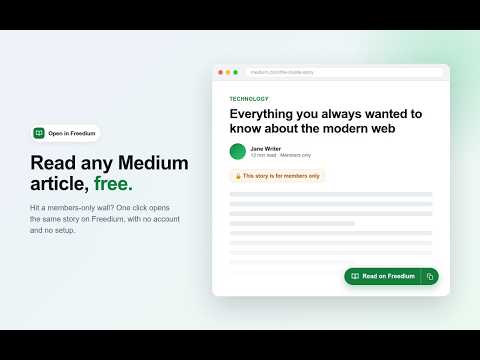
Read on Freedium, with one click. Open in Freedium adds a small green "Read on Freedium" button to Medium article pages and a compact button group to every story card in your feed. Click it and the same story opens on Freedium (freedium-mirror.cfd) in a new tab. No account and no setup needed. NEW IN 3.0: AI SUMMARIES WITH YOUR OWN KEY Want the gist before you read? Click the sparkle button on any Medium article, feed card, or Freedium page to get a summary of the full story. - Bring your own API key: OpenAI, Claude, Gemini, Mistral, or OpenRouter. - The summary streams into the browser's side panel as it is written. - Written in your browser's language. - Pick a style: overview and key points, overview only, or key points only. - Pick a length: short, medium, or long. - Optionally pick a model from your provider's list. SUMMARY HISTORY Every summary is saved on your device with the article link (up to the 500 most recent). Open the History tab in the side panel to search, reopen, or delete past summaries, or clear them all. Reopening a saved summary is instant and makes no new API call. Open the side panel any time from the toolbar popup with "Open sidebar". YOUR BUTTONS, YOUR CHOICE The new Settings page lets you turn each button (Read on Freedium, Copy Freedium link, Summarize) on or off separately for article pages, feed cards, and Freedium pages. Changes apply instantly to open tabs. ALSO INCLUDED - Copy a story's Freedium link in one click, from the article or any feed card. - Works with Medium's in-page navigation: the article button appears only on stories. - Quietly retries when Freedium returns a temporary server error. - 75 interface languages, following your browser's language. - Dark mode that follows your browser theme. - Keyboard friendly, with clear focus styles and screen-reader labels. - No external libraries and no remote code. PRIVACY The developer collects nothing: no analytics, no tracking, no accounts. AI summaries are optional and off until you add a key. Your API key is encrypted (AES-GCM, with a non-extractable key) and stored only on this device. It is never synced. Article text is sent only to the provider you chose, and only when you click Summarize. COSTS Reading on Freedium needs no setup. Summaries are billed by your AI provider at their normal rates; some providers offer free tiers. The extension adds no fees. OPEN SOURCE MIT licensed: https://github.com/therohanparmar/medium-to-freedium Privacy policy: https://github.com/therohanparmar/medium-to-freedium/blob/main/PRIVACY.md DISCLAIMER This is an independent project. It is not affiliated with, endorsed by, or sponsored by Medium, Freedium, or any AI provider. Please respect writers and support the ones you value.
4.8 out of 516 ratings
Details
- Version3.0.0
- UpdatedOctober 18, 2026
- Offered byRohan Parmar
- Size447KiB
- Languages64 languages
- Developer
Email
rohanrparmar987@gmail.com - Non-traderThis developer has not identified itself as a trader. For consumers in the European Union, please note that consumer rights do not apply to contracts between you and this developer.
Privacy

This developer declares that your data is
- Not being sold to third parties, outside of the approved use cases
- Not being used or transferred for purposes that are unrelated to the item's core functionality
- Not being used or transferred to determine creditworthiness or for lending purposes
Support
For help with questions, suggestions, or problems, visit the developer's support site