

ChatExport AI - Export Gemini, Claude & ChatGPT to PDF & More

Overview
Export AI chats from ChatGPT, Claude, Gemini, DeepSeek and 45+ more platforms to PDF, Word and 11 other formats.
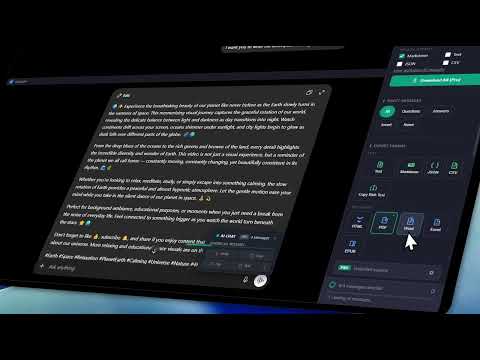
ChatExport AI: Export Gemini, Claude & ChatGPT to PDF & More Your best AI conversations deserve to outlive the tab they're in. ChatExport AI is a browser extension that saves any AI chat as a portable, well-structured file you actually own — generated entirely on your device, with no account and no uploads. 🌐 One exporter for all your AI chats Instead of juggling a separate tool for every chatbot, ChatExport AI runs directly inside the page on ChatGPT, Claude, Gemini and 45+ more AI platforms, automatically detecting which one you're on. Code blocks, LaTeX math, tables, images, and formatting survive the export on every platform. Wherever your work lives — covered. 🧠 Export smart, not everything Most chats have filler. Keep what matters. • Per-message buttons copy or save any single answer instantly — no sidebar needed • Checkbox selection with shift-click ranges for long threads • Your selection survives page updates while the AI is still typing • One-click filters: all, questions only, answers only, invert • Export full threads or cherry-picked insights Turn messy chats into clean, reusable knowledge. 📄 The right output for every workflow Save a conversation as a polished PDF for a report, a Word document for editing or sharing, Markdown for your notes and wiki, HTML for a readable standalone archive, or JSON for automation and pipelines — plus further formats covering spreadsheets, e-readers, image captures, shareable cards and complete archives with every attachment included. The full, current format catalog lives on the website: https://chatexportai.com From quick saves to full pipelines — all covered. 🚀 Project & batch export (Pro) Serious work lives in projects. • Export entire ChatGPT and Claude projects in one go — every conversation, attachment, and generated artifact in one organized archive • Batch export all conversations from your account • Cancel anytime and keep what's already packaged Everything. In one place. Ready to use. 🗂️ Local auto-save archive Flip one switch and you get an automatic local backup of every conversation you export. Pick a retention period (7, 30, 90 days — or keep forever) and revisit past exports from the history panel. 🤖 Model detection Exports automatically record which AI model wrote each response, so you always know which model produced what. 🔒 Privacy you don't have to take on faith Your conversations never leave your browser. • Exports are generated 100% locally on your device — no uploads, no developer cloud storage • No AI conversation content is ever transmitted to any server we control, period • The only request to a server we control is optional Pro license validation, which sends a license key and a hashed pseudonymous device identifier, never chat content • Optional settings and auto-save archive metadata can sync through your browser's own sync service, operated by your browser vendor and never by us — disable it any time in your browser's sync settings • No analytics, no telemetry, no tracking, no account What happens in your browser stays in your browser. 🌍 Speaks your language The interface ships in 36 languages (English plus 35 full translations) — the sidebar, the settings, the export progress, all of it. ⚙️ Up and running in 30 seconds 1. Install the extension 2. Open any supported AI chat 3. Click the ChatExport AI icon — or press Ctrl+Shift+Y 4. Select what you want 5. Export instantly No accounts. No setup. No friction. Keyboard shortcuts included: copy as Markdown (Ctrl+Shift+M), copy as text (Ctrl+Shift+X), quick export (Ctrl+Shift+E). 💎 Free vs Pro Free — 5 exports per day, all platforms, all formats. No account required. Pro — unlimited exports, project export, batch export, priority support. Full feature list and format catalog: https://chatexportai.com
3.7 out of 515 ratings
Details
- Version2.9.4
- UpdatedSeptember 25, 2026
- FeaturesOffers in-app purchases
- Size1.27MiB
- Languages36 languages
- DeveloperWebsite
Email
support@umbrabits.com - Non-traderThis developer has not identified itself as a trader. For consumers in the European Union, please note that consumer rights do not apply to contracts between you and this developer.
Privacy

This developer declares that your data is
- Not being sold to third parties, outside of the approved use cases
- Not being used or transferred for purposes that are unrelated to the item's core functionality
- Not being used or transferred to determine creditworthiness or for lending purposes
Support
For help with questions, suggestions, or problems, visit the developer's support site