

RefineIQ: Sound Human, Not Like AI

Overview
Turn robotic, AI-sounding text into natural, human-sounding writing. Refine emails, messages, and everyday communication.
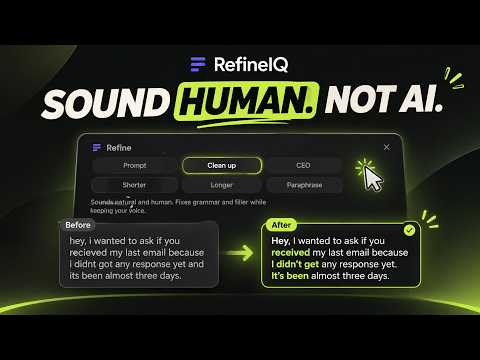
Sound human, not like AI. RefineIQ transforms robotic, AI-sounding text into natural, human-sounding writing. Perfect for cold emails, professional messages, and everyday communication where you want to sound like yourself, not a chatbot. Select text in any field and click Refine, press Alt+Shift+R, or use the built-in scratchpad in the toolbar popup. REFINE MODES Pick how RefineIQ reshapes your text: • Clean up — sounds natural and human. Fixes grammar and filler while keeping your voice • CEO — confident, direct, concise. Perfect for cold emails and key messages • Prompt — for AI prompts. Makes your request clear and specific BEFORE & AFTER Before: "I wanted to reach out regarding the potential opportunity to collaborate on this initiative moving forward and would appreciate the chance to discuss this at your earliest convenience." After (CEO Mode): "I'd like to discuss collaborating on this initiative. When works for a quick call?" HOW IT WORKS Sign in once with your RefineIQ account, then refine from any page. Your text is sent securely to the RefineIQ backend, refined, and returned — never stored, never logged, never used for training. WHAT YOU GET • One-click refine on any text field • Three refine modes — Clean up, CEO, Prompt • Keyboard shortcut (Alt+Shift+R) • A reliable scratchpad in the popup — refine and copy, no site quirks • Light/dark themes, full keyboard and screen-reader support WHAT IT IS NOT • Not a chatbot — it refines your writing, it doesn't write for you • Not a data collector — no analytics, no telemetry
5 out of 52 ratings
Details
- Version3.0.7
- UpdatedNovember 4, 2026
- Size129KiB
- LanguagesEnglish
- DeveloperWebsite
Email
obliviox@zohomail.in - Non-traderThis developer has not identified itself as a trader. For consumers in the European Union, please note that consumer rights do not apply to contracts between you and this developer.
Privacy

RefineIQ: Sound Human, Not Like AI has disclosed the following information regarding the collection and usage of your data. More detailed information can be found in the developer's privacy policy.
RefineIQ: Sound Human, Not Like AI handles the following:
This developer declares that your data is
- Not being sold to third parties, outside of the approved use cases
- Not being used or transferred for purposes that are unrelated to the item's core functionality
- Not being used or transferred to determine creditworthiness or for lending purposes
Support
For help with questions, suggestions, or problems, visit the developer's support site