


Overview
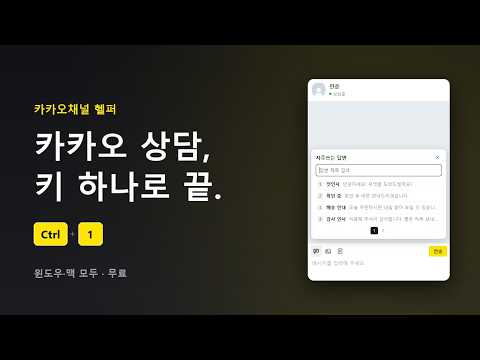
카카오채널 상담을 키 하나로. 지난 대화 내용 검색, 자주쓰는 답변·사진·메모·상담 완료 단축키, 다른 채널 새 메시지 알림. 윈도우·맥 지원.
카카오채널 상담을 키 하나로. ■ 새로 생겼습니다 — 지난 대화 검색 상담 방에서 Ctrl + F (맥은 ⌘ + F) 카카오톡처럼 대화 내용을 찾습니다. 채팅 목록 검색칸에 낱말을 넣으면 그 말이 나온 방이 바로 보입니다. 열어 보신 방, 위로 올려 보신 대화가 저절로 모입니다. 모은 대화는 이 PC 크롬 안에만 저장됩니다. 파일로 내보내 다른 PC 로 옮길 수 있습니다. ■ 단축키 (윈도우) Ctrl + 1~9 : 자주쓰는 답변 보내기 Ctrl + / : 자주쓰는 답변 열기 Ctrl + Shift + V : 사진 바로 붙여넣기 Ctrl + Enter : 메모 열기·닫기 Ctrl + Shift + Enter : 상담 완료 Ctrl + F : 대화 내용 검색 Alt + 방향키 : 창 크기 Alt + Shift + 방향키 : 창 옮기기 말풍선 두 번 누르기 : 글 복사 맥 키는 사용법에 있습니다. ■ 다른 채널 새 메시지 알림 채널이 여러 개라면 안 읽은 수를 한눈에 봅니다. 무료 · 윈도우·맥 사용법: https://mgunexcel.gitbook.io/doc/self/advanced/programs/kakao-helper
5 out of 56 ratings
Details
- Version1.0.10
- UpdatedOctober 24, 2026
- Size48.24KiB
- Languages한국어
- DeveloperWebsite
Email
support@mgunexcel.com - Non-traderThis developer has not identified itself as a trader. For consumers in the European Union, please note that consumer rights do not apply to contracts between you and this developer.
Privacy

This developer declares that your data is
- Not being sold to third parties, outside of the approved use cases
- Not being used or transferred for purposes that are unrelated to the item's core functionality
- Not being used or transferred to determine creditworthiness or for lending purposes
Support
For help with questions, suggestions, or problems, please open this page on your desktop browser