

Just-One-Page-PDF: An awesome web page to PDF tool

Overview
Use Just-One-Page-PDF in just a few clicks. Easily capture entire webpage or selection area as high-quality PDF.
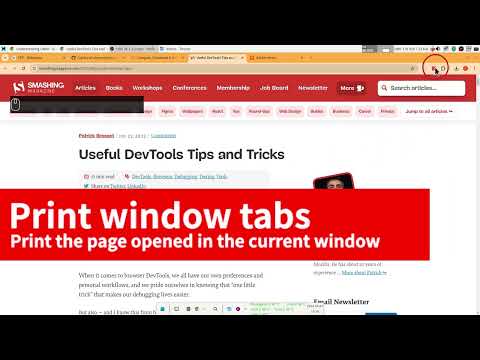
**Save any webpage, selected area, or local HTML file as a high-quality PDF instantly. Just-One-Page-PDF (JOPP) is an awesome web to PDF tool that works like a screenshot clipper but outputs pixel-perfect, searchable PDF formats locally. Whether you need to convert HTML to PDF, archive a full webpage to PDF, or turn a local HTML file into a polished document, JOPP handles it all. No cloud uploads, 100% privacy secured.** Why settle for standard browser printing or blurry image-to-PDF tools? Just-One-Page-PDF serves as your ultimate, lightweight local **HTML to PDF** and **web to PDF** conversion workstation—purpose-built for developers, researchers, students, and professionals who handle high-frequency knowledge management, legal archiving, and operational auditing. 🌟 WHY CHOOSE JUST-ONE-PAGE-PDF OVER OTHERS? 1. **100% High-Fidelity Vector Rendering (Searchable & Selectable)** Utilizes native vector rendering instead of long screenshots, ensuring text remains fully selectable, copyable, and searchable via `Ctrl+F` with crystal-clear quality—the gold standard for any serious **HTML to PDF** converter. 2. **Intuitive "Area Selection" & Ad Slicing** Crop specific sections like a screenshot and use "Clean Mode" to remove annoying floating ads, sidebars, and cookie banners before printing—perfect when you only need part of a webpage converted to PDF. 3. **Power-User Batch Export & PDF Merging** Convert dozens of open browser tabs simultaneously and seamlessly merge multiple independent PDF files directly inside the extension interface—ideal for bulk **web to PDF** workflows. 4. **Automated Document Navigation Outline** Intelligently detects heading structures (`H1`, `H2`, `H3`) to automatically generate interactive bookmarks within your PDF for easy browsing. 5. **Professional Layout & Style Customization** Take control with customizable headers/footers, confidential watermarks, custom covers, and pixel-perfect CSS injection for developers who want full command over every **webpage to PDF** export. 6. **100% Local Execution (Zero Privacy Risk)** All parsing, slicing, and merging processes occur entirely within your local browser with zero external cloud uploads—your **HTML to PDF** conversions never leave your machine. 7. **One-Click Cloud Synchronization** Sync local PDFs directly to Google Drive, OneDrive, or Dropbox to keep your knowledge organized across all devices. 🚀 COMPARED TO BROWSER BUILT-IN PRINTING: - 🔹 Direct fast download without lagging print preview dialogs. - 🔹 Customize canvas and page sizes exactly as needed. - 🔹 Export multiple browser tabs at once. - 🔹 Flexible custom styles and headers/footers injection. - 🔹 A true **web to PDF** experience—no print dialog, no pagination guesswork. 🎯 Use Cases - ➤ **Branded invoices & receipts** — Turn HTML bills into archival-ready PDFs, with headers, footers, and watermarks kept intact - ➤ **E-commerce product catalogs** — Batch-save listing pages into searchable product catalogs for client sharing or offline reference - ➤ **Internal reports from BI tools** — Capture dashboards and data reports as vector PDFs with crisp, selectable charts and text for audit archiving - ➤ **Website documentation pages** — Save API docs and knowledge bases as bookmarked offline PDFs for on-demand reading - ➤ **HTML email templates** — Convert local email templates into PDF proofs for design review and client sign-off - ➤ **Landing pages & marketing assets** — Strip ads and pop-ups with Clean Mode first, then save as high-quality PDFs for competitor analysis or brand archiving 📑 PRO TIP FOR KNOWLEDGE MANAGEMENT: Install **Just-One-Page-PDF** today to archive online articles and build your local document database effortlessly. Stop searching for a reliable **HTML to PDF** or **web to PDF** converter—this extension turns any webpage, selected area, or local HTML file into a searchable, high-fidelity PDF in seconds.
4.4 out of 5284 ratings
Details
- Version2.0.4
- UpdatedOctober 26, 2026
- Size8.07MiB
- Languages52 languages
- DeveloperWebsite
Email
suziwen1@gmail.com - Non-traderThis developer has not identified itself as a trader. For consumers in the European Union, please note that consumer rights do not apply to contracts between you and this developer.
Privacy

This developer declares that your data is
- Not being sold to third parties, outside of the approved use cases
- Not being used or transferred for purposes that are unrelated to the item's core functionality
- Not being used or transferred to determine creditworthiness or for lending purposes
Support
For help with questions, suggestions, or problems, visit the developer's support site