


Overview
TradingView Parameter Optimizer as an extension
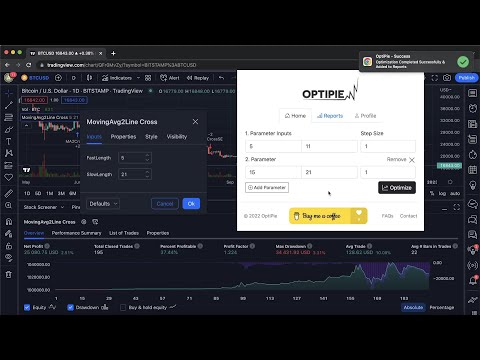
OptiPie is an open source strategy optimizer automation tool for TradingView. Easily optimize strategies, store optimization reports and make analysis via simple UI. Download as Chrome Extension Now! Quick Start: 1. Open TradingView and load a chart with a strategy applied. 2. Open the strategy's Settings window (click the gear icon on the strategy) 3. Click the OptiPie extension icon to open the popup 4. Configure your parameter ranges and click Optimize Features Optimize Strategies Up to 5 Parameters Optimize any TradingView Strategy you want up to 5 Parameters. Limitless Parameter Input Range Unless your Internet or TradingView is broken, you can optimize with any input range you want. Find, Sort, View & Analyze Reports Easily find your report in Reports tab with table search and sorts. Open report detail view to make a deep analysis. Copy & Apply Best Parameters Copy any result from your report and apply it to your strategy settings in one click. No more typing inputs by hand. Reports Stored ⚙️ All optimization reports are saved locally thus can be viewed or deleted any time within 'Reports' tab. Last Entered Parameter Inputs Stored In State During your Chrome Session, last entered parameter inputs are per unique strategy - switch strategies freely. OptiPie Plus, The Ultimate Input Optimizer 📢 Join the OptiPie Plus Membership, discover amazing features, go beyond the limits! - Walk-Forward Analysis - Multi-Timeframe Optimization - Selectable Parameters - Stoppable Optimization with Partial Report - Extended Report Data - Optimize Strategies Up to 20 Parameters Walk-Forward Analysis takes optimization one step further: strengthen your backtests on data they've never seen. Try now! https://buymeacoffee.com/optipieapp/membership Latest Updates 📢 (v2.2.1) - Found a winner? Apply it in one click. • Copy Parameters on the report detail page. Select any row and copy its values: the optimized values only, or every strategy input as it was when the report ran. • Apply them from your strategy settings. The new Apply button fills in every input, you review and press Ok. Open OptiPie once on the chart tab to make it appear. • Strategy Inputs on the report detail page. See every input of the run, and click through rows to preview each result's values. • Available for everyone. No more typing inputs by hand. Previous Release 📢 (v2.1.0) - Open faster, decide better. • Three new metrics on the report detail page. RoMaD (net profit over maximum drawdown), Expectancy (average profit or loss per trade) and Payoff Ratio (average win against average loss). • Blazing fast Reports tab. No more waiting on the extension, reports open the moment you click, however many you have saved. • Reports using different number formats now work as expected, including sorting correctly on profit, drawdown and every other column. • Cleaner CSV export. Currency has its own column, parameter columns come first, and negative values use a plain minus sign. Checkout news for the latest updates here! optipie.app/news Visit optipie.app for more!
3.8 out of 544 ratings
Details
- Version2.2.1
- UpdatedOctober 21, 2026
- FeaturesOffers in-app purchases
- Size7.45MiB
- LanguagesEnglish (United States)
- DeveloperMuhammed Atakan PehlivanogluWebsite
CUMHURİYET MAH. DALGAKIRAN SK. Suleymanpasa, Tekirdağ 59000 TREmail
contact@optipie.appPhone
+90 541 587 03 99 - TraderThis developer has identified itself as a trader per the definition from the European Union and committed to only offer products or services that comply with EU laws.
Privacy

OptiPie TradingView Optimizer has disclosed the following information regarding the collection and usage of your data. More detailed information can be found in the developer's privacy policy.
OptiPie TradingView Optimizer handles the following:
This developer declares that your data is
- Not being sold to third parties, outside of the approved use cases
- Not being used or transferred for purposes that are unrelated to the item's core functionality
- Not being used or transferred to determine creditworthiness or for lending purposes
Support
For help with questions, suggestions, or problems, visit the developer's support site