

Product Exporter for Printify - Export Product Data
2 ratings
)
Overview
Export Printify products and variants to CSV or JSON. Download product mockup images individually or in bulk.
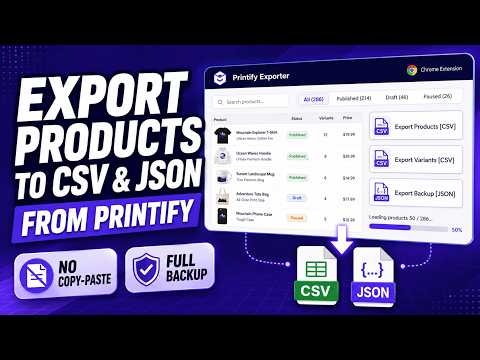
Product Exporter for Printify helps sellers export and back up product data from their Printify shops, including product catalogs, variants, JSON backups, and generated product mockup images—directly from Chrome. Connect your Printify API token, select a shop, and browse product status, variants, pricing, and mockups. Export Products CSV, Variants CSV, or a complete JSON backup. Save individual product mockup images or download multiple mockups in a product-organized ZIP—without copy-paste or manual page scraping. ## Who this product exporter helps * POD sellers who want a structured catalog export from their Printify shops * Store owners preparing product audits, inventory tracking, or migration plans * Designers and agencies managing multiple Printify shops who need CSV reports * Sellers who want to archive generated product mockup images alongside their catalog data * Anyone who wants a complete backup of their product data for reference ## Main features ✓ One-click data export — download Products CSV, Variants CSV, or a complete JSON backup from the Export Data menu ✓ Download Mockups — save existing product preview images individually or in bulk; the Images counter shows how many are in the current view ✓ Organized bulk mockup downloads — multiple images are packed in a ZIP with product folders and mockup-index.csv; failed-mockups.csv is included when applicable ✓ Browse your full product catalog with thumbnail previews, status badges, variant counts, and price ranges ✓ Search products by title or ID and filter by status (Published, Hidden, Draft) ✓ Pro advanced filters — find products with no enabled variants, prices below cost, or missing mockups ✓ Full JSON backup — retain products, variants, options, mockup URLs, and design-related data returned by Printify ✓ Secure storage of your Printify API token using Chrome sync storage ## How to use 1. Install the extension from the Chrome Web Store and open it from the toolbar. 2. In Printify, create an API token from your Printify account. 3. Paste your token into the "Printify API token" field in the extension and click Save. 4. Select a Printify shop from the dropdown — products load automatically. 5. Browse, search, or filter your catalog. Click Export Data to select Products CSV, Variants CSV, or Full JSON Backup. 6. Click Download Mockups to save product preview images. One image can save directly; multiple images are downloaded as a ZIP archive. ## Free vs Pro Free plan: * Browse and search all products in your shop * Filter products by status (Published, Hidden, Draft) * Export Products CSV and Variants CSV for your first 5 fixed products per shop * Export a complete JSON backup and download mockup images for those SAME 5 products * These 5 product IDs stay fixed when you search or sort and are not automatically replaced when a product is removed Pro plan: * Export full Products CSV — eligible products matching your current filters * Export full Variants CSV — all variants, including disabled variants, for eligible products * Export complete JSON Backup — products, variants, options, mockups, and design-related information * Download product mockup images across your selected catalog, individually or in bulk * Advanced issue filters (missing enabled variants, price below cost, missing mockups) * Priority support ## Why use a product exporter instead of manual export * Export structured CSV and JSON files instead of manually collecting product information * Review product catalogs, variants, and listing details in a faster Chrome workflow * Access variant-level fields such as SKU, cost, price, profit margin, grams, and availability where supplied by Printify * Create data backups with shop metadata, design URLs, and mockup image URLs * Save the actual generated product preview pictures, not just their URLs * Load large catalogs with concurrent data fetching, progress indicators, and retry handling ## Privacy and disclaimer Your Printify API token is stored using Chrome sync storage. Product data is fetched from Printify's API directly to your browser, and catalog export files and mockup image downloads are prepared there; this export feature does not proxy or store those files on our servers. Google sign-in, subscription checks, and billing services may communicate with Google or our service backend as needed. Mockup downloads contain existing rendered product preview images, not original or editable design files from the Printify Media Library. This extension does not create, restore, or publish products, upload artwork, or manage orders. Product Exporter for Printify is an independent third-party Chrome extension and is not affiliated with, endorsed by, or sponsored by Printify. Use this extension in accordance with Printify's Terms of Service and API policies.
5 out of 52 ratings
Details
- Version1.0.6
- UpdatedOctober 15, 2026
- FeaturesOffers in-app purchases
- Offered byExtSky
- Size626KiB
- LanguagesEnglish
- Developer
Email
support@extsky.com - Non-traderThis developer has not identified itself as a trader. For consumers in the European Union, please note that consumer rights do not apply to contracts between you and this developer.
Privacy

Product Exporter for Printify - Export Product Data has disclosed the following information regarding the collection and usage of your data. More detailed information can be found in the developer's privacy policy.
Product Exporter for Printify - Export Product Data handles the following:
This developer declares that your data is
- Not being sold to third parties, outside of the approved use cases
- Not being used or transferred for purposes that are unrelated to the item's core functionality
- Not being used or transferred to determine creditworthiness or for lending purposes
Support
For help with questions, suggestions, or problems, visit the developer's support site