

Autofill Forms — Save & Refill Any Field
2 ratings
)
Overview
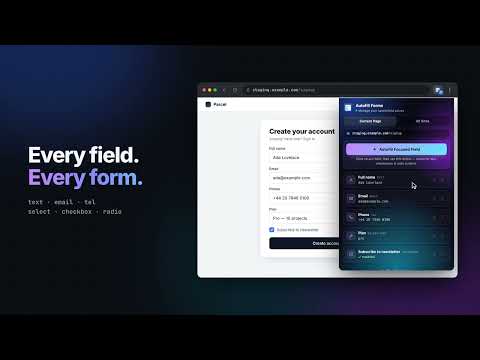
Autofill any form. Save a value into any field and it refills every time you return. No profile, no setup, no account needed.
Tired of re-typing the same things into the same fields? Autofill Forms remembers the values you type and puts them back the next time you open the page. Profile-based autofill only knows your name, email and address. This remembers whatever you actually entered, field by field, page by page — no profile to build, no setup. Right-click a field, choose "Autofill Forms", enter the value once, and it is already there on your next visit. What people use it for: 1 Search filters they always set the same way 2 A quantity, date or amount they keep re-typing 3 Dropdown and checkbox defaults that never stick on their own 4 Usernames and repeated fields on internal tools, dashboards and staging sites 5 Long boilerplate text pasted into the same form again and again It handles the ordinary parts of a form: the fields you type into, dropdowns, checkboxes and radio groups. It also copes with forms that build themselves as you go, where a field only appears once you have answered something else. A saved value belongs to the page it came from, so the same field on a different site stays separate. Everything is managed from the toolbar popup — see what is saved for the page you are on, change a value in place, or remove it. The icon shows how many fields were filled on the current page. Your data stays on your device. There is no account, no server, no analytics and no tracking: values live in Chrome's own extension storage and never leave the browser. That storage is not encrypted, so saving passwords, one-time codes and payment card details is switched off by default. You can turn it on in the popup if you want it, though for passwords Chrome's built-in password manager is the better tool.
5 out of 52 ratings
Details
- Version2.6.0
- UpdatedSeptember 29, 2026
- Offered bycodecube01
- Size58.99KiB
- LanguagesEnglish
- Developer
Email
thexmeister@gmail.com - Non-traderThis developer has not identified itself as a trader. For consumers in the European Union, please note that consumer rights do not apply to contracts between you and this developer.
Privacy

Autofill Forms — Save & Refill Any Field has disclosed the following information regarding the collection and usage of your data. More detailed information can be found in the developer's privacy policy.
Autofill Forms — Save & Refill Any Field handles the following:
This developer declares that your data is
- Not being sold to third parties, outside of the approved use cases
- Not being used or transferred for purposes that are unrelated to the item's core functionality
- Not being used or transferred to determine creditworthiness or for lending purposes
Support
For help with questions, suggestions, or problems, visit the developer's support site