

Bot Portal

Overview
Your bookmarks come back alive. One click sends any page to your AI agent. Works with Grok Bot and any agent that reads email.
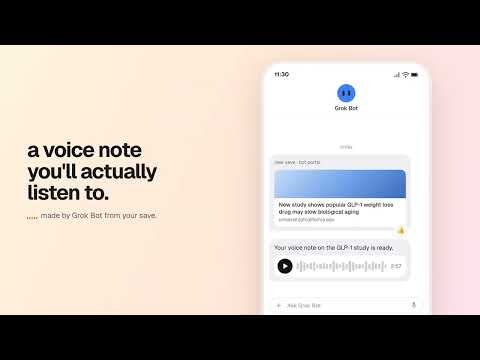
Turn your bookmarks into something you'll actually get value from. Save any page with one click, and your AI agent turns it into what fits your day: a voice note for your walk, a short summary, or an evening podcast that connects today's saves with ones from months ago. You need an AI agent with its own email address, such as Grok Bot, or any AI assistant that can read your email. Think of Bot Portal as a doorway; your agent does the work. YOU SET THE ROUTINE You decide what your agent makes from your saves, and when. Tell it once in plain words, and change it in chat any time. For example: 🎧 "A voice note for each save, for my walk to work." 📝 "Every Sunday, one summary of everything I saved this week." 🎙️ "At 8pm, a short podcast that ties today's saves to older ones." Nothing happens to your saves that you didn't ask for. HOW IT WORKS 1. Connect your agent: type the email address where your bookmarks should land, and confirm with a code. 2. Save any page: click the Bot Portal icon, or highlight some text first and then click it. Bot Portal sends the page (or the highlighted text) to the address from step 1. If you like, the small card that follows asks your agent for one more thing, such as a podcast. 3. Set up the routine in your agent. PRIVATE BY DESIGN 🔒 • Bot Portal reads a page only when you save or pick it, and sends it only to the inbox you verified. • It looks at your history only if you choose to pick from your week: once, on your computer, and Chrome takes the access back right after. • Every save is marked as information, not instructions, so your agent won't act on anything a page tells it to do. • No account, no analytics, no tracking. Bot Portal is free and independent, not affiliated with or endorsed by any AI company. Privacy policy: https://botportal.app/privacy Questions: hello@botportal.app
0 out of 5No ratings
Details
- Version0.9.0
- UpdatedNovember 2, 2026
- Offered bySaurabh Mehta
- Size248KiB
- LanguagesEnglish
- Developer
Email
hello@botportal.app - Non-traderThis developer has not identified itself as a trader. For consumers in the European Union, please note that consumer rights do not apply to contracts between you and this developer.
Privacy

Bot Portal has disclosed the following information regarding the collection and usage of your data. More detailed information can be found in the developer's privacy policy.
Bot Portal handles the following:
This developer declares that your data is
- Not being sold to third parties, outside of the approved use cases
- Not being used or transferred for purposes that are unrelated to the item's core functionality
- Not being used or transferred to determine creditworthiness or for lending purposes
Support
For help with questions, suggestions, or problems, visit the developer's support site