


Overview
Save and revisit important moments from your ChatGPT and Claude AI conversations.
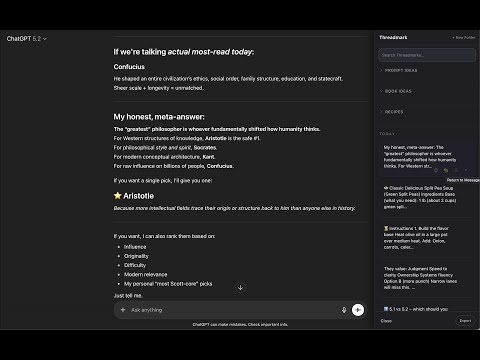
Threadmark saves your best ChatGPT and Claude responses so you can find them, organize them, improve them, and use them later. AI chats are great at creating ideas, but terrible at helping you keep track of the good ones. Threadmark adds a lightweight workspace layer on top of ChatGPT and Claude so your best outputs do not disappear inside endless conversations. Save the answer. Return to the exact moment. Improve it with Lenses. Export it when it is ready. --- 🚀 What’s New in 1.1.1 Simpler Founding Lifetime Upgrade Threadmark now has one simple optional upgrade: • Free: 5 saves + 3 Lens runs • Founding Lifetime: one payment unlocks everything Founding Lifetime includes unlimited Threadmarks, unlimited Lenses, folders, and clean PDF export. No subscription required. --- ✨ Improved ChatGPT Save Button ChatGPT recently added new selection controls. Threadmark’s + Save button has been repositioned so it stays attached to your selected passage without overlapping ChatGPT’s own toolbar. --- 🧠 Lenses for Better AI Outputs Turn any saved response into a stronger version: • Deep Dive — expand the idea with more depth and insight • Sharpen — make the response clearer, tighter, and more usable • Challenge — pressure-test assumptions and find weak spots • Package — turn rough output into polished, ready-to-send writing Lens results are saved as versions under the original Threadmark, so you can compare, refine, and keep building. --- 🔀 ChatGPT + Claude in One Workflow Threadmark works across both ChatGPT and Claude. You can: • Save a useful answer from ChatGPT • Refine it later in Claude • Deep Dive in one model and Package in another • Return to the exact original message whenever you need context Threadmark acts as the layer between AI tools, so your best ideas are not locked inside one chat. --- 💡 Why Use Threadmark? Without Threadmark: • “I know ChatGPT said something useful somewhere…” • Endless scrolling through long conversations • Copying good answers into separate notes apps • Losing momentum when ideas span multiple sessions • Re-asking the same question because the original answer is buried With Threadmark: • Highlight any useful passage and save it instantly • Bookmark full AI responses • Organize saves into folders • Add titles to make ideas easier to find • Jump back to the exact message later • Branch saved ideas into new chats • Improve outputs with Lenses • Export your best work into clean PDFs Threadmark turns AI conversations into a real working memory. --- 🔒 Privacy-First by Design Threadmark is local-first: • No Threadmark account required • No external Threadmark servers • No tracking or analytics • Your saved Threadmarks stay in your browser Privacy policy: https://www.gooduse.ai/privacy --- 💳 Free & Optional Upgrade Threadmark is free to start. Free includes: • 5 saved Threadmarks • 3 Lens runs The optional Founding Lifetime upgrade unlocks: • Unlimited Threadmarks • Unlimited Lenses • Folders • Clean PDF export • Lifetime access You always retain access to your saved data. --- 🌐 Supported Sites • ChatGPT at chatgpt.com • Claude at claude.ai --- 🔐 Permissions Explanation Storage: Used to save Threadmarks, highlights, titles, folders, and Lens versions locally in your browser. Site access: Required to add saving, organizing, Lens workflows, and jump-back functionality inside ChatGPT and Claude conversations.
4 out of 54 ratings
Details
- Version1.1.1
- UpdatedJuly 5, 2026
- FeaturesOffers in-app purchases
- Size96.18KiB
- LanguagesEnglish (United States)
- Developer
- Non-traderThis developer has not identified itself as a trader. For consumers in the European Union, please note that consumer rights do not apply to contracts between you and this developer.
Privacy

Threadmark has disclosed the following information regarding the collection and usage of your data. More detailed information can be found in the developer's privacy policy.
Threadmark handles the following:
This developer declares that your data is
- Not being sold to third parties, outside of the approved use cases
- Not being used or transferred for purposes that are unrelated to the item's core functionality
- Not being used or transferred to determine creditworthiness or for lending purposes