

YouTube Focus Mode
1 rating
)
Overview
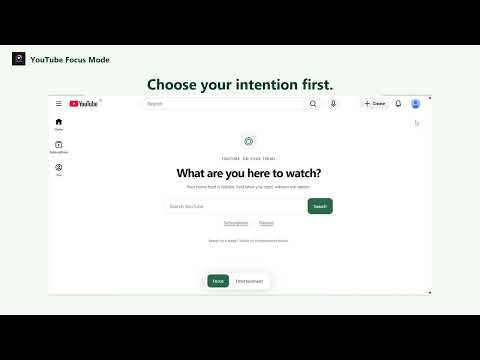
Open YouTube with intention. Focus without the feed, or take a timed entertainment break.
Use YouTube for what you came to watch. YouTube Focus Mode gives you two simple viewing modes: Focus (default) - Hide the home recommendation feed and watch-page related recommendations. - Hide Shorts cards, shelves, search filters and navigation on supported YouTube layouts. - Return direct Shorts URLs to Focus home. - Search for videos and access subscriptions and playlists. Entertainment - Restore normal YouTube browsing, including Shorts. - Choose a 5-, 15- or 30-minute break, set a custom timer from 1 to 240 minutes, or continue without a timer. - When the timer expires, Focus returns and video playback pauses. Browser sleep or background throttling can delay this until the tab resumes. A responsive Focus/Entertainment control bar stays separate from YouTube search and adapts to smaller windows. The Focus page follows YouTube's light or dark theme. Modes and timers apply to each tab. This extension does not block advertisements or sponsored product panels. It does not collect analytics or transmit viewing history. Mode and timer settings are stored locally for the tab session.
5 out of 51 rating
Details
- Version0.0.4
- UpdatedNovember 8, 2026
- Offered byYouTube Focus Mode
- Size11.24KiB
- LanguagesEnglish
- Developer
Email
yfocusmode@gmail.com - Non-traderThis developer has not identified itself as a trader. For consumers in the European Union, please note that consumer rights do not apply to contracts between you and this developer.
Privacy

This developer declares that your data is
- Not being sold to third parties, outside of the approved use cases
- Not being used or transferred for purposes that are unrelated to the item's core functionality
- Not being used or transferred to determine creditworthiness or for lending purposes