

Text Transformer
1 rating
)
Overview
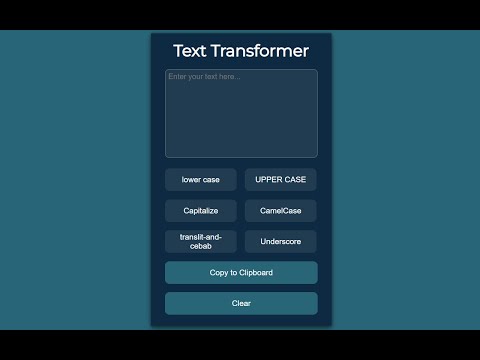
This extension changes the case of the text. Insert the text, click the desired case and copy it to the clipboard.
Text Transformer is a handy Chrome extension that quickly converts text case and performs transliteration. 🔹 Key Features: ✅ Change text case (uppercase, lowercase, title case) ✅ Transliterate text (convert Cyrillic to Latin) ✅ Quick copy to clipboard ✅ Minimalistic and user-friendly interface 🔹 Why Use Text Transformer? ✍ Speeds up text formatting 🚀 Simple to use – no unnecessary features 🔒 Does not require access to your data 🔹 How to Use? 1️⃣ Insert text into the input field 2️⃣ Choose the desired transformation 3️⃣ Click the button to copy the result 📌 Fully local – does not send data over the internet. Install Text Transformer and simplify your text editing today!
5 out of 51 rating
Details
- Version1.0
- UpdatedMarch 15, 2025
- Size13.63KiB
- LanguagesEnglish
- Developer
Email
sgt.suhoff@gmail.com - Non-traderThis developer has not identified itself as a trader. For consumers in the European Union, please note that consumer rights do not apply to contracts between you and this developer.
Privacy

This developer declares that your data is
- Not being sold to third parties, outside of the approved use cases
- Not being used or transferred for purposes that are unrelated to the item's core functionality
- Not being used or transferred to determine creditworthiness or for lending purposes