

Tabfinity - New Tab Workspace & Bookmark Manager

Overview
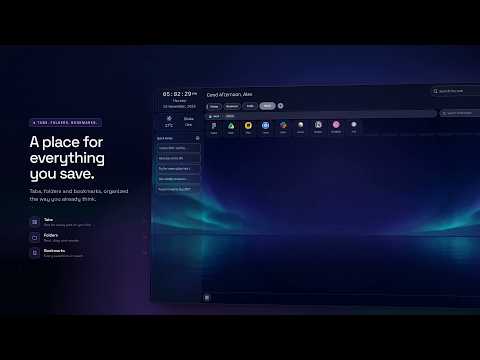
Turn every new tab into a workspace. Organize bookmarks into tabs and folders, and use handy tools and instant search.
Tabfinity turns every new tab in Chrome into a personal workspace and bookmark manager. Your tabs, folders, bookmarks, notes and small tools sit on one page, so the things you use every day are one click away. Everything you organize is saved in Chrome's own bookmarks, alongside the bookmarks you already have. TABS, FOLDERS AND BOOKMARKS Tabs are the top level of your workspace. Create a tab for each part of your life or work, such as Work, Study, Shopping or Reading, and switch between them from the tab strip at the top. Inside a tab, create folders and add bookmarks. A folder keeps related links together, for example "Design resources" or "Recipes". On the premium plan, folders can also hold other folders, so you can build a deeper structure. You can create, rename, move and delete tabs, folders and bookmarks at any time. Turn a tab into a folder, or a folder into a tab, when your structure changes. Every bookmark is a normal Chrome bookmark, so it appears in Chrome's Bookmark Manager and syncs with Chrome Sync on your other devices when Chrome Sync is on. DRAG AND DROP, AND REORDER Arrange your workspace the way you think. Press and hold a tab, folder or bookmark, then drag it to a new position. Tabs reorder across the tab strip, and folders and bookmarks reorder inside the current view. To move a bookmark or a folder into a folder, drag it onto that folder. On the premium plan you can also drag a folder into another folder. The new order is written back to Chrome's bookmarks straight away, so Chrome's Bookmark Manager shows the same order. ICONS AND DESCRIPTIONS FOR FOLDERS AND BOOKMARKS Give a folder or bookmark a custom icon URL so you can recognize it at a glance. Paste a link to any image, such as a site logo or a favicon, and Tabfinity shows it on the tile. Add a short description to a folder or bookmark to remember why you saved it. Names, icons and descriptions can be edited at any time and stay with the item in your bookmarks. SEARCH THE WEB A search box sits at the top of every new tab. Type a query and press Enter to search with the search engine you already use in Chrome. Suggestions appear as you type, and you can pick one with the arrow keys or the mouse. Tabfinity does not change your default search engine. SEARCH BOOKMARKS Use bookmark search to find any saved link without opening folders one by one. Start typing a title or a URL and matching bookmarks appear instantly, with the folder path so you know where each one lives. Choose a result to open it. Search covers the tabs, folders and bookmarks in your Tabfinity workspace. WIDGETS: CLOCK, WEATHER AND QUICK NOTES Choose the widgets that suit your day. The clock shows the current time and date. The weather widget shows a local forecast based on an approximate location from your IP address, with no GPS used. Quick Notes keeps small reminders on the page: click a note to copy it, double-click to edit it, and delete it when it is done. Turn any widget on or off in settings. TOOLS Tabfinity also includes a small toolbox of everyday utilities, from a calculator to generators and more. Open a tool from the toolbar without leaving your new tab. Extra tools are available on the premium plan. BACKGROUND Personalize the page with a background that fits your mood. Keep the default wallpaper, choose from a set of built-in wallpapers, or paste a URL to any image you like. On the premium plan you can also upload your own JPG or PNG image, up to 5 MB, and it is optimized automatically. ACCOUNT AND LOGIN Tabfinity works without an account. Every tab, folder, bookmark, icon, description and note feature is available while signed out, because the data lives in Chrome's bookmarks. Sign in with Google only when you want the free trial or a paid plan. Sign-in uses the Google account already signed into your Chrome profile, so you do not accidentally sign in with a different account. The free trial lets you try premium features for up to 14 days; after that you can subscribe to keep them. Signing out does not remove your bookmarks.
4.8 out of 54 ratings
Details
- Version2026.11.10
- UpdatedNovember 10, 2026
- FeaturesOffers in-app purchases
- Size603KiB
- LanguagesEnglish (United States)
- Developer
- Non-traderThis developer has not identified itself as a trader. For consumers in the European Union, please note that consumer rights do not apply to contracts between you and this developer.
Privacy

Tabfinity - New Tab Workspace & Bookmark Manager has disclosed the following information regarding the collection and usage of your data. More detailed information can be found in the developer's privacy policy.
Tabfinity - New Tab Workspace & Bookmark Manager handles the following:
This developer declares that your data is
- Not being sold to third parties, outside of the approved use cases
- Not being used or transferred for purposes that are unrelated to the item's core functionality
- Not being used or transferred to determine creditworthiness or for lending purposes
Support
For help with questions, suggestions, or problems, please open this page on your desktop browser