

TabSaver
2 ratings
)
Overview
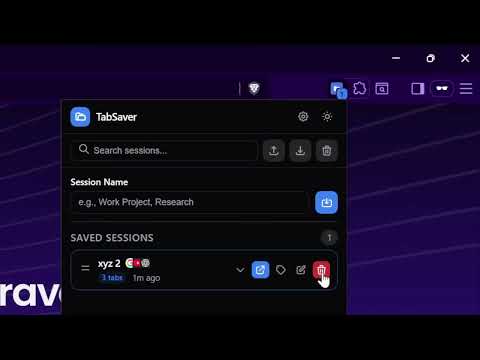
Save and restore browser tab sessions with ease. Features include export/import, search, tags, auto-save, and more.
TabSaver saves the tabs in your current window as a session you can reopen later. Name it, click save, and close the tabs. When you need them again, open the session and everything comes back, tab groups included. Each saved session shows a small screenshot of the page you were on, how many tabs it has, and when you saved it. Click a session to see its tabs and open only the ones you want. If you've opened more tabs since saving, the + button adds them to the session. Two optional background features, found in Settings: • Auto-save backs up your window every 15, 30, 60 or 120 minutes and keeps the last five backups. • Live Sync keeps a session matched to your current window. Turn it on for individual sessions with the sync button. Also included: • Tags (Work, Personal, Research, Shopping, Social, Entertainment), and search by session name, tag or tab title • A button that closes duplicate tabs across all windows • Rename, drag to reorder, and undo after deleting • Export and import as JSON • Right-click menu to save all tabs or just the current one • Dark mode Shortcuts: Ctrl+Shift+S saves the current window and Ctrl+Shift+T opens TabSaver (⌘ on Mac). You can change them at chrome://extensions/shortcuts. Everything is stored locally in your browser. There are no accounts and no analytics, and your sessions are never sent anywhere. New in 2.1.2: session names show on every card again, and the popup footer is no longer cut off.
5 out of 52 ratings
Details
- Version2.1.2
- UpdatedOctober 30, 2026
- Offered bySamonwita Sarker
- Size42.97KiB
- LanguagesEnglish
- Developer
Email
sarker.samonwita@gmail.com - Non-traderThis developer has not identified itself as a trader. For consumers in the European Union, please note that consumer rights do not apply to contracts between you and this developer.
Privacy

TabSaver has disclosed the following information regarding the collection and usage of your data. More detailed information can be found in the developer's privacy policy.
TabSaver handles the following:
This developer declares that your data is
- Not being sold to third parties, outside of the approved use cases
- Not being used or transferred for purposes that are unrelated to the item's core functionality
- Not being used or transferred to determine creditworthiness or for lending purposes
Support
For help with questions, suggestions, or problems, please open this page on your desktop browser