

Strava Collage
2 ratings
)
Overview
Strava Collage - Turn Activities into Collages, GIFs & Videos
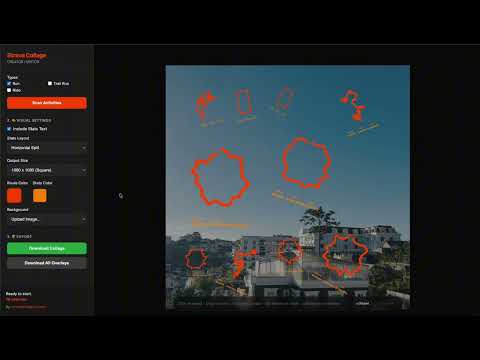
Strava Collage turns your Strava activities into polished collages, city heatmaps, telemetry recaps, and cinematic animated exports. Use it to combine multiple Strava routes into one visual story for a week, a month, a race training block, or any custom set of adventures. It works directly with your existing Strava browser session—no manual GPX exporting or third-party logins required. What you can create - Route collages & unified city heatmaps projected onto real street or topographic maps - StatMaps route artwork color-coded by Pace, Elevation, or Progress gradients - Live Telemetry HUD cards (Glass Pill, Cyberpunk, Athletic) with ticking real-time stats - Animated MP4, WebM (with alpha transparency), and GIF exports featuring glowing path-tracing heads and comet trails - Milestone & recap cards displaying total sessions, distance, elevation gain, and moving time - Transparent PNG overlays for seamless layering in Canva, Photoshop, Premiere, or Final Cut Features - Direct & Private Sync: Scan activities directly from your active Strava browser session; 100% processed locally on your machine for complete privacy. - Smart Filtering & Activity Management: Filter by sport type (Run, Ride, Trail Run, Walk, Hike, Swim), date range, and distance; toggle individual activity visibility from a dedicated sidebar manager. - Real Map Canvas & City Heatmaps: Align activities to real-world street and terrain tiles (OpenStreetMap Dark & Natural styles, OpenTopoMap) with configurable backdrop dimming. - StatMaps & Pace Gradients: Render routes in vibrant solid colors or dynamic multi-color gradients (Pace, Elevation, Progress) with curated palettes (Velocity, Sunset, Neon Spectrum, Fire). - True-to-Life Projections: Equirectangular geographic normalization eliminates latitude distortion, preserving authentic route shapes and track proportions. - Clean Circuit Extraction: Automatically detects repeated laps and extracts a single clean loop for closed-course tracks and crits. - Flexible Layouts & Route Spacing: Auto-arrange into balanced grids or overlay routes freely; fine-tune spacing with the route scale slider, or drag, scale, and rotate manually. - Live Telemetry HUD & Overlays: Add dynamic HUD counters (distance, time, pace, elevation, heart rate) that tick up during animation, along with activity names, PR badges, and custom text watermarks. - Visual Effects & Backdrop Atmosphere: Apply neon glow with white-hot core controls, backdrop blur, brightness dimming, and photographic filter overlays. - Motion & Path Tracing: Animate route drawing with pulsing glow heads, comet tails, or sleek dots; choose between simultaneous, sequential, or staggered animations. - High-Res Multi-Format Export: Export in Square (1:1), Portrait (4:5), Stories/Reels (9:16), 1080p, or 4K resolutions as PNG, JPG, GIF, MP4, or transparent WebM. How it works 1. Log in to Strava in your browser and open Strava Collage. 2. Scan and select the activities you want to showcase. 3. Choose your canvas layout: freeform collage, grid, or Unified City Heatmap on real map tiles. 4. Style your routes: pick solid neon or a Pace/Elevation gradient, and fine-tune spacing and rotation. 5. Add overlays: toggle Activity Names, stats badges, custom text, or a Live Telemetry HUD. 6. Apply effects: enable Path Tracing animation, glowing trails, or backdrop atmosphere blur. 7. Export: download as a high-resolution image, transparent overlay, or animated video (MP4/WebM/GIF). Good for - Weekly, monthly, and annual training recaps - Marathon, ultra, and gran fondo race build-up visual stories - City exploration heatmaps and vacation route compilations - Dynamic Instagram Stories, Reels, TikToks, and Strava post images - Custom sports prints, posters, and digital memorabilia Strava Collage turns your raw GPS data into stunning, high-definition visual stories ready to share.
5 out of 52 ratings
Details
- Version1.12.2
- UpdatedOctober 26, 2026
- Offered bychuongtran
- Size1.06MiB
- LanguagesEnglish
- DeveloperTran Hoang Chuong
Phường An Lạc Ehome3 Hồ Chí Minh, Thành phố Hồ Chí Minh 70000 VNEmail
chuongtrh@gmail.com - Non-traderThis developer has not identified itself as a trader. For consumers in the European Union, please note that consumer rights do not apply to contracts between you and this developer.
Privacy

This developer declares that your data is
- Not being sold to third parties, outside of the approved use cases
- Not being used or transferred for purposes that are unrelated to the item's core functionality
- Not being used or transferred to determine creditworthiness or for lending purposes