


Overview
Automate foreUP tee time reservations at Bethpage & top courses. Seamless in-page interface to secure weekend slots instantly.
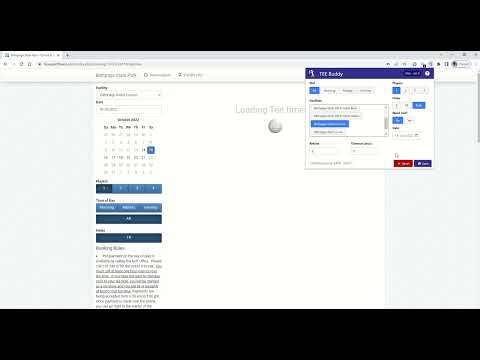
⚡ Stop Losing Weekend Tee Times. Secure Bethpage & foreUP Slots in Seconds! Ever logged in at 7:00 PM sharp, clicked as fast as you could, and still lost the slot? You weren't unlucky—manual clicking simply can't compete with the rush. TEE Buddy is a lightweight browser assistant that integrates directly into your course's booking page. It adds a seamless, inline control bar right on top of the foreUP reservation view, letting you automate your booking sequence the micro-second slots drop. -------------------------------------------------- 🎯 WHY GOLFERS PREFER TEE BUDDY -------------------------------------------------- • 🖥️ Seamless In-Page Interface: No clunky extension popups, side panels, or tab switching. TEE Buddy renders directly inside the booking page right above the course schedule. • ⚡ Beat the 7:00 PM Rush: Automates date selection, time filtering, and checkout navigation instantly. • 🛡️ 100% Local & Secure: Runs completely inside your active browser tab. TEE Buddy never sees, collects, or stores your login credentials or payment details. • 🏌️ Verified Course Support: Built for foreUP system courses, including Bethpage State Park, Montauk Downs, Crab Meadow, and major US public tracks. • 🔄 Smart Retry Logic: Automatically retries without breaking if course servers lag during heavy 7 PM traffic spikes. -------------------------------------------------- 📌 HOW IT WORKS IN 3 EASY STEPS -------------------------------------------------- 1. Open the Booking Site: Go to your target foreUP golf course reservation page and log into your account. 2. Set Your Preferences In-Page: You'll see the clean TEE Buddy control bar embedded right on the page. Select your target date, time window, and player count. 3. Click Run: Hit "Run" and watch TEE Buddy execute the reservation sequence directly to the checkout screen. -------------------------------------------------- 🔒 PRIVACY & FAIR USAGE -------------------------------------------------- TEE Buddy acts as an in-page browser macro assistant to automate manual mouse clicks on your behalf. It executes entirely within your browser session and never routes your data through external third-party servers. Need help or want support for a new course? 🌐 Website: https://www.teebuddygolf.com 📧 Support: support@teebuddygolf.com
0 out of 5No ratings
Details
- Version2.10.1
- UpdatedSeptember 27, 2026
- FeaturesOffers in-app purchases
- Size148KiB
- LanguagesEnglish (United States)
- DeveloperWebsite
Email
hyperios.exe@gmail.com - Non-traderThis developer has not identified itself as a trader. For consumers in the European Union, please note that consumer rights do not apply to contracts between you and this developer.
Privacy

TEE Buddy Premium has disclosed the following information regarding the collection and usage of your data. More detailed information can be found in the developer's privacy policy.
TEE Buddy Premium handles the following:
This developer declares that your data is
- Not being sold to third parties, outside of the approved use cases
- Not being used or transferred for purposes that are unrelated to the item's core functionality
- Not being used or transferred to determine creditworthiness or for lending purposes
Support
For help with questions, suggestions, or problems, please open this page on your desktop browser