

Safe Privacy Mask — Keep personal information out of AI chats

Overview
Masks emails, phones and API keys in the input box before you hit send. No copy-paste to another site. On device, no account.
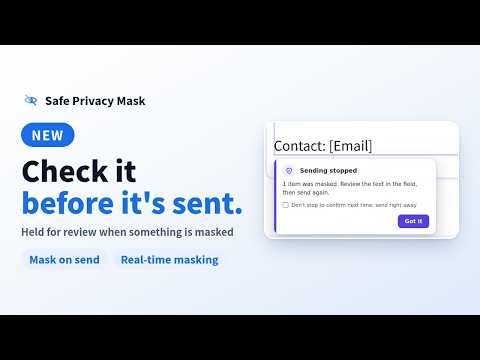
Safe Privacy Mask is a free Chrome extension that masks personal information in AI chat input fields before your message is sent. Use it for work, everyday questions, or to help family members and loved ones use AI more thoughtfully. It helps you avoid accidentally sharing email addresses, phone numbers, API keys, and similar information. If something is masked when you send a message, Safe Privacy Mask holds the message so you can check the masked text first. NEW: CHOOSE WHEN MASKING HAPPENS • Mask on send: everything detected is masked at once when you send, and the message is held so you can review it first (default). • Real-time masking: text is masked as you type, so you can see the result as you write. HOW IT WORKS • The default is Mask on send (the "Replace when sending" setting). Type as usual. Your text stays exactly as you write it. • When you send a message (by clicking the send button, pressing Enter, or submitting a form), detected information is replaced all at once, right in the input field. For example: alex@example.com → [Email] • If anything was replaced, the message is held instead of being sent. Check the masked text, then send it again. You can turn this off. • Prefer to see replacements as you type? Switch to Real-time masking (the "Replace while typing" setting) on the welcome screen or later in Settings. • Press Shift+Enter to start a new line. It doesn't trigger masking. FOR YOUR FAMILY AND THE PEOPLE YOU CARE ABOUT When someone asks AI to polish an email or help with a problem, their message may include personal contact details. You can help a family member or loved one get started, set up masking rules together, and build a habit of checking what they share. USEFUL AT WORK, TOO • Email summaries and editing: mask email addresses and phone numbers before asking AI for help. • Customer support summaries and translations: add custom rules to replace customer names and project names. • Code and log troubleshooting: catch strings that look like API keys or tokens before you share them with AI. START SMALL, RIGHT IN YOUR BROWSER Free to use, with no account required. Start masking personal information in everyday text without signing up for a paid service. Works with major AI chat services, including ChatGPT, Claude, and Gemini. Text is masked right in the input field you're using, so there's no need to paste it into a separate masking website. MAKE IT WORK FOR YOU • Choose when masking happens: Mask on send (default) or Real-time masking. You can also turn individual timings on or off. • Choose whether to hold a message when something is masked. • Add custom rules for names and other text, with support for regular expressions. • Add more websites and input fields. Masking works on supported services and on input fields you register. It doesn't work on every webpage or in every input field. DETECTION AND MASKING STAY IN YOUR BROWSER Your text and detection results are never sent to external servers for detection or masking. The extension contains no ads or analytics and doesn't collect your browsing history. Settings are stored locally with Chrome's storage. Access to supported or registered pages is used only to detect and replace text in input fields. BEFORE YOU USE IT Detection relies on text patterns and the rules you set up. Names and similar information need custom rules. The extension may miss sensitive information or mask text that doesn't need it, so always check what you send. It doesn't guarantee complete anonymization. With Mask on send, your original text stays in the input field until you send it. The website or AI service may be able to read what you type before then (for example, to save drafts or show suggestions), and the extension can't prevent this. If you turn off holding, messages are sent without a chance to review the masked text. In some input fields, pressing Enter to start a new line may also trigger masking. Follow your organization's policies when using it at work. It isn't a replacement for organization-wide data protection. Changes to websites or AI services may affect how the extension works. SUPPORT Report a problem or share a suggestion: https://legacy-tools.dev/support
5 out of 51 rating
Details
- Version1.2.2
- UpdatedOctober 25, 2026
- Size168KiB
- Languages3 languages
- DeveloperWebsite
Email
support@legacy-tools.dev - Non-traderThis developer has not identified itself as a trader. For consumers in the European Union, please note that consumer rights do not apply to contracts between you and this developer.
Privacy

Safe Privacy Mask — Keep personal information out of AI chats has disclosed the following information regarding the collection and usage of your data. More detailed information can be found in the developer's privacy policy.
Safe Privacy Mask — Keep personal information out of AI chats handles the following:
This developer declares that your data is
- Not being sold to third parties, outside of the approved use cases
- Not being used or transferred for purposes that are unrelated to the item's core functionality
- Not being used or transferred to determine creditworthiness or for lending purposes
Support
For help with questions, suggestions, or problems, visit the developer's support site