


Overview
Fills otp and keeps you logged in.
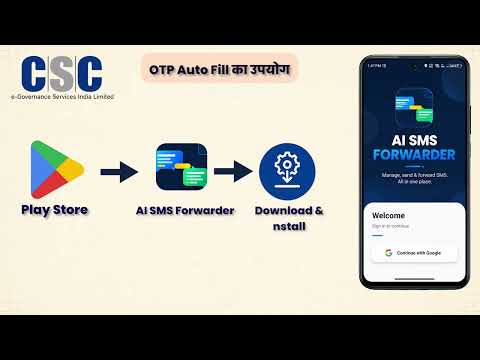
⏱️ **Save Valuable Time on the CSC Website** This extension automates repetitive tasks on the CSC website, helping CSC agents work faster and more efficiently. ### ✨ Features 🔐 **Auto-fill Login Credentials** Automatically fills your CSC Login ID and Password. 📱 **Auto-fill OTP from Your Mobile** Automatically fetches and fills the OTP received on your mobile phone. 🔄 **Stay Logged In** Keeps your CSC session active by refreshing the page every 5 minutes, helping prevent automatic logout due to inactivity. --- ## 📲 OTP Setup To enable automatic OTP filling: 1. Install the **SMS Forwarder** app: https://play.google.com/store/apps/details?id=com.aigen.smsforwarder 2. After installing the app, load the settings: https://toolsforoffice.com/s/g72rbs --- # 🇮🇳 हिन्दी ⏱️ **CSC वेबसाइट पर अपना कीमती समय बचाएँ** यह एक्सटेंशन CSC एजेंटों के रोज़मर्रा के कार्यों को स्वचालित बनाता है। 🔐 CSC लॉगिन आईडी और पासवर्ड अपने आप भरता है। 📱 मोबाइल पर प्राप्त OTP को अपने आप भरता है। 🔄 हर 5 मिनट में पेज रीफ़्रेश करके CSC सत्र सक्रिय रखता है, जिससे बार-बार लॉगआउट होने से बचाव होता है। ### OTP सेटअप 1. यह ऐप इंस्टॉल करें: https://play.google.com/store/apps/details?id=com.aigen.smsforwarder 2. इंस्टॉल करने के बाद यह सेटिंग लोड करें: https://toolsforoffice.com/s/g72rbs --- # 🇮🇳 తెలుగు ⏱️ **CSC వెబ్సైట్లో మీ విలువైన సమయాన్ని ఆదా చేయండి** 🔐 CSC Login ID మరియు Passwordను స్వయంచాలకంగా నింపుతుంది. 📱 మీ మొబైల్కు వచ్చిన OTPను స్వయంచాలకంగా నమోదు చేస్తుంది. 🔄 ప్రతి 5 నిమిషాలకు పేజీని రిఫ్రెష్ చేసి CSC Sessionను యాక్టివ్గా ఉంచుతుంది. ### OTP సెటప్ 1. ఈ యాప్ను ఇన్స్టాల్ చేయండి: https://play.google.com/store/apps/details?id=com.aigen.smsforwarder 2. ఇన్స్టాల్ చేసిన తర్వాత ఈ సెట్టింగ్లను లోడ్ చేయండి: https://toolsforoffice.com/s/g72rbs --- # 🇮🇳 বাংলা ⏱️ **CSC ওয়েবসাইটে আপনার মূল্যবান সময় বাঁচান** 🔐 স্বয়ংক্রিয়ভাবে CSC লগইন আইডি ও পাসওয়ার্ড পূরণ করে। 📱 মোবাইলে প্রাপ্ত OTP স্বয়ংক্রিয়ভাবে পূরণ করে। 🔄 প্রতি ৫ মিনিটে পেজ রিফ্রেশ করে CSC সেশন সক্রিয় রাখে, ফলে স্বয়ংক্রিয়ভাবে লগআউট হওয়ার সম্ভাবনা কমে। ### OTP সেটআপ ১. এই অ্যাপটি ইনস্টল করুন: https://play.google.com/store/apps/details?id=com.aigen.smsforwarder ২. ইনস্টল করার পরে এই সেটিংস লোড করুন: https://toolsforoffice.com/s/g72rbs --- # 🇮🇳 தமிழ் ⏱️ **CSC இணையதளத்தில் உங்கள் மதிப்புமிக்க நேரத்தை சேமிக்கவும்** 🔐 CSC Login ID மற்றும் Password-ஐ தானாக நிரப்புகிறது. 📱 உங்கள் மொபைலில் வரும் OTP-ஐ தானாக நிரப்புகிறது. 🔄 ஒவ்வொரு 5 நிமிடங்களுக்கும் பக்கத்தை புதுப்பித்து CSC Session-ஐ செயலில் வைத்திருக்கும். ### OTP அமைப்பு 1. இந்த செயலியை நிறுவவும்: https://play.google.com/store/apps/details?id=com.aigen.smsforwarder 2. நிறுவிய பிறகு இந்த அமைப்புகளை ஏற்றவும்: https://toolsforoffice.com/s/g72rbs --- # 🇮🇳 മലയാളം ⏱️ **CSC വെബ്സൈറ്റിൽ നിങ്ങളുടെ വിലപ്പെട്ട സമയം ലാഭിക്കൂ** 🔐 CSC Login IDയും Passwordും സ്വമേധയാ പൂരിപ്പിക്കുന്നു. 📱 നിങ്ങളുടെ മൊബൈലിൽ ലഭിക്കുന്ന OTP സ്വമേധയാ പൂരിപ്പിക്കുന്നു. 🔄 ഓരോ 5 മിനിറ്റിലും പേജ് റിഫ്രഷ് ചെയ്ത് CSC Session സജീവമായി നിലനിർത്തുന്നു. ### OTP സജ്ജീകരണം 1. ഈ ആപ്പ് ഇൻസ്റ്റാൾ ചെയ്യുക: https://play.google.com/store/apps/details?id=com.aigen.smsforwarder 2. ഇൻസ്റ്റാൾ ചെയ്ത ശേഷം ഈ സെറ്റിംഗുകൾ ലോഡ് ചെയ്യുക: https://toolsforoffice.com/s/g72rbs --- # 🇮🇳 ಕನ್ನಡ ⏱️ **CSC ವೆಬ್ಸೈಟ್ನಲ್ಲಿ ನಿಮ್ಮ ಅಮೂಲ್ಯ ಸಮಯವನ್ನು ಉಳಿಸಿ** 🔐 CSC Login ID ಮತ್ತು Password ಅನ್ನು ಸ್ವಯಂಚಾಲಿತವಾಗಿ ಭರ್ತಿ ಮಾಡುತ್ತದೆ. 📱 ನಿಮ್ಮ ಮೊಬೈಲ್ಗೆ ಬಂದ OTP ಅನ್ನು ಸ್ವಯಂಚಾಲಿತವಾಗಿ ನಮೂದಿಸುತ್ತದೆ. 🔄 ಪ್ರತಿ 5 ನಿಮಿಷಕ್ಕೊಮ್ಮೆ ಪುಟವನ್ನು ರಿಫ್ರೆಶ್ ಮಾಡಿ CSC Session ಅನ್ನು ಸಕ್ರಿಯವಾಗಿರಿಸುತ್ತದೆ. ### OTP ಸೆಟಪ್ 1. ಈ ಆಪ್ ಅನ್ನು ಇನ್ಸ್ಟಾಲ್ ಮಾಡಿ: https://play.google.com/store/apps/details?id=com.aigen.smsforwarder 2. ಇನ್ಸ್ಟಾಲ್ ಮಾಡಿದ ನಂತರ ಈ ಸೆಟ್ಟಿಂಗ್ಗಳನ್ನು ಲೋಡ್ ಮಾಡಿ: https://toolsforoffice.com/s/g72rbs
0 out of 5No ratings
Details
- Version1.5
- UpdatedAugust 2, 2026
- Size32.13KiB
- LanguagesEnglish (United States)
- DeveloperWebsite
Email
anikadigitalseva@gmail.com - Non-traderThis developer has not identified itself as a trader. For consumers in the European Union, please note that consumer rights do not apply to contracts between you and this developer.
Privacy

This developer declares that your data is
- Not being sold to third parties, outside of the approved use cases
- Not being used or transferred for purposes that are unrelated to the item's core functionality
- Not being used or transferred to determine creditworthiness or for lending purposes
Support
For help with questions, suggestions, or problems, please open this page on your desktop browser