

Taboom - Tabs Manager by ariva-tools
2 ratings
)
Overview
Taboom - Privacy-first smart Tabs Manager to search, snooze, and protect Chrome tabs. Saves memory, runs fully locally.
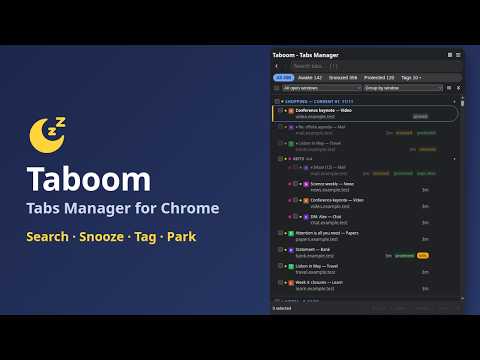
Taboom saves memory and brings order to tab chaos. It snoozes (discards) tabs you haven't used in a while, freeing the RAM they were eating; they stay right where they are in the tab strip and reload the moment you click them. Nothing is ever closed automatically. And when the mess grows anyway, one searchable panel puts every window's tabs at your fingertips. FIND ANY TAB INSTANTLY Open the side panel and every tab across all your windows is there: search by title, site or tag as you type, filter by Awake / Snoozed / Protected / Tags, sort by last use, title, or domain — then act on one tab or fifty with bulk snooze, protect, or close. Hover a row for its full address and states; copy the address from the row menu. TAG ANY PAGE Give pages colored labels of your own — work, bills, read later — from a tab's menu or the page's right-click menu. A tag follows the page address, so it shows on every copy of that page in every window and survives restarts. Search with #name, filter by one or several tags, group the whole list by tag, and manage tags and tagged pages in Settings, with undo. PARK A WINDOW, GET IT BACK LATER A window you do not need right now but do not want to lose? Park it: its tabs (order, pins, tab groups), its name and color are saved and the window closes — no memory used while it waits. Parked windows have their own view in the side panel with search and grouping; restore one as a new window or into the current one, move single tabs in or out, or remove what you no longer need, all undoable. CLEAN UP DUPLICATES IN ONE CLICK The same page open five times across three windows? Taboom finds every duplicated page and shows them in one list — how many copies, in which windows. Keep one copy per browser or one per window, with a single click from the ☰ menu or page by page. It keeps the copy you care about (a pinned tab, a kept-alive page, the one in front of you), never closes a pinned tab, and always leaves one New Tab per window. You see the count and confirm before anything closes. AUTOMATIC SNOOZE, YOUR RULES Taboom quietly discards tabs after a period of inactivity you choose. Pinned tabs, tabs playing audio, the active tab, and protected sites are always skipped, and you can keep a minimum number of tabs awake per window. Prefer manual control? Snooze from the panel, the toolbar popup, the right-click menu, or a keyboard shortcut. PROTECT WHAT MATTERS Some pages lose work when they reload. Add them to the protected list — exact hosts (mail.google.com), whole domains (*.github.com) or one exact page (https://app.example.com/board), straight from a tab's menu — and Taboom will never snooze them. It even shields them from Chrome's own Memory Saver. Changed your mind? Edit a rule in place, or undo any removal from Settings. KEEP SESSIONS ALIVE Some sites log you out after a few idle minutes; dashboards go stale once the tab sleeps. Mark such a page — from its right-click menu, the side panel, or by typing its address in Settings — and Taboom reloads it every N minutes (your choice per page), so the session stays signed in and the data stays fresh. Kept pages are never auto-snoozed. Pause, resume or remove a mark any time; the Alive view in the side panel lists them all. MADE FOR TAB HOARDERS Handles 1000+ open tabs without breaking a sweat. Group the list by window, domain, title, tab group or tag, see Chrome tab groups nested in place, and name, color and pin your windows so you always know which is which. The quick launch popover lists every window with its counts (parked ones too), your tab groups, pins, tags, kept-alive pages and duplicates — one click to jump. Step back and forward through the tabs you used last with Ctrl+Shift+, and Ctrl+Shift+. (Command on Mac). Keyboard-friendly: / to search, arrows to move, Enter to jump. Compact density mode, zoom presets, light and dark themes. PRIVACY FIRST • Collects nothing, tracks nothing — your browsing is yours • Everything stays on your device, no accounts, no analytics, no servers • Open source: https://github.com/ariva/taboom-extension Taboom asks only for the minimum permissions a tab manager needs — no access to page content, no host permissions, zero network requests.
5 out of 52 ratings
Details
- Version1.0.7
- UpdatedOctober 26, 2026
- Offered byArunas Ivanauskas
- Size115KiB
- LanguagesEnglish (United States)
- Developer
Email
arunas.work.hg@gmail.com - Non-traderThis developer has not identified itself as a trader. For consumers in the European Union, please note that consumer rights do not apply to contracts between you and this developer.
Privacy

This developer declares that your data is
- Not being sold to third parties, outside of the approved use cases
- Not being used or transferred for purposes that are unrelated to the item's core functionality
- Not being used or transferred to determine creditworthiness or for lending purposes
Support
For help with questions, suggestions, or problems, visit the developer's support site