

TorchTiger Engineer

Overview
Ask how your ServiceNow instance works, then update config with a plan-and-approve workflow. Powered by Claude.
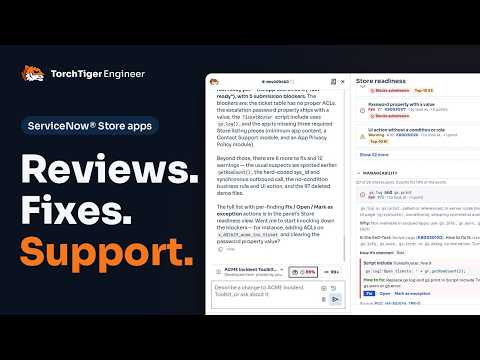
TorchTiger Engineer answers questions about the business rules, scripts, flows and ACLs already on your instance, and traces how they connect. Write mode is off by default. To change something, it proposes a plan, checks every field against your instance, and creates, updates or deletes nothing until you approve. After it writes, it reads each record back, and you can undo its configuration changes, deletes included, from the change log. On production it switches off completely. It runs on Claude with your own Anthropic API key. It's free, with no TorchTiger account; you pay Anthropic for your usage. Your key stays encrypted on your machine, and requests go from your browser straight to Anthropic: we never see your key or your data. It uses your own signed-in session and permissions. WHAT IT DOES 1. Ask anything about your instance Ask in plain English across business rules, client scripts, script includes, UI policies and flows. When it needs current documentation, it can search ServiceNow's own sites; Anthropic runs that search on its servers, under your key, from the redacted conversation. Ask "where is this used?" and it looks in 27 places at once. Paste a screenshot or drop files to show what you mean: text files are redacted, while pictures and PDFs go to your AI provider as they are. 2. Approve every change first Every field in a plan is checked before you see it. A step only the form can do runs in your own tab while you watch. Flows are built through Flow Designer's own API and published only when you ask. It stays off on any instance it can't confirm is non-production. 3. Undo from the change log Every configuration change is logged under its update set. Select one to undo it, deletes included, after you approve. 4. Check the result on the page After a change people see, it can open the page and take a picture to check it. Pictures go to your AI provider with the conversation and can't be redacted. 5. Work app by app Answers, plans and changes stay in the app you pick. 6. Commit and publish See the files not yet in Git, then commit them, publish a version to your company's app repository, or both. 7. Check Store readiness Before you submit to the ServiceNow Store, run a Quick scan against the Certification Self-Test's 88 rules, or a Full scan of up to 233 checks, with a fix for each finding. The rules run in your browser; with AI review on, only the flagged lines, and what the AI-only checks read, go to your AI provider. It doesn't replace the Store's own certification review. If you ask for paid help, the chat can link to XpertApps, paid app-development help from TorchTiger's maker, and to ServiceNow's Partner Finder. WHAT YOU NEED - Google Chrome or Microsoft Edge - A ServiceNow instance you can sign in to (a personal developer instance works) - An API key from the Claude Console, pay-as-you-go (Claude Pro/Max subscriptions aren't supported) GET STARTED Set-up guide: https://torchtiger.com/get-started.html Demo videos: https://torchtiger.com/videos/ TorchTiger Engineer is independent of ServiceNow, Inc. and of Anthropic, PBC. ServiceNow is a trademark of ServiceNow, Inc., and Claude is a trademark of Anthropic, PBC.
5 out of 52 ratings
Details
- Version2.5.0
- UpdatedNovember 6, 2026
- Size5.08MiB
- LanguagesEnglish
- DeveloperQuoDroid Software Development PrivateWebsite
2nd Floor Flat No - C Rammohan Apartment, 56/9 Rammohan Mukherjee Lane Shibpur Howrah, West Bengal 711102 INEmail
support@torchtiger.comPhone
+91 85548 27944 - TraderThis developer has identified itself as a trader per the definition from the European Union and committed to only offer products or services that comply with EU laws.
Privacy

TorchTiger Engineer has disclosed the following information regarding the collection and usage of your data. More detailed information can be found in the developer's privacy policy.
TorchTiger Engineer handles the following:
This developer declares that your data is
- Not being sold to third parties, outside of the approved use cases
- Not being used or transferred for purposes that are unrelated to the item's core functionality
- Not being used or transferred to determine creditworthiness or for lending purposes
Support
For help with questions, suggestions, or problems, please open this page on your desktop browser