


Overview
Extract a ZIP from a link straight into Downloads or a folder, without saving the ZIP. Preview files first. Every file checked.
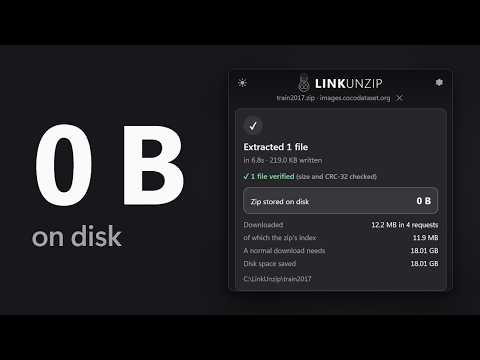
LinkUnzip is a ZIP extractor and ZIP file viewer for links: it unzips a ZIP file straight from a link, without saving the ZIP. You see every file inside before anything is downloaded, take only the files you want, and your disk only needs room for those files. Free and open source. No account, nothing else to install, and it works on Windows, Mac and Linux. WHAT YOU CAN DO WITH IT • Unzip a big download when your disk can't hold the ZIP and its files at the same time. • See what's inside an online ZIP before you download it: every file and folder with its size, and a preview of any file. • Get one file, one folder or every .jpg out of a huge ZIP, like a dataset, without downloading the rest. • Take a random sample of a dataset, like 100 images out of 118,000, and download only those. HOW TO UNZIP A FILE FROM A LINK 1. Right-click a link to a .zip and choose "Extract with LinkUnzip". Or click the LinkUnzip icon and paste the link. The popup also lists the .zip links on the page you're on. 2. LinkUnzip reads only the ZIP's index and shows what's inside and how much space it needs. Untick what you don't need, or click the eye to preview a file. 3. Click Start Extraction. Each file is checked and saved as it arrives, and you can close the popup meanwhile. FEATURES Look inside • Cost Analysis before anything is written: the space LinkUnzip needs next to what a normal download-then-extract needs. • Preview a file without extracting it: documents, tables, images and videos open in a new tab. Only that one file is downloaded. • Image grid: see a folder's images as thumbnails and tick them there (turn it on in Settings). • Recent zips: open a ZIP again in one click, without downloading its index again. Pick • The file list is a tree: folders open in place and show how many files they hold. Tick files or folders with the mouse or the keys (arrows and Space). Files you leave out are never downloaded. • Search by name or by type (*.jpg), or show only one kind of file, and tick every result in one click. • Sample: tick N random files from a folder, a search or the whole ZIP, of one file type if you like. The same seed gives the same files on every computer. • Share: copy a link that opens the same ZIP with the same files ticked, or copy a command that gets those files on another machine (a Python script that needs nothing installed, for Linux, Mac or Windows). Extract • The ZIP itself is never saved, so you only need room for the files. • Into Downloads with no setup, or into a folder you choose, which is much faster for ZIPs with thousands of files. • Every file is verified (size and CRC-32) before it gets its name, so a damaged file never appears. • Resume: stopped halfway, or lost the connection? Finished files are skipped, and a file stored without compression carries on where it stopped. • Big archives: ZIP64, no 2 GB limit, folders with 100,000+ files. • Several connections at once, and a notification when it's done. Works with • Password-protected ZIPs (ZipCrypto and AES): LinkUnzip asks for the password before it starts and never saves it. • ZIPs inside ZIPs: open one from the file list and pick its files, without downloading the rest of the outer ZIP. • Downloads that need a login, GitHub's green "Download ZIP" button, and servers that only send a file from start to end. • In 8 languages. It follows the browser, or you can pick one in Settings. • Light and dark theme. An optional Windows helper for very large extractions, off unless you turn it on. REAL EXAMPLES (measured in Chrome on the developer's PC) • One photo out of the COCO train2017 dataset, an 18.01 GB ZIP with 118,287 files: about 6 seconds and 12.2 MB downloaded (the ZIP's 11.9 MB index and the 219 KB photo). • Blender 4.2 for Windows, a 365.8 MB ZIP with 5,518 files, into a folder: about 55 seconds, 925.6 MB written, 0 B of ZIP on disk, every file verified. A normal download-then-extract needs 1.26 GB. QUESTIONS Does LinkUnzip upload my files anywhere? No. It connects only to the server in your link. There's no account and no analytics, and nothing you open or extract is sent to the developer. Does it work with downloads that need a login? Yes. If a site needs you to be signed in, LinkUnzip asks before using your login on that one site. Your browser then sends its own cookies to that site, and nowhere else. Can I get the same files on a server? Yes. Pick the files in the popup, then Share > Copy as command. You get a Python script that downloads only those files from the ZIP. It needs nothing but Python and runs on Linux, Mac and Windows. Why is saving into Downloads slower for ZIPs with many files? Chrome's downloads save about 8 files a second. For ZIPs with thousands of files, choose a folder in Settings. Chrome doesn't let extensions use Downloads, Desktop or Documents themselves, so make a folder inside one of them, like Downloads > LinkUnzip. Does it work on Mac and Linux? Yes. It runs inside the browser and works on Windows, Mac and Linux. Only the optional helper is Windows-only. LIMITS • ZIP only. RAR, 7z and a few rare compression methods aren't supported yet, and LinkUnzip doesn't create archives. • Saving into Downloads, Chrome holds back some file types until you click Keep, and names that start with a dot get a _ added. • The extracted files still need their disk space. What LinkUnzip saves is the room the ZIP would take. Privacy policy: https://linkunzip.app/privacy Source code and support: https://github.com/CincaAlex/LinkUnzip Website: https://linkunzip.app
4.2 out of 55 ratings
Details
- Version1.4.1
- UpdatedNovember 25, 2026
- Size508KiB
- Languages8 languages
- DeveloperWebsite
Email
cincaalex17@gmail.com - Non-traderThis developer has not identified itself as a trader. For consumers in the European Union, please note that consumer rights do not apply to contracts between you and this developer.
Privacy

LinkUnzip: unzip ZIP files straight from links has disclosed the following information regarding the collection and usage of your data. More detailed information can be found in the developer's privacy policy.
LinkUnzip: unzip ZIP files straight from links handles the following:
This developer declares that your data is
- Not being sold to third parties, outside of the approved use cases
- Not being used or transferred for purposes that are unrelated to the item's core functionality
- Not being used or transferred to determine creditworthiness or for lending purposes
Support
For help with questions, suggestions, or problems, visit the developer's support site