

QuickGrabAI

Overview
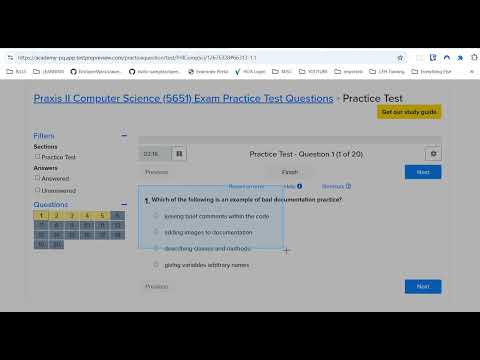
Capture a webpage region and analyze it with current OpenAI vision models. Includes local history and text extraction.
QuickGrabAI: Smart Screenshot Analysis Tool Turn screenshots into clear descriptions, answers, and editable text. Select a region of a webpage and analyze it using your own OpenAI API key. HOW IT WORKS • Capture: Drag to select the area you want to analyze • Choose: Describe an image, answer a visible question, or extract text • Analyze: Read results as they arrive, then copy or revisit them later WHAT’S NEW • Live model discovery: Load available models directly from your OpenAI account and refresh the list anytime • Streaming responses: Start reading while your analysis is being generated • Flexible capture quality: Choose compressed screenshots for smaller uploads or original-quality PNG for fine details • Improved cropping: Better handling of browser zoom and high-resolution displays • Text extraction: Copy visible text while preserving line breaks, mathematical symbols, and international characters • Result reuse: Reuse identical saved analyses to avoid another API request • Better history: Browse saved screenshots and results in a gallery with thumbnails and pagination • More control: Cancel requests, retry failed analyses, and choose whether to save new results PERFECT FOR • Research and documentation • Understanding screenshots, charts, and diagrams • Extracting text from visual content • Educational exploration and question answering • Everyday productivity PRIVACY & CONTROL • Bring Your Own Key: You control your OpenAI API access • Your API key and preferences are stored locally by the extension • Only your selected screenshot region is sent to OpenAI for analysis • Optional analysis history stays on your device • No developer analytics or advertising trackers • Delete individual saved analyses or remove your API key in Settings REQUIREMENTS An OpenAI API key and a model that supports image input through the Responses API are required. Available models depend on your API account. OpenAI API usage charges apply. Capture works on regular webpages. Chrome system pages and other browser-restricted pages are not supported.
0 out of 5No ratings
Details
- Version1.2.0
- UpdatedNovember 12, 2026
- Offered byQwikTechTips
- Size60.83KiB
- LanguagesEnglish
- Developer
Email
info@qwiktechtips.com - Non-traderThis developer has not identified itself as a trader. For consumers in the European Union, please note that consumer rights do not apply to contracts between you and this developer.
Privacy

This developer declares that your data is
- Not being sold to third parties, outside of the approved use cases
- Not being used or transferred for purposes that are unrelated to the item's core functionality
- Not being used or transferred to determine creditworthiness or for lending purposes
Support
For help with questions, suggestions, or problems, please open this page on your desktop browser