

LinkedIn Invites Helper
7 ratings
)
Overview
Accept or ignore all your LinkedIn invitations in one click, at a safe human pace.
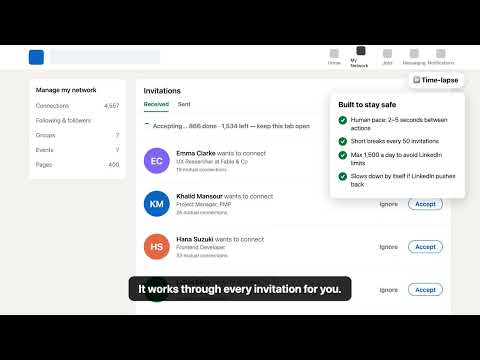
Tired of clicking Accept or Ignore one by one? LinkedIn Invites Helper adds "Accept all" and "Ignore all" buttons to your LinkedIn invitations page: • https://www.linkedin.com/mynetwork/grow/ • https://www.linkedin.com/mynetwork/invitation-manager/received/ Works with any number of invitations: 5, 500 or 50,000. Built to keep your account safe • Human pace: 2–5 seconds between actions • Short breaks every 50 invitations • Up to 1,500 a day, then it pauses until tomorrow • Slows down by itself if LinkedIn asks it to • Stops cleanly at LinkedIn's 30,000-connection limit • Remembers progress, so large backlogs continue after a reload or the next day Features • One-click Accept all / Ignore all, with a confirmation step • Live progress and a Stop button • Looks like LinkedIn's own interface • English and Arabic Privacy • No data collected, sold or sent anywhere except linkedin.com • No analytics, no servers of its own • Runs only on the two LinkedIn invitation pages This tool performs actions you could do manually. Use it responsibly.
5 out of 57 ratings
Details
- Version1.2.1
- UpdatedNovember 11, 2026
- Offered byEmran Alhaddad
- Size17.9KiB
- LanguagesEnglish
- Developer
Email
emran.alhaddad.dev@gmail.com - Non-traderThis developer has not identified itself as a trader. For consumers in the European Union, please note that consumer rights do not apply to contracts between you and this developer.
Privacy

This developer declares that your data is
- Not being sold to third parties, outside of the approved use cases
- Not being used or transferred for purposes that are unrelated to the item's core functionality
- Not being used or transferred to determine creditworthiness or for lending purposes
Support
For help with questions, suggestions, or problems, visit the developer's support site