

Mass Edit Google Photos

Overview
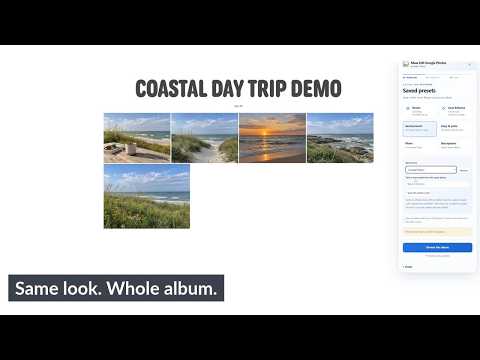
Bulk rotate, enhance, filter and describe Google Photos. Save presets and copy a look across selected photos.
Mass Edit Google Photos helps you apply the same editing job across selected photos in a Google Photos album without repeating the process one photo at a time. REUSABLE LOOKS AND PRESETS • Save an edited photo's 14 supported adjustments and filter as a reusable preset. • Store up to 30 presets in your current Chrome profile. • Copy a saved look from one photo and apply it across selected photos. • Apply Google Photos filters with adjustable strength. DESCRIPTIONS • Fill descriptions only when they are empty. • Append text without duplicating an identical append. • Explicitly replace existing descriptions after confirmation. OTHER BATCH TOOLS • Rotate selected photos 90 degrees left or right. • Apply Google's Auto Enhance to selected photos. • Review up to 100 photos and choose all photos or an individual selection before starting. • Pause after the current photo and resume from locally saved progress. • Skip photos that already match the requested result without consuming another free edit. • Stop for review when a result cannot be verified instead of automatically repeating an uncertain edit. REQUIREMENTS Use Chrome on desktop with Google Photos set to English. Albums and batches can contain 1–100 JPEG or PNG photos. Videos and other formats are not supported. Rotation requires rectangular photos. The other editing tools support square photos. Duplicate filenames are not supported. Keep the Google Photos tab open while processing. Photos are edited one at a time, so larger batches can take several minutes. Rotation applies the direction you select; it does not automatically detect photo orientation. Auto Enhance results vary by photo. PRICING The first 10 successful saved photo edits are free and shared across all editing tools. Saving a preset or capturing a look does not consume an edit. Photos that already match the requested result are skipped without consuming another edit. After the free allowance, subscribe for US$4.99/month for unlimited edits while subscribed, with the same maximum of 100 photos per batch. The subscription renews monthly until canceled. Use Manage subscription in the extension to manage or cancel billing. Free usage is stored in the current Chrome profile. PRIVACY The extension does not upload your photos to us or to a separate image-processing service. Presets, copied looks, descriptions, free usage, and batch progress are stored locally in Chrome. Subscription checks use ExtensionPay, with checkout handled through Stripe. Mass Edit Google Photos is an independent extension and is not made by or affiliated with Google. Google Photos is a trademark of Google LLC. Support: support@masseditphotos.com Publisher: Sam Marchand Website: https://masseditphotos.com Privacy policy: https://masseditphotos.com/privacy
0 out of 5No ratings
Details
- Version0.4.3
- UpdatedSeptember 21, 2026
- FeaturesOffers in-app purchases
- Offered bySam Marchand
- Size2.43MiB
- LanguagesEnglish
- DeveloperSAMUEL R MARCHAND
17 stowell rd wilton, ME 04294 USEmail
smarch0429@gmail.comPhone
+1 401-749-7389 - TraderThis developer has identified itself as a trader per the definition from the European Union and committed to only offer products or services that comply with EU laws.
Privacy

Mass Edit Google Photos has disclosed the following information regarding the collection and usage of your data. More detailed information can be found in the developer's privacy policy.
Mass Edit Google Photos handles the following:
This developer declares that your data is
- Not being sold to third parties, outside of the approved use cases
- Not being used or transferred for purposes that are unrelated to the item's core functionality
- Not being used or transferred to determine creditworthiness or for lending purposes
Support
For help with questions, suggestions, or problems, visit the developer's support site