


Overview
Unlimited history retention, session management, time tracking, bookmarks, multi-device.
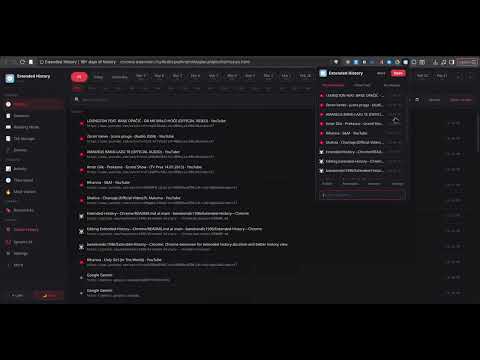
Can't find that TV show you watched 9 months ago or what you searched for to send to your friend, because of 90 days history limit? Well not anymore, with this extension you can keep your history forever. Did you ever lose whole browser session and you had bunch of tabs open? Well this extension fixes that also, by keeping your sessions saved and safe (locally). Do you open a lot of tabs that stay open for days, that you barely use? This extension can store tabs you don't use and you can reopen them later on. Features: -Keep history more then 90 days, even for 10 years or forever -Filter history by date, url, title -Quick access to recent history and stored tabs by pressing extension button -See time spent on websites and total page loads -Ignore visits from being stored in history by url, domain, keyword, path, etc. -Store tabs -Export and import history and bookmarks -Export session tabs and see previous sessions -Change accent colors and put custom wallpaper or random one -Delete history per day, based on filter, or selection even from popup -Encrypt history export -Read exported history without import, even if encrypted in "Reading mode" -Auto export sessions as .html file -Quick filters to find history fast based on more then one domain or keyword -Lock history -Search extensions history inside address bar, by typing in 'q' then pressing tab or space This extension can be paired with Extended Page extension that replaces new tab page. So you get most visited history from 90+ days of history data + tab storage in new tab page ---------------------------------------------------------------- Important ! ------------------------------------------------------------------------- You can right click "Sessions" and "Tab Storage" in popup for secondary options Secondary options: -Right clicking "Sessions" in popup exports sessions -Right clicking "Tab Storage" shows opened tabs, clicking them will store them ------------------------------------------------------------------------------------------------------------------------------------------------------------- To do and in works: -Store visit even if page didn't load completely Changelog: https://github.com/banekondic1996/Extended-History---Chrome/blob/main/CHANGELOG.md If you want to support this developer you can donate USDT on BNB address: 0x86dd33f283326c781a97ab293eed96a17afd965b
5 out of 59 ratings
Details
- Version4.2.5
- UpdatedOctober 27, 2026
- Size1.2MiB
- Languages10 languages
- DeveloperWebsite
Email
ediusbane-dev@yahoo.com - Non-traderThis developer has not identified itself as a trader. For consumers in the European Union, please note that consumer rights do not apply to contracts between you and this developer.
Privacy

This developer declares that your data is
- Not being sold to third parties, outside of the approved use cases
- Not being used or transferred for purposes that are unrelated to the item's core functionality
- Not being used or transferred to determine creditworthiness or for lending purposes
Support
For help with questions, suggestions, or problems, please open this page on your desktop browser