

ReadyTab - New Tab Dashboard & Launcher

Overview
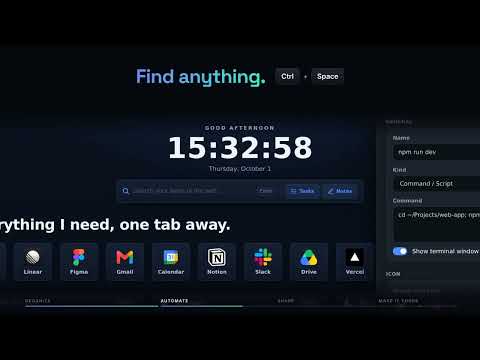
Customizable new tab page: organize your links into boards and workspaces, and open anything you saved in a few keystrokes.
Your team’s shared resources. Your own personal workspace. ReadyTab brings both into your new tab, with links, tools and desktop launchers close at hand. One owner hosts the team board with Full; collaborators view and edit for free with the access they’re given. Organize everything into spaces - work, personal, projects - drop links into drag-and-drop groups, build out a real dashboard with shortcuts, headings, notes and more, and find anything instantly with built-in search. Need a folder, file, or app from your computer? Launch it right from your new tab with the optional companion app. WHAT YOU GET (FREE) ✓ Replace your new tab with a clean, customizable command center ✓ Unlimited spaces - organize links into groups across as many spaces as you like ✓ Drag-and-drop grid layout - arrange it exactly how you think ✓ Build a real dashboard: shortcut buttons, headings, text, callouts, code blocks, step guides, images, dividers, and quick-copy snippets ✓ More than links inside groups: headers, dividers, notes, to-dos, and clipboard snippets ✓ Spotlight search - find saved links from your new tab; optionally enable it on other websites in settings ✓ Search your links from the address bar with the "rt" keyword ✓ Beautiful themes, gradients, animated and custom backgrounds, plus a full theme editor with custom CSS ✓ App & website launchers, custom icons, automatic favicons ✓ Guided start screen: import your browser bookmarks (pick folders or single links and preview the groups), start from popular sites, or begin with a blank board ✓ Export and import your current local dashboard as JSON; unlock protected spaces before exporting ✓ Desktop launchers - open folders, files, and run commands/scripts via the companion app (Windows, macOS, Linux) ✓ One-click routines - bundle links, apps, files, folders, clipboard snippets, and workspace switches into a single button ✓ Personal Notes - a Markdown notes hub for each workspace; personal notes are not included in team board updates ✓ Tasks - per-workspace to-do lists in a dedicated hub, plus to-do items inside any group ✓ Tab Ribbon - see every open tab in a ribbon above Spotlight search; filter, highlight, and switch tabs without leaving the keyboard ✓ Join team boards for free: view shared resources and edit with an owner-issued key, with no paid editor seats ✓ Shared edits autosave. Conflicts and recovered work need review; local recovery drafts remain only until pending work is saved or explicitly discarded ✓ One Sharing window for share codes, public links and live boards; publishing and hosting require Full ✓ Available in 11 languages (English, German, Spanish, French, Italian, Japanese, Korean, Portuguese, Russian, Chinese & Croatian) READYTAB SYNC - FOR YOUR OWN DEVICES ✦ Encrypted cloud sync across your devices, with optional automatic sync ✦ Sync your spaces, notes and tasks, with version history for saved snapshots ✦ Password-protected spaces, encrypted locally before anything is stored or synced ✦ Automatic link-health checks READYTAB FULL - FOR SHARING AND TEAMS ✦ Everything in Sync ✦ Publish any space as a public board - share a read-only link that anyone can open in their browser, no extension required ✦ Share a space with a code so others get their own editable copy ✦ Host managed boards that subscribers follow and receive your updates ✦ Named edit keys for people or groups: create multiple keys per board, then rename, replace or revoke each independently. Revoking a key removes editing access, not viewing access PRIVATE BY DESIGN ReadyTab keeps your data locally in your browser. No tracking, no ads, no selling your data. Optional networked features (cloud sync, sharing) only run when you turn them on - and protected spaces are encrypted before they ever leave your device. Make your new tab work for you. Install ReadyTab - free to start.
4.6 out of 58 ratings
Details
- Version1.9.0
- UpdatedOctober 27, 2026
- FeaturesOffers in-app purchases
- Size4.46MiB
- Languages11 languages
- DeveloperWebsite
Email
yannkostch@gmail.com - Non-traderThis developer has not identified itself as a trader. For consumers in the European Union, please note that consumer rights do not apply to contracts between you and this developer.
Privacy

ReadyTab - New Tab Dashboard & Launcher has disclosed the following information regarding the collection and usage of your data. More detailed information can be found in the developer's privacy policy.
ReadyTab - New Tab Dashboard & Launcher handles the following:
This developer declares that your data is
- Not being sold to third parties, outside of the approved use cases
- Not being used or transferred for purposes that are unrelated to the item's core functionality
- Not being used or transferred to determine creditworthiness or for lending purposes
Support
For help with questions, suggestions, or problems, visit the developer's support site