

PostKeeper - Export X/Twitter Bookmarks to PDF & Markdown

Overview
Export your X/Twitter bookmarks to PDF, Markdown, CSV, JSON and HTML. Save your favorite posts locally with no cloud upload.
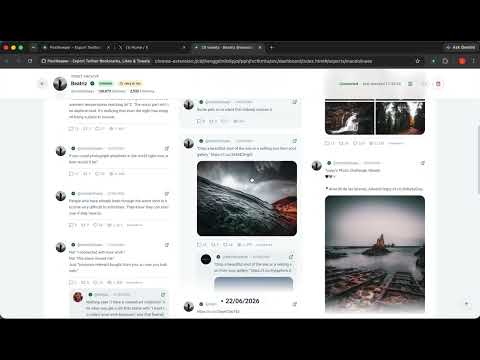
PostKeeper creates a local archive of your X.com (formerly Twitter) posts, likes, and bookmarks. All data stays on your device — nothing is sent to external servers. FEATURES - Archive posts from any X.com profile - Save your Likes and Bookmarks for offline access - Export in 6 formats: CSV, JSON, Markdown, HTML, PDF, and ZIP - Long-running export with pause, resume, and cancel - Automatic rate limiting and network error recovery - Full-featured Dashboard for browsing and managing archives - Full-text search across archived posts - Filter by date range, post type, and media - Multi-language interface (English, Chinese, Japanese, Korean, and more) HOW TO USE 1. Navigate to any profile on X.com 2. Click the PostKeeper icon in the toolbar 3. Choose what to archive — posts, likes, or bookmarks 4. Monitor progress in the Dashboard (right-click icon → Options) 5. Select a format and export your archive PRIVACY PostKeeper stores all data locally in your browser using Chrome's built-in storage. No data is ever sent to our servers. API requests go directly to X.com using your existing browser session. We do not collect analytics or telemetry. SUPPORT Email: support@postkeeper.app Website: https://postkeeper.app
5 out of 51 rating
Details
- Version1.14.0
- UpdatedJuly 10, 2026
- FeaturesOffers in-app purchases
- Size489KiB
- Languages18 languages
- DeveloperWebsite
Email
yangxunwu@gmail.com - Non-traderThis developer has not identified itself as a trader. For consumers in the European Union, please note that consumer rights do not apply to contracts between you and this developer.
Privacy

PostKeeper - Export X/Twitter Bookmarks to PDF & Markdown has disclosed the following information regarding the collection and usage of your data. More detailed information can be found in the developer's privacy policy.
PostKeeper - Export X/Twitter Bookmarks to PDF & Markdown handles the following:
This developer declares that your data is
- Not being sold to third parties, outside of the approved use cases
- Not being used or transferred for purposes that are unrelated to the item's core functionality
- Not being used or transferred to determine creditworthiness or for lending purposes
Support
For help with questions, suggestions, or problems, visit the developer's support site