

Bug Reproduction Recorder

Overview
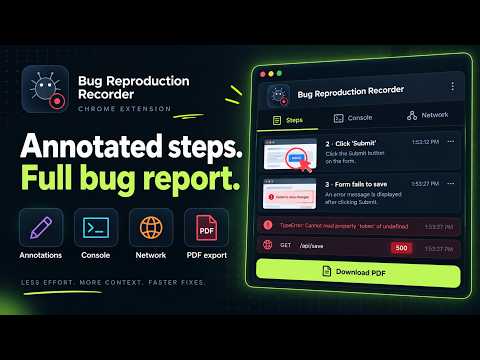
Record bugs with console & network logs, video, screenshots, and annotations. Auto-generate reproducible PDF reports instantly.
Bug Reproduction Recorder is a free developer tool and Chrome extension for bug reporting. Built for QA engineers, developers, and teams — it records browser interactions and auto-generates structured bug reports with screenshots, video, console logs, network requests, screenshot annotation, and a team dashboard. Stop writing bug reports by hand. This QA tool and screen recorder captures everything in one click. 🔴 HOW IT WORKS 1. Click Record — choose Tab mode, Window mode, or Steps-only 2. Reproduce the bug — BugRecorder captures every click, input, navigation, console error, and network request, grouped by step 3. Annotate — draw arrows, rectangles, text, and freehand highlights directly on screenshots 4. Share — get a shareable link, export as HTML/PDF, or send to your team dashboard 🛠 CORE FEATURES — Bug Reporting Made Easy • Record any tab or window — Tab mode captures a single tab. Window mode captures your full browser window. Steps-only mode skips video for lightweight bug reports. • Auto-generated bug reports — Every recording produces a structured report with numbered steps, action descriptions, timestamps, browser info, and viewport details. • Screenshot capture at every step — Each user action automatically captures a full-page screenshot for your bug report. • Video recording — Record the full visual session alongside your step-by-step bug report. • Microphone + system audio — Narrate your bug reproduction with voice. Capture tab or system audio. Both can be mixed simultaneously. • Camera bubble overlay — A draggable webcam circle appears on the page during recording. 🔬 DEVELOPER TOOLS — What Makes This Bug Reporter Different • Console log capture — Automatically captures console.log, console.warn, console.error, and console.info. Unhandled errors and promise rejections captured too. All logs grouped under the step that triggered them. • Network request capture — Every fetch() and XMLHttpRequest recorded with full details: method, URL, status code, duration, request headers, response headers, and response body. Associated with the user action that triggered them, creating a step-by-step debugging timeline. • Screenshot annotation — After recording, draw arrows, rectangles, text labels, and freehand highlights on any screenshot. Annotations are re-editable in the shared report viewer. Only flattened into PNGs on export. 👥 TEAM DASHBOARD — Collaborate on Bug Reports • Shared bug inbox — All team bug reports in one place with filters by status, priority, and assignee. • Assign & track — Assign bugs to team members. Track status: Open → In Progress → Fixed → Closed. Set priority: Low, Medium, High, Critical. • Comments — Discuss bugs directly on reports with real-time comments. • Team management — Invite members by email, shareable link, or auto-join by company email domain. Role management: Owner, Admin, Member. • Report detail view — Full report rendering with resizable sidebar for status, priority, assignee, and comments. Independent scrolling for steps and sidebar. • Dashboard: https://bugrecorder-app.vercel.app Free for teams up to 3 members. Teams with 4+ members require Pro ($10/month, paid by team owner). 📋 EXPORT & SHARING • Shareable report links — Every bug report gets a unique URL. No account required to view. • HTML & PDF export — Download self-contained bug reports with all screenshots, annotations, console logs, and network details embedded. • Report history — Browse and re-export all past bug reports from the extension. 🔒 PRIVACY & SECURITY • Password fields automatically masked in bug reports • Row Level Security — only you and your team can see your reports • Shared report links are public by design, accessible only with the unique URL • No analytics, no tracking, no ads • Privacy policy: https://bugrecorder-landing.vercel.app/privacy.html 💰 PRICING FREE — Unlimited bug reports + teams up to 3 members: • All recording modes (Tab, Window, Steps-only) • Video + mic + system audio + camera bubble • Console & network log capture • Screenshot annotation • Shareable report links + HTML/PDF export • Report history • Team dashboard (up to 3 members) PRO ($10/month — team owner pays): • Everything is Free • Unlimited team members • Priority support
0 out of 5No ratings
Details
- Version0.6.8
- UpdatedOctober 1, 2026
- Size212KiB
- LanguagesEnglish
- Developer
Email
marksameh94@gmail.com - Non-traderThis developer has not identified itself as a trader. For consumers in the European Union, please note that consumer rights do not apply to contracts between you and this developer.
Privacy

Bug Reproduction Recorder has disclosed the following information regarding the collection and usage of your data. More detailed information can be found in the developer's privacy policy.
Bug Reproduction Recorder handles the following:
This developer declares that your data is
- Not being sold to third parties, outside of the approved use cases
- Not being used or transferred for purposes that are unrelated to the item's core functionality
- Not being used or transferred to determine creditworthiness or for lending purposes
Support
For help with questions, suggestions, or problems, visit the developer's support site