

AI Prompt Generator & Optimizer by Feedough

Overview
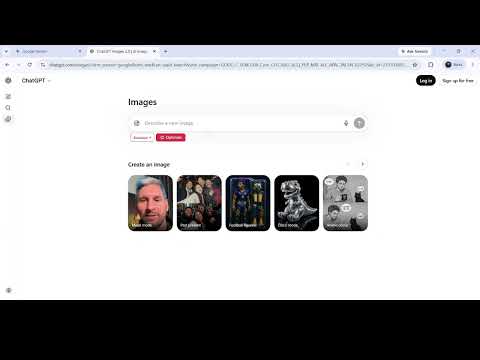
Optimize prompts on ChatGPT, Claude, Gemini, DeepSeek & Kimi. Choose a prompting framework and get better AI results instantly.
AI Prompt Generator & Optimizer by Feedough Most people using AI tools get average results not because the AI is limited, but because the prompt they sent didn't give it enough to work with. Prompt engineering fixes this, but learning it properly takes time. This AI prompt generator and optimizer solves both problems in one step. If you have a task in mind, type it out in plain English and the extension generates a structured, well-framed prompt for you. If you already have a prompt written, paste it in and the optimizer reads your intent and rewrites it into something sharper. Either way, you get a better result without needing to study prompt engineering yourself. HOW IT WORKS Open any AI platform you already use: ChatGPT, Claude, Gemini, DeepSeek, or Kimi. The moment the chat loads, a framework selector and an Optimize button appear directly below your input field. There's nothing to configure and no separate window to manage. Type your task or your existing prompt, pick a style, and click Optimize. The extension rewrites your input and replaces it in the chat immediately. MULTIPLE PROMPTING STYLES, BUILT IN Choose the approach that fits your task, or leave it on Standard and let the optimizer apply balanced structuring automatically. Some styles are built for structured tasks that need a clearly defined role and output. Others are suited to step-by-step, iterative work, or to outputs that require tight control with worked examples. There are options tuned for persuasive and marketing writing, for scenario-based instructional prompts, and for straightforward everyday tasks that just need a direct, efficient rewrite. For complex requests with multiple moving parts, a more detailed multi-step style breaks the task down before generating the final prompt. Whatever the task, you can switch styles anytime from the selector. No need to know the underlying framework names to get the benefit. SAVE PROMPTS AND REUSE THEM WITH // SHORTCUTS Once your prompt is ready, a Save button appears next to Optimize. Give the prompt a name, assign a shortcut, and add placeholders for the parts that change between uses. Next time you need it, type // followed by the shortcut name in any AI chat, and the full prompt template appears in your input field instantly. Build a library of prompts that work well and reuse them across every session without rewriting anything from scratch. TRACK USAGE AND MANAGE YOUR PROMPT LIBRARY Click the extension icon in your toolbar to see your daily usage, browse your saved prompts, and toggle the optimizer on or off. Each saved prompt shows how many times it's been used, so you can see which ones you rely on most. WORKS INSIDE THE PLATFORMS YOU ALREADY USE The framework selector and Optimize button inject directly into ChatGPT, Claude, Gemini, DeepSeek, and Kimi. Nothing to install separately. Nothing to set up. WHO IT'S FOR Marketers writing briefs, copy, or campaign strategy get structured, consistent outputs instead of vague, generic AI responses. Content creators and writers use it to turn rough ideas into well-framed prompts before sending anything to an AI. Founders and product teams can describe a problem in plain language and get back a prompt with enough context for the AI to produce something genuinely useful. Developers and researchers rely on the more technical, step-by-step styles for precise, structured outputs. Students get more focused, accurate responses without needing to learn prompt engineering first. If you find yourself writing the same kind of prompt over and over, save it once and pull it up instantly with a // shortcut in any future session. PRIVACY The extension does not collect or sell your personal data. An account is used only to save and sync your prompt library across sessions.
5 out of 55 ratings
Details
- Version1.3.0
- UpdatedSeptember 25, 2026
- Size1.66MiB
- LanguagesEnglish (United States)
- DeveloperIDEANAB PRIVATE LTDWebsite
124-128 City Road LONDON EC1V 2NX GBEmail
aashish@feedough.comPhone
+91 99994 36109 - TraderThis developer has identified itself as a trader per the definition from the European Union and committed to only offer products or services that comply with EU laws.
- D-U-N-S233653319
Privacy

AI Prompt Generator & Optimizer by Feedough has disclosed the following information regarding the collection and usage of your data. More detailed information can be found in the developer's privacy policy.
AI Prompt Generator & Optimizer by Feedough handles the following:
This developer declares that your data is
- Not being sold to third parties, outside of the approved use cases
- Not being used or transferred for purposes that are unrelated to the item's core functionality
- Not being used or transferred to determine creditworthiness or for lending purposes
Support
For help with questions, suggestions, or problems, visit the developer's support site