

Manga OCR & Mining for Anki
1 rating
)
Overview
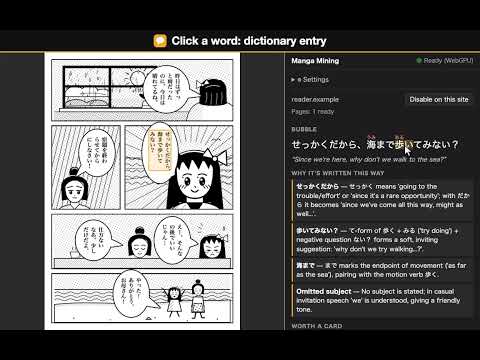
OCR manga speech bubbles in your browser, then get furigana, a grammar explanation, dictionary entries and one-click Anki cards.
Read Japanese manga in Chrome with furigana, dictionary lookups, translations and short English grammar explanations. Click a recognized speech bubble to explore its text in the side panel. Anki is optional: connect Anki desktop when you want to save words as flashcards. The extension finds the speech bubbles on a manga page and reads their text right in your browser. Click a bubble and the side panel shows: • the line with furigana readings • a short English explanation of the grammar and nuance • a dictionary entry for any word you click (JMdict, built in) • a "+" button that turns a word into an Anki card: reading, meaning, the sentence with furigana and its translation, the explanation and a picture of the comic panel GETTING STARTED 1. On install, a welcome tab shows the one-time model download (about 340 MB with a GPU, about 190 MB on the CPU, which is slower). 2. Open a manga reader page and click the extension icon. 3. Click "Enable on this site". 4. Click any speech bubble. OPTIONAL: SAVE CARDS TO ANKI Skip this if you only want OCR, furigana, dictionary lookups and explanations. 1. Install and open Anki desktop on this computer (apps.ankiweb.net). 2. In Anki: Tools → Add-ons → Get Add-ons…, enter 2055492159, click OK (this installs AnkiConnect). 3. Restart Anki and keep it running while you add cards. 4. Open the extension's Settings (⚙ in the side panel). Click "Connect to Anki" if shown, and accept the prompt in Anki. 5. Pick an Anki deck. Then click + next to a word to save it. The note type is created for you. "Anki refused this extension"? Click "Connect to Anki" again and accept the prompt. If it's still blocked: Anki → Tools → Add-ons → AnkiConnect → Config, add "chrome-extension://bgfnpifeeclmpfdcahphaiahgafjppeo" to webCorsOriginList (keep the other entries), save, restart Anki. PRIVATE BY DESIGN • Text recognition runs on your device (GPU via WebGPU, or CPU). The extension never uploads page images. • For an explanation, the text of the bubble you click is sent: to our free service (with a pseudonymous install ID; your network address is used only to enforce the free limits) or straight to your own AI provider. Set Explanations to Off and no bubble text is sent. • No account, no analytics, no ads. It runs only on sites you enable. EXPLANATIONS • Free: up to 100 new explanations a day per installation, within the service's shared limits and monthly budget. No sign-up. • Your own key: add your own DeepSeek or other OpenAI-compatible API key; your provider's billing and limits apply. The text goes straight to your provider. • Off: turn explanations off and no bubble text is sent; furigana, the dictionary and cards still work. SLOWER COMPUTER? Switch to on-demand mode in the panel: bubbles are read when you hover them. WHAT'S NEW IN 0.3.0 • Faster on long chapters: the page on screen is read first. Jump or scroll fast to a page and its bubbles show in about 2–3 s instead of 15+ s. • Faster start: the first download shows megabytes and time left, a welcome tab follows it, and after a browser restart the extension is ready in about a second. • Works on more sites: images are loaded the way the page loads them, tall pages are read from screenshots, and thumbnails no longer get badges. • Explanations can be turned off, and "Delete saved key" removes your API key. • You choose the Anki deck: the extension never picks one for you, and the panel shows which deck "+" adds to. • Clear messages when an explanation isn't available for a line, and when the free service has used its monthly budget (with the date it comes back). "NOT TRUSTED BY ENHANCED SAFE BROWSING"? Chrome shows this for extensions from new developers until they have a few months of history in the Web Store. It isn't a malware warning. Text recognition runs in your browser, and the extension never uploads page images. Open source (GPL-3.0): https://github.com/Suraba03/anki_manga Privacy policy: https://suraba03.github.io/anki_manga/privacy Dictionary data: JMdict by the Electronic Dictionary Research and Development Group, CC BY-SA 4.0.
5 out of 51 rating
Details
- Version0.3.0
- UpdatedNovember 9, 2026
- Offered bychekmenev031@gmail.com
- Size20.0MiB
- LanguagesEnglish
- Developersakena seifullina avenue, 469/1 Almaty, Алматы 050004 KZ
Email
chekmenev031@gmail.com - Non-traderThis developer has not identified itself as a trader. For consumers in the European Union, please note that consumer rights do not apply to contracts between you and this developer.
Privacy

Manga OCR & Mining for Anki has disclosed the following information regarding the collection and usage of your data. More detailed information can be found in the developer's privacy policy.
Manga OCR & Mining for Anki handles the following:
This developer declares that your data is
- Not being sold to third parties, outside of the approved use cases
- Not being used or transferred for purposes that are unrelated to the item's core functionality
- Not being used or transferred to determine creditworthiness or for lending purposes
Support
For help with questions, suggestions, or problems, please open this page on your desktop browser