


Overview
Censor profanity on YouTube.
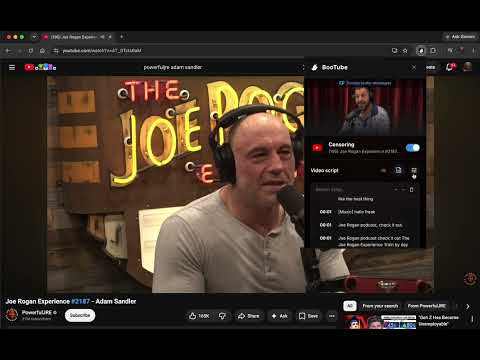
BooTube is a powerful, privacy-first extension that ensures a family-friendly viewing experience by proactively ghosting inappropriate words on YouTube, Disney+, Hulu, and Plex. Key features: Closed Captions Requirement: Automatically turns on Closed Captions (CC) behind the scenes to read upcoming dialog. Precision Word Timing: Uses precise word-by-word timestamp alignment to target the exact sub-second a word is spoken. While we aren't perfect—sometimes overlapping dialogue is missing from captions, or unusual punctuation can slip past the filter—we are committed to continuously improving our engine until it is as close to perfection as possible. Precise Muting & Heavy Blur: Instantly mutes the audio and applies a heavy blur to the video player to prevent lip-reading or seeing visually offensive content. Translation Support: Fully supports foreign language captions with our custom translation-sync algorithm. Custom Blocklists: Features a highly customizable blocklist menu so you can safely add or remove words. NEW! Plex Web App Support: Seamlessly intercepts, cleans, and mutes profanity on app.plex.tv/desktop (and local Plex servers), including a custom SubRip (SRT) timings parser. NEW! Fallback DOM Subtitle Checking: Includes a robust secondary scanner that continuously checks for dynamic caption overlays so no profanity slips through. NEW! Premium UI & Brand Redesign: A stunning, modern interface featuring a dynamic "Censoring" banner that instantly detects and displays your active show or movie (including ratings) along with authentic, brand-themed indicator logos for YouTube and Disney+. NEW! Safe Settings: An advanced "Reveal words" toggle that safely obfuscates your custom blocklist by default, ensuring kids (or yourself) don't accidentally read profanity while adjusting settings. NEW! Disney+ & Hulu Support: Seamlessly intercepts, censors, and mutes profanity on Disney+ and Hulu movies and shows, including dynamic shadow-DOM subtitle parsing. NEW! Mute Buffer Slider: Fine-tune your muting cushions dynamically (from 0.3s to 1.0s) for tight, natural dialogue flows or wide safety margins. NEW! Respectful Mode: Automatically detects when videos are speaking reverently (like sermons or faith-based podcasts) and bypasses the censor for sacred names (like Jesus Christ), while continuing to censor them as profanity on non-religious videos. NEW! Trust Channel Toggle: If Respectful Mode fails to auto-detect a good podcast, you can manually whitelist the channel using the Trust Channel switch in the popup menu. NEW! Instant Subtitle Restore: Turning off the extension or captions automatically restores clean subtitles and video state back to normal instantly without a page reload. How to use it: Install the extension. Click the BooTube ghost icon in your toolbar to customize your blocked word list. Pro Tip: For the best results when adding new words, look at the closed captions and copy the word exactly as it's seen. If the word includes punctuation in the captions, include the punctuation! Open any YouTube, Disney+, Hulu, or Plex video. The extension will automatically enable captions and censor the content seamlessly. If you want to bypass the filter for a specific channel, open the popup while watching their video and toggle the "Trust Channel" switch. Privacy Note: BooTube runs entirely locally on your machine. Your blocklist, trusted channels, and browsing data are never sent to any external servers.
5 out of 55 ratings
Details
- Version1.26
- UpdatedJuly 10, 2026
- Size81.05KiB
- LanguagesEnglish (United States)
- DeveloperWebsite
Email
thebradgriffin@gmail.com - Non-traderThis developer has not identified itself as a trader. For consumers in the European Union, please note that consumer rights do not apply to contracts between you and this developer.
Privacy

This developer declares that your data is
- Not being sold to third parties, outside of the approved use cases
- Not being used or transferred for purposes that are unrelated to the item's core functionality
- Not being used or transferred to determine creditworthiness or for lending purposes
Support
For help with questions, suggestions, or problems, visit the developer's support site